
One of the best ways to learn Power BI and hone practical analytics abilities is to create useful projects. In 2026, employers are seeking professionals who can design dashboards, analyze data, and offer valuable business insights in addition to certificates. A common mistake made by beginners is to attend tutorials without putting what they learn into practice. You can gain a lot better understanding of data visualization, DAX calculations, reporting, and business intelligence principles by working on projects.
Your chances of landing internships, freelancing work, or full-time positions in data analytics might be increased with a solid Power BI portfolio. Fortunately, novices can begin with basic facts and then proceed to more complex business scenarios. . Below are ten excellent Power BI project ideas that can help beginners strengthen their portfolio and gain hands-on experience.
1. Sales Performance Dashboard
Since practically every company analyzes sales data, one of the most common projects for beginners is a sales performance dashboard. Revenue, earnings, consumer behavior, product performance, and regional sales patterns can all be examined in this study.
You may make visualizations that display revenue comparisons, top-performing goods, best sales regions, and monthly sales increases. Beginners can learn how to use KPIs, charts, filters, slicers, and DAX computations with this project. It also aids in comprehending how companies track their performance and make strategic choices.
2. HR Analytics Dashboard
Employee-related information including attendance, pay, attrition, departments, and workforce diversity is the main focus of an HR analytics dashboard. This project helps you learn how businesses oversee organizational performance and manage their workforce.
Reports that display wage distributions, attendance trends, staff attrition rates, and department-specific personnel numbers can be generated. Data segmentation, conditional formatting, and HR KPI analysis are all taught in this assignment. HR analytics is a useful addition to any beginner’s portfolio because it is employed in many different businesses.
3. Financial Analysis Dashboard
A financial analysis dashboard helps businesses monitor revenue, expenses, profits, and financial trends. This project is excellent for learning time intelligence functions and financial reporting concepts in Power BI.
You can build dashboards showing profit and loss analysis, monthly revenue growth, expense tracking, and year-over-year comparisons. Beginners can also learn how to create financial KPIs and interactive reports that support business decision-making. Financial dashboards are highly valued because every organization depends on accurate financial analysis.
4. E-Commerce Analytics Dashboard
E-commerce businesses generate large amounts of customer and sales data. This project allows beginners to analyze customer purchasing behavior, order trends, and product performance.
You can create reports displaying top-selling products, customer locations, sales by category, order delivery performance, and repeat customer analysis. This project improves data storytelling and visualization skills while helping beginners understand real-world business analytics scenarios.
5. Social Media Analytics Dashboard
For novices interested in digital analytics and marketing, social media analytics projects are perfect. Social media data is used by businesses to gauge audience growth, marketing effectiveness, and engagement.
This project allows you to examine audience demographics across platforms as well as follower growth, post engagement, likes, comments, and shares. Building social media dashboards teaches marketing KPI visualization, comparative reporting, and trend analysis. Particularly helpful for creating a contemporary analytics portfolio is this project.
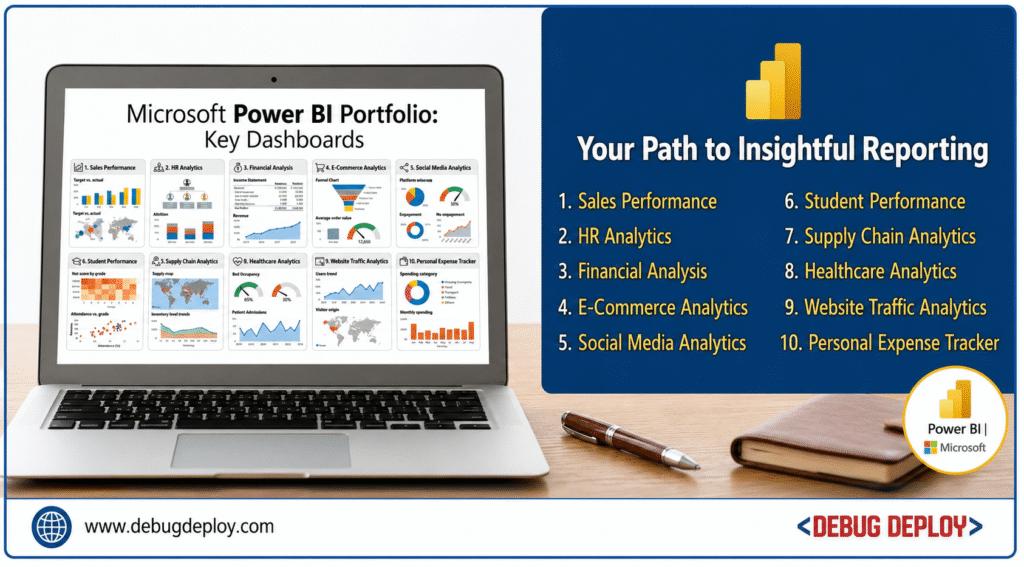
6. Student Performance Dashboard
Educational analytics projects are beginner-friendly and easy to understand. This project focuses on analyzing student marks, attendance, grades, and overall academic performance.
You can create visualizations that compare subject-wise performance, attendance trends, pass percentages, and class rankings. This project teaches beginners how to organize and present structured data clearly. It also improves dashboard design and drill-down reporting skills.
7. Supply Chain Analytics Dashboard
Supply chain analytics is an important area where businesses use Power BI for operational efficiency. In this project, beginners can analyze inventory levels, shipments, suppliers, and delivery performance.
You can create reports that track stock availability, delayed deliveries, supplier performance, and warehouse operations. This project teaches operational analytics, forecasting basics, and performance monitoring. Supply chain dashboards are widely used in manufacturing, logistics, and retail industries.
8. Healthcare Analytics Dashboard
Healthcare organizations rely heavily on data analytics to improve patient care and operational efficiency. This project helps beginners understand how data supports decision-making in hospitals and healthcare systems.
You can create dashboards showing patient admissions, treatment costs, hospital occupancy rates, department-wise patient distribution, and doctor performance metrics. This project improves filtering, segmentation, and storytelling skills while demonstrating the practical importance of analytics in healthcare.
9. Website Traffic Analytics Dashboard
A website analytics dashboard focuses on tracking user behavior and website performance. Businesses use this data to improve user experience and marketing effectiveness.
In this project, you can analyze traffic sources, bounce rates, conversions, device usage, and visitor trends. You can also compare performance across different traffic channels such as organic search, social media, and paid advertising. This project is highly useful for beginners interested in digital marketing and web analytics.
10. Personal Expense Tracker Dashboard
A personal expense tracker is one of the simplest yet most practical Power BI projects for beginners. It helps users monitor their income, expenses, savings, and spending habits.
You can build reports that display monthly expenses, budget comparisons, savings analysis, and spending categories. This project teaches the basics of data modeling, financial tracking, and dashboard interactivity. Since it uses personal finance data, beginners can easily understand and customize the project.
Why These Projects Are Important
These Power BI projects are important because they help beginners apply theoretical concepts in practical scenarios. Instead of simply learning formulas and visualization techniques, beginners understand how businesses use analytics for decision-making. Working on real-world projects also improves problem-solving skills and builds confidence in handling datasets.
Portfolio projects demonstrate your ability to clean data, create dashboards, write DAX formulas, and generate insights. Recruiters and clients often prefer candidates who can show practical work rather than only certifications.
Tips for Building a Strong Power BI Portfolio
Beginners should concentrate on making dashboards that are clear, easy to use, and interactive. Technical precision is vital, but so is good visual design. To make projects look more professional, use realistic datasets from public government datasets or sources like Kaggle.
Additionally, rather than just displaying charts, it is crucial to convey business insights. A well-designed dashboard conveys a narrative and aids users in comprehending the appropriate course of action based on the facts.
You can increase visibility and draw chances by publishing your work on sites like GitHub, LinkedIn, or Power BI Service.
Conclusion
One of the best methods to get proficient with Power BI and have a solid analytics portfolio in 2026 is to create real-world projects. These ten project ideas are suitable for beginners and aid in the development of critical abilities including data visualization, DAX computations, reporting, and business intelligence analysis. Whether you want to work as a reporting specialist, business intelligence developer, or data analyst, practical projects will boost your confidence and make you stand out in the crowded job market.
Want to Get Certified in Power BI?
Get trained by a Microsoft Certified Trainer (MCT) and master the skills every Power BI professional needs in 2026.
Recommended certification program:
PL-300T00-A: Microsoft Power BI Data Analyst
✅ Live Instructor-Led Training
✅ Hands-On Power BI Labs
✅ DAX Functions & Formula Mastery
✅ Data Modeling & Power Query Practice
✅ Real-World Dashboard Scenarios
✅ Certification Exam Guidance
📧 Email us: trainings@debugdeploy.com
📱 WhatsApp us for quick assistance
Start your Power BI certification journey today and become an in-demand BI professional in 2026!