
Introduction
Cloud-native applications are now the go-to method for creating scalable and dependable software as companies continue to embrace digital transformation. Organizations now use containers—lightweight packages that contain everything an application needs to execute reliably across several environments—instead of creating huge, monolithic programs. Containers increase portability, streamline software deployment, and facilitate application maintenance.
Nevertheless, it is a difficult chore to manually manage hundreds or even thousands of containers. Applications must manage traffic spikes, automatically recover from faults, stay accessible, and receive updates without interfering with users. Kubernetes is essential in this situation. Containerized application deployment, scalability, and management are all automated by Kubernetes. To make Kubernetes easier to use, Microsoft introduced Azure Kubernetes Service (AKS), a fully managed Kubernetes platform that removes much of the operational complexity.
Whether you’re an aspiring cloud engineer, a developer exploring modern application architecture, or preparing for Microsoft Azure certifications, understanding Azure Kubernetes Service is an essential step toward mastering cloud computing.
AKS at a Glance
Feature | Details |
Service | Azure Kubernetes Service (AKS) |
Category | Container Orchestration |
Cloud Provider | Microsoft Azure |
Best For | Developers, DevOps Engineers, Cloud Architects |
Skill Level | Beginner to Advanced |
Common Certifications | AZ-104, AZ-305, AZ-400 |
What Is Azure Kubernetes Service (AKS)?
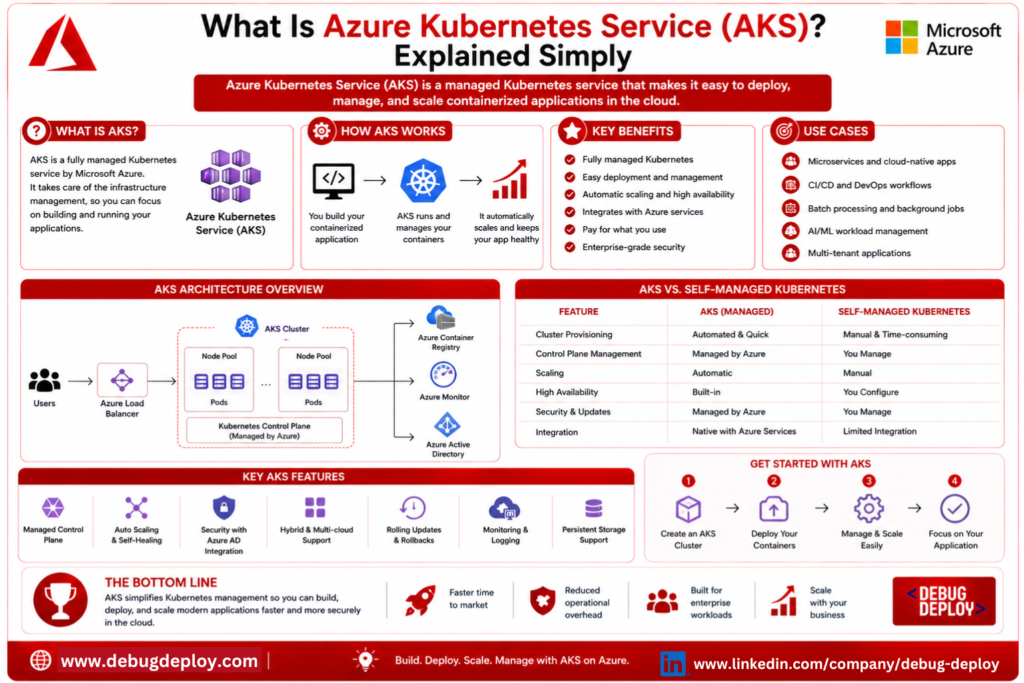
Microsoft’s completely managed Kubernetes platform, Azure Kubernetes Service (AKS), enables enterprises to develop, scale, and manage containerized apps without having to worry about maintaining the underlying Kubernetes infrastructure.
Installing control planes, setting up networking, controlling updates, keeping an eye on cluster health, and guaranteeing high availability were all previously necessary to run Kubernetes. These administrative duties took up important development time and required a high level of technical competence.
Microsoft handles a large portion of this operational labor with AKS, freeing up developers and IT teams to concentrate on creating apps rather than maintaining infrastructure. Automatic scaling, integrated monitoring, security integrations, and streamlined cluster management allow organizations to swiftly build applications.
Understanding Containers Before AKS
It’s crucial to comprehend containers before understanding AKS.
An application and all the libraries, dependencies, runtime components, and configuration files it need to function are contained in a container, which is a lightweight software package. The application performs consistently in development, testing, and production settings since everything is packed together.
Envision transporting delicate equipment in a safe, uniform container. The contents of the container are safe and well-organized wherever it goes. Similar to this, software containers guarantee dependable application operation independent of the underlying infrastructure.
Kubernetes employs Docker, the most popular container creation and management platform, to create scalable cloud applications.
Why Do We Need Kubernetes?
Enterprise applications frequently comprise hundreds or even thousands of containers dispersed over numerous servers, although running a few containers manually is manageable.
Think of a platform for online buying during a holiday sale. To ensure performance, more application instances must be automatically deployed as customer traffic rises. Applications should continue to run uninterrupted even if one server dies. In order to lower infrastructure expenses, superfluous resources should be eliminated when traffic declines.
By scheduling containers, balancing traffic, keeping an eye on the health of applications, restarting unsuccessful workloads, and scaling resources according to demand, Kubernetes automates these processes. All of these features are provided by AKS, which also eliminates the difficulty of operating Kubernetes on your own.
How Azure Kubernetes Service Works
The AKS workflow is simple yet powerful:
Developers package their application into Docker containers.
Containers are deployed to an Azure Kubernetes cluster.
Azure manages the Kubernetes control plane.
Kubernetes schedules containers across worker nodes.
AKS continuously monitors application health.
Failed containers are automatically replaced.
Applications scale automatically as demand changes.
Users access a secure, highly available application running in Azure.
This automated process allows organizations to deliver reliable applications with minimal manual intervention.
Key Features of Azure Kubernetes Service
The Azure Kubernetes Service has a number of strong features that make managing and deploying applications easier.
Applications can adapt to shifting workloads thanks to automatic scaling. AKS automatically generates more application instances at times of high demand. In order to maximize costs, superfluous resources are eliminated when demand declines.
Self-Healing Applications keep an eye on active containers to guarantee high availability. Kubernetes automatically replaces sick or crashed containers without the need for administrator involvement.
Developers can release new versions of their applications without causing any downtime by using rolling updates. Kubernetes updates containers gradually as consumers continue to use the service, rather than replacing the entire application at once.
To improve authentication, compliance, monitoring, and secret management, Built-in Security interacts with Microsoft Entra ID, Azure Policy, Microsoft Defender for Cloud, Azure Key Vault, and Azure Monitor.
Administrators can swiftly detect and fix problems thanks to monitoring and diagnostics, which offer real-time visibility into CPU usage, memory consumption, application performance, container health, and system logs.
Benefits of Using AKS
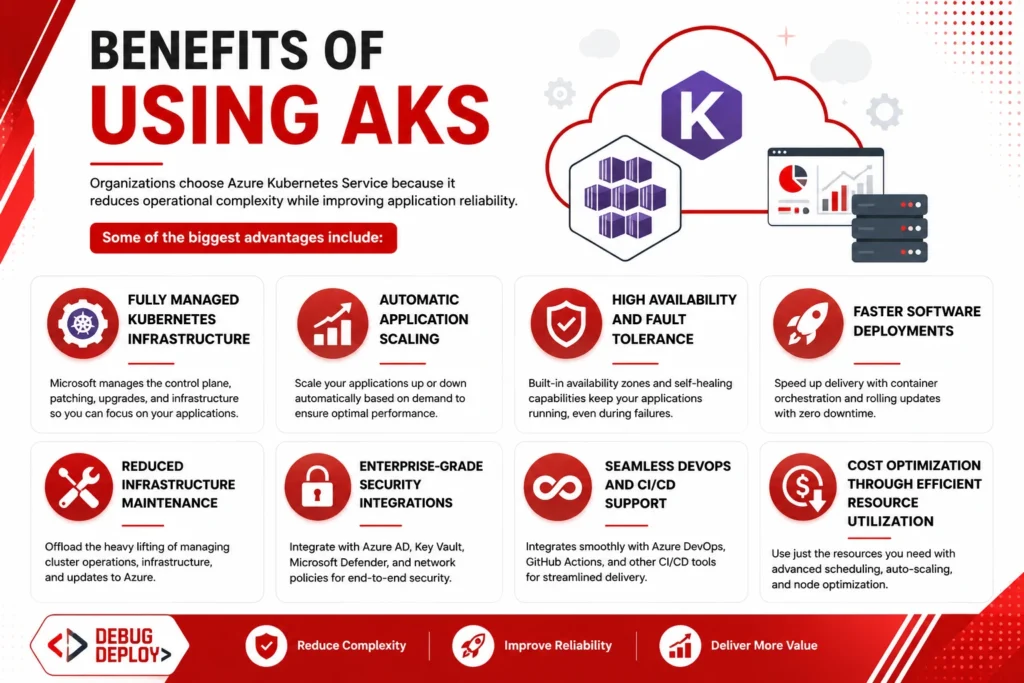
Organizations choose Azure Kubernetes Service because it reduces operational complexity while improving application reliability.
Some of the biggest advantages include:
Fully managed Kubernetes infrastructure
Automatic application scaling
High availability and fault tolerance
Faster software deployments
Reduced infrastructure maintenance
Enterprise-grade security integrations
Seamless DevOps and CI/CD support
Cost optimization through efficient resource utilization
These benefits help organizations accelerate software delivery while maintaining reliable and secure cloud environments.
Real-World Example
Consider a meal delivery business that serves clients in several different cities. Thousands of users place orders at once between lunch and evening, which significantly increases application traffic.
Administrators would have to manually provision more servers and keep an eye on system performance without Kubernetes. This procedure takes a long time and is prone to delays.
As demand increases, the platform automatically spins more application containers using Azure Kubernetes Service. In the event of an unplanned container failure, Kubernetes quickly generates a replacement without impacting client orders. Extra containers are automatically evacuated at the conclusion of peak traffic, which lowers operating expenses.
One of the key reasons businesses choose AKS is its capacity to scale dynamically while preserving high availability.
Common Use Cases
Azure Kubernetes Service supports a wide variety of cloud-native workloads, including:
Enterprise web applications
Microservices architectures
REST APIs
AI and Machine Learning applications
Internet of Things (IoT) platforms
Continuous Integration and Continuous Deployment (CI/CD)
DevOps automation
Containerized business applications
Hybrid cloud deployments
High-traffic e-commerce platforms
Because AKS supports virtually any containerized workload, it has become a cornerstone of modern application development.
Best Practices for Beginners
Prioritize laying a solid foundation before delving into more complex features if you’re just getting started with Kubernetes.
Start by becoming familiar with Docker and the workings of containers. Next, learn about the basics of Kubernetes, including Pods, Nodes, Deployments, Services, and Clusters. Create a tiny AKS cluster and launch a basic web application once you are familiar with these ideas.
Your learning will be accelerated and you will be ready for real-world cloud projects with regular hands-on experience, monitoring application performance, putting basic security measures in place, and investigating Infrastructure as Code technologies like Azure Bicep or Terraform.
Career Opportunities with AKS Skills
As containerized applications become the industry standard, professionals with Kubernetes expertise are in high demand.
Learning Azure Kubernetes Service can help you pursue roles such as:
Azure Administrator
Cloud Engineer
DevOps Engineer
Kubernetes Administrator
Platform Engineer
Site Reliability Engineer (SRE)
Cloud Solutions Architect
Software Engineer
Many Microsoft certifications, including AZ-104, AZ-305, and AZ-400, include Kubernetes concepts, making AKS an important skill for anyone building a career in cloud computing.
Frequently Asked Questions
Is Azure Kubernetes Service free?
Microsoft manages the Kubernetes control plane without additional charges in most standard AKS configurations. However, you pay for the Azure resources such as virtual machines, storage, networking, and other services used by your cluster.
Do I need Docker before learning AKS?
Yes. Docker provides the foundation for understanding containers, making Kubernetes concepts much easier to learn.
Is AKS suitable for beginners?
Yes. Beginners should first understand cloud computing fundamentals and Docker before moving into Kubernetes and AKS.
Which Microsoft certifications cover AKS?
AKS is commonly included in Azure Administrator (AZ-104), Azure Solutions Architect (AZ-305), and DevOps Engineer Expert (AZ-400) certification paths.
Conclusion
By offering a fully managed Kubernetes platform for deploying, managing, and scaling containerized applications, Azure Kubernetes Service (AKS) streamlines one of the trickiest aspects of contemporary cloud computing. Organizations can concentrate on innovation, quicker software delivery, and creating dependable cloud-native applications rather than spending time maintaining Kubernetes infrastructure.
Beginners may find AKS difficult at first, but mastering the basics of containers, Docker, and Kubernetes makes the process much simpler. Kubernetes expertise is becoming more and more important in the tech sector as companies continue to use microservices, DevOps, and cloud-native architectures.
Whether you’re preparing for Azure certifications, transitioning into cloud computing, or expanding your DevOps expertise, learning Azure Kubernetes Service is a worthwhile investment. It provides practical knowledge that aligns with modern software development practices and opens the door to numerous career opportunities in today’s cloud-driven world.
Want to Get Certified in Azure Kubernetes Service (AKS)?
Get trained by a Microsoft Certified Trainer (MCT) and learn how to deploy, manage, and scale containerized applications using Azure Kubernetes Service (AKS).
Recommended Microsoft Azure training programs:
| Course Code | Course Title |
|---|---|
| AZ-104T00-A | Microsoft Azure Administrator |
| AZ-400T00-A | Designing and Implementing Microsoft DevOps Solutions |
| AZ-305T00-A | Designing Microsoft Azure Infrastructure Solutions |
✅ Live Instructor-Led Training
✅ Hands-On Azure Kubernetes Service (AKS) Labs
✅ Containerization with Docker & Kubernetes
✅ Real-World DevOps & Cloud Deployment Projects
✅ Certification Exam Guidance
📧 Email us: trainings@debugdeploy.com
📱 WhatsApp us for quick assistance
Start your Azure Kubernetes Service (AKS) journey today and become an expert in cloud-native application deployment!