
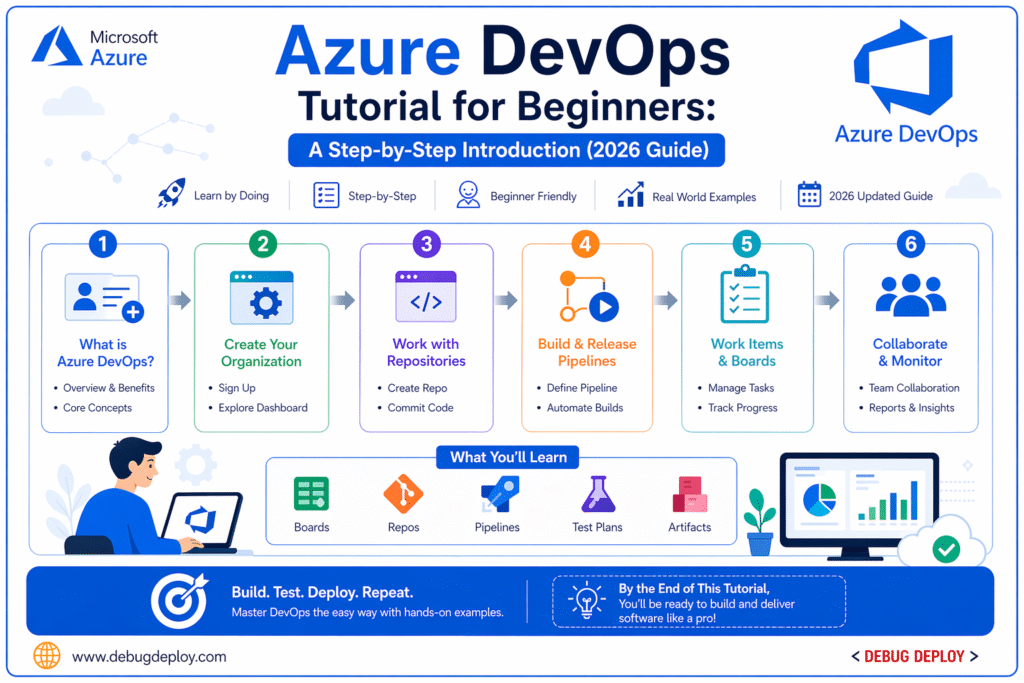
Modern software development is no longer just about writing code. It involves collaboration, automation, testing, deployment, monitoring, and continuous improvement. This is where DevOps comes in. DevOps is a set of practices that combines development (Dev) and operations (Ops) to deliver software faster, more reliably, and with better quality. One of the most powerful platforms that supports this approach is Microsoft Azure DevOps. For beginners entering the cloud and software world in 2026, learning Azure DevOps is a valuable step toward building real-world technical skills.
What Is Azure DevOps?
Azure DevOps is a suite of development tools provided by Microsoft that helps teams plan projects, manage code, build applications, test software, and deploy it automatically. It supports the entire software development lifecycle in one platform, making collaboration easier between developers, testers, and operations teams.
Azure DevOps includes multiple services that work together:
- Azure Boards for project management and tracking work items
- Azure Repos for source code management using Git
- Azure Pipelines for CI/CD automation
- Azure Test Plans for manual and automated testing
- Azure Artifacts for package management
These tools help teams move from idea to production efficiently.
Why Azure DevOps Matters in 2026
Companies today expect faster releases, fewer bugs, and continuous updates. Manual processes slow down development and increase errors. Azure DevOps solves this by automating workflows such as building code, running tests, and deploying applications.
It is widely used in startups and enterprises because it improves collaboration, reduces deployment risks, and speeds up delivery cycles. For beginners, it also provides hands-on experience with industry-standard DevOps practices.
Key Concepts You Should Know
Before starting, understand a few core DevOps concepts:
Version Control helps track code changes and collaborate with teams.
Continuous Integration (CI) means automatically building and testing code whenever changes are made.
Continuous Deployment (CD) means automatically releasing code to production after passing tests.
Pipelines are automated workflows that define build and deployment steps.
Repositories are places where code is stored and managed.
These concepts are the foundation of Azure DevOps.
Step-by-Step Guide to Azure DevOps
Step 1: Create an Azure DevOps Account
Go to the Azure DevOps website and sign in using your Microsoft account. Create a new organization and project. Choose visibility (private or public) and select Git as the version control system.
Step 2: Set Up a Project
After creating a project, you will see the dashboard where all services are available. Start by setting up basic configurations like project name, team members, and permissions.
Step 3: Use Azure Boards for Task Management
Azure Boards helps you manage your work using tasks, user stories, and bugs. You can create work items, assign them to team members, and track progress using Kanban boards or Scrum frameworks.
This helps teams stay organized and aligned.
Step 4: Create a Repository with Azure Repos
Azure Repos allows you to store and manage your source code. Create a new repository and push your code using Git commands.
Basic Git commands you will use:
- git init
- git add .
- git commit -m “Initial commit”
- git push
Version control ensures your code is safe and collaborative.
Step 5: Build Your First Pipeline (CI)
Azure Pipelines automates the process of building and testing your application. You can create a pipeline using YAML or the visual editor.
Steps include:
- Connect your repository
- Choose a template (Node.js, .NET, Python, etc.)
- Configure build steps
- Run the pipeline
Every time you push code, the pipeline runs automatically.
Step 6: Set Up Continuous Deployment (CD)
After CI, the next step is CD. This allows your application to be deployed automatically to servers, cloud platforms, or containers.
You can deploy to:
- Azure App Services
- Virtual Machines
- Kubernetes clusters
This removes manual deployment effort and reduces errors.
Step 7: Add Testing
Use Azure Test Plans or integrate automated tests into your pipeline. Testing ensures your code works correctly before deployment.
Include:
- Unit tests
- Integration tests
- UI tests
Automated testing improves software quality.
Step 8: Monitor and Improve
After deployment, monitor application performance using logs, alerts, and analytics. This helps identify issues early and improve reliability.
Continuous monitoring is a key part of DevOps.
Example Workflow
A typical Azure DevOps workflow looks like this:
Developer writes code → pushes to repository → pipeline builds code → tests run → application is deployed → monitoring tracks performance → feedback improves next release
This cycle repeats continuously, enabling faster and better software delivery.
Best Practices for Beginners
When starting out, it’s best to begin with small projects so you can clearly understand workflows without feeling overwhelmed. Make it a habit to use version control regularly, as it helps you track changes and collaborate efficiently. Focus on writing clean and well-structured code, which makes your work easier to maintain and debug over time. Try to automate builds and deployments early in your learning journey to develop good DevOps practices from the beginning. Learning YAML pipelines is also important, as it gives you better control over how your processes are defined and executed. As you work, spend time practicing how to debug failed builds so you can quickly identify and fix issues. Pay close attention to logs and error messages, since they provide valuable insights into what went wrong. Above all, remember that consistency matters more than complexity—building simple, reliable solutions consistently will take you much further than trying to create overly complex systems too soon.
Common Mistakes to Avoid
Skipping version control basics
Not using pipelines properly
Ignoring testing
Hardcoding configurations
Not monitoring deployments
Relying only on theory without practice
Hands-on learning is essential in DevOps.
Career Opportunities After Learning Azure DevOps
After gaining skills in Azure DevOps, you can explore a variety of career opportunities such as becoming a DevOps Engineer, where you manage CI/CD pipelines, automate workflows, and improve collaboration between development and operations teams; a Cloud Engineer, where you design, deploy, and manage cloud-based infrastructure and services; a Build and Release Engineer, where you handle code integration, build processes, and ensure smooth software releases; a Site Reliability Engineer, where you focus on system reliability, performance, and scalability while minimizing downtime; and an Automation Engineer, where you create scripts and tools to automate repetitive tasks and improve efficiency across systems, and all of these roles are in high demand globally, offering strong career growth, competitive salaries, and opportunities to work with modern technologies across industries.
People Also Ask
What is Azure DevOps used for?
It is used to manage the entire software development lifecycle.
Is Azure DevOps easy for beginners?
Yes, it is beginner-friendly with proper guidance.
Do I need coding skills for Azure DevOps?
Basic coding knowledge is helpful but not mandatory. However Scripting and Configuration is required for advanced automation and specific professional roles within the ecosystem.
What is CI/CD in Azure DevOps?
It automates building and deploying applications.
Is Azure DevOps free?
It offers a free tier with limited features.
Real-World Example
Example Scenario Goal:
Deploy a web application
- Code stored in Azure Repos
- Pipeline builds and tests code
- App deployed automatically
Result: Faster and reliable software delivery
Related Reports
- How Power BI Drives Smarter Data-Driven Decisions
- Transitioning Your Data Workflow from Excel to Power BI
- What Is Microsoft Azure? 7 Powerful Reasons Beginners Should Care About Cloud Computing
- What Is Power BI? A Complete Beginner’s Guide (2026)
Conclusion
This Azure DevOps tutorial for beginners provides a clear, step-by-step path to understanding how modern development teams build and deliver software efficiently.
Final Takeaways
Azure DevOps covers the entire development lifecycle
CI/CD automation is key to faster delivery
Hands-on practice is essential for learning
Career Insight
Learning Azure DevOps opens opportunities in roles like DevOps Engineer, Cloud Engineer, and Software Developer.
Want to Get Certified?
Get trained by a Microsoft Certified Trainer (MCT) on:
AZ-400T00-A: Design and Implement Microsoft DevOps Solutions
✅ Expert-Led Live Training
✅ Hands-On Labs & Real-Time Projects
✅ CI/CD Pipeline Implementation
✅ Azure DevOps Best Practices
✅ Certification Exam Guidance
📧 Email us: trainings@debugdeploy.com
📱 WhatsApp us for quick assistance
Start your Azure DevOps certification journey today and accelerate your cloud career!