
Introduction
It is required of modern programs to do more than just handle data; they also need to assist users in understanding it. Users are becoming more and more accustomed to having built-in dashboards and analytics without having to move between different tools, whether it’s an internal business application, SaaS platform, ERP system, or customer portal.
Power BI Embedded proves useful in this situation. It enables programmers to include interactive Power BI dashboards, reports, and visualizations straight into their own applications. Organizations can provide a smooth analytics experience within their own software rather than rerouting users to the Power BI Service.
We’ll look at what Power BI Embedded is, how it functions, and why developers utilize it to create contemporary data-driven apps in this guide.
What Is Power BI Embedded?
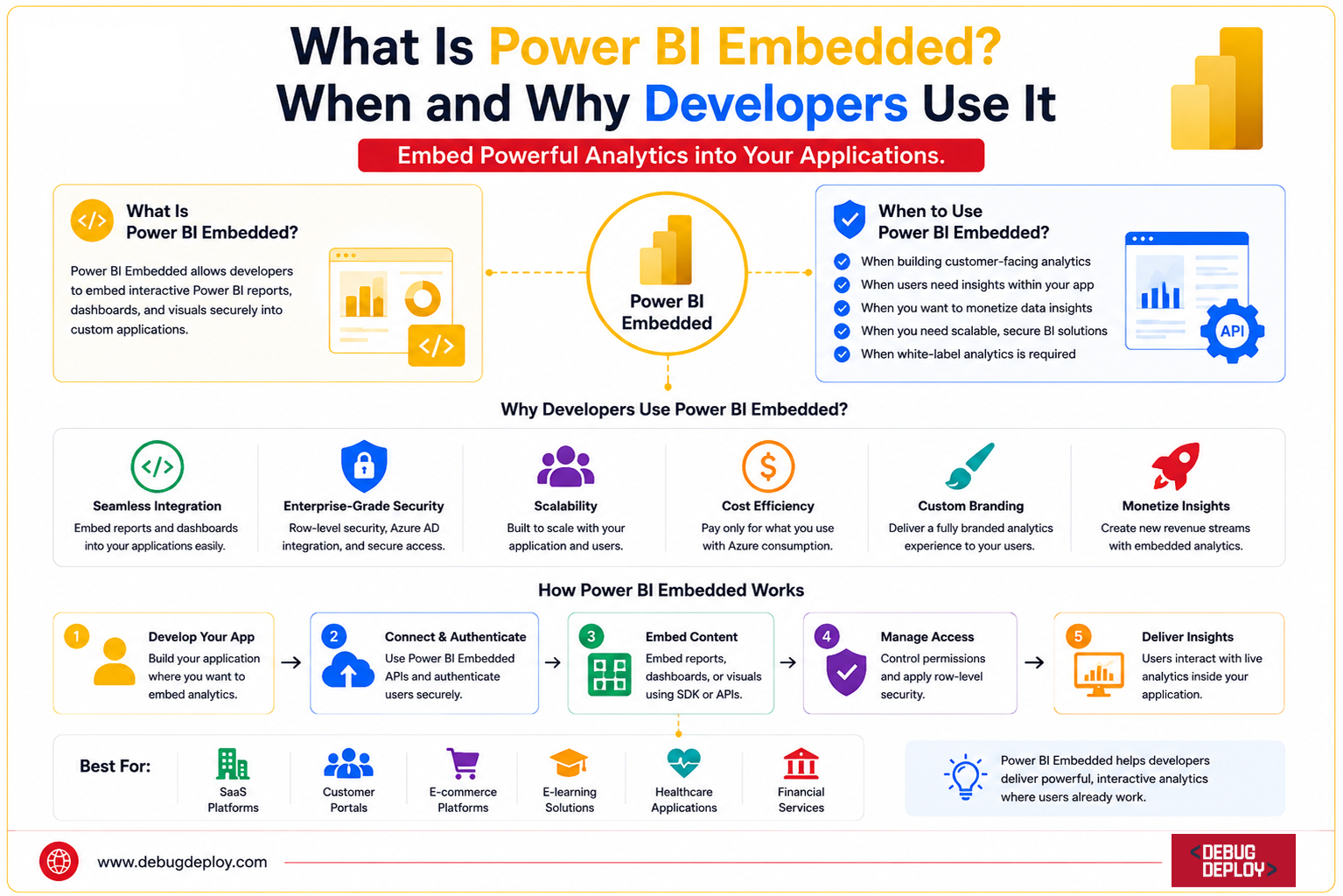
Power BI Embedded is a Microsoft Azure service that enables developers to embed Power BI reports and dashboards into web applications, mobile apps, and customer portals.
The service combines Power BI’s powerful reporting capabilities with Azure’s scalability, allowing organizations to provide analytics directly inside their applications.
With Power BI Embedded, users can:
View interactive dashboards
Filter and analyze data
Drill down into reports
Access real-time insights
Export report data
All of this happens without leaving the application they are using.
How Power BI Embedded Works
The process of implementation is not too complicated.
Developers first use Power BI Desktop to build reports, which they then publish to the Power BI Service. After then, the reports are kept in a Power BI workspace.
Developers create secure embed tokens that let authorized users access to reports using the Azure and Power BI APIs. Microsoft’s JavaScript SDK or REST APIs are used to display the reports within apps.
A fully integrated reporting experience that seems like a natural part of the program is the end result.
Power BI Embedded vs Power BI Service
Although both solutions use the same reporting engine, they are designed for different audiences.
Power BI Service
The standard Power BI Service is primarily intended for internal business users who access reports through:
Power BI Service
Microsoft Teams
Power BI Mobile
This model works well for organizational reporting.
Power BI Embedded
Power BI Embedded is designed for developers who need to integrate analytics into software products.
Typical use cases include:
SaaS platforms
Customer portals
Partner dashboards
Internal business applications
Users access reports directly through the application rather than logging into Power BI separately.
Why Developers Use Power BI Embedded
Faster Development
Building a reporting platform from scratch can take months of development effort.
Developers would need to create:
Charts and visualizations
Filtering systems
Export functionality
Security models
Dashboard frameworks
Power BI Embedded eliminates this complexity by providing a ready-made analytics platform.
Enhanced User Experience
Users can access reports without switching applications.
For example:
Customers can view subscription analytics.
Sales teams can monitor performance metrics.
Managers can review operational KPIs.
This creates a more seamless and professional user experience.
Enterprise-Grade Analytics
Power BI Embedded includes advanced capabilities such as:
Interactive dashboards
Drill-through reports
Real-time data updates
AI-powered insights
Custom visualizations
Organizations gain sophisticated reporting functionality without building it themselves.
Reduced Maintenance
Microsoft handles infrastructure, security updates, and platform enhancements.
This allows development teams to focus on business features rather than maintaining a reporting engine.
Common Use Cases
SaaS Applications
Many software vendors use Power BI Embedded to provide analytics to customers.
Examples include:
CRM platforms
HR software
Accounting systems
Project management tools
Embedded dashboards often become premium product features.
Customer Portals
Organizations can provide customers with self-service access to reports and analytics.
Examples include:
Account performance reports
Usage dashboards
Financial statements
Subscription analytics
This reduces support requests and improves customer satisfaction.
Internal Business Applications
Many enterprises build custom applications for employees.
Power BI Embedded helps integrate:
Sales dashboards
Operational KPIs
Inventory tracking
Financial reporting
within a single platform.
Partner and Vendor Portals
Businesses can securely share analytics with distributors, suppliers, and partners without granting access to internal systems.
Security Features
Security is one of the strongest advantages of Power BI Embedded.
Row-Level Security (RLS)
RLS ensures users only see the data they are authorized to access.
For example:
Regional managers see only regional data.
Customers see only their account information.
Partners view only relevant reports.
Secure Embed Tokens
Embed tokens provide temporary access to specific reports and datasets.
These tokens help prevent unauthorized access.
Microsoft Entra ID Integration
Organizations can integrate authentication with Microsoft Entra ID (formerly Azure Active Directory) to manage user access securely.
Data Protection
Microsoft encrypts data both in transit and at rest, helping organizations meet compliance and security requirements.
Licensing and Pricing
Unlike traditional Power BI licensing, Power BI Embedded uses an Azure-based pricing model.
Organizations pay for dedicated capacity rather than individual user licenses.
This model is especially beneficial for:
SaaS providers
Customer-facing applications
Large external user bases
Pricing can scale based on report usage and performance requirements.
For applications serving thousands of users, Embedded capacity can often be more cost-effective than assigning Power BI licenses to every user.
Challenges to Consider
While Power BI Embedded offers significant advantages, developers should plan carefully.
Capacity Management
Choosing the wrong Azure capacity can impact report performance.
Monitoring usage and scaling resources appropriately is essential.
Authentication Setup
Embedding reports securely requires proper token generation and access control implementation.
Cost Monitoring
High report usage can increase Azure consumption costs.
Organizations should regularly review utilization and optimize report performance.
Governance Requirements
Data governance policies must be maintained to ensure secure access and compliance.
Best Practices
To get the most value from Power BI Embedded:
Design reports specifically for embedded scenarios.
Implement Row-Level Security whenever possible.
Optimize datasets for performance.
Use service principals for automation.
Monitor Azure capacity utilization.
Test reports on desktop and mobile devices.
Secure all API access points.
Following these practices helps ensure a smooth user experience and reliable performance.
When Should You Use Power BI Embedded?
Power BI Embedded is ideal when:
You are developing a SaaS application.
Customers need access to analytics.
Reports must be integrated into a portal or website.
You want enterprise-grade reporting without building it from scratch.
You require secure, scalable analytics for external users.
If your reporting needs are limited to internal employees, the standard Power BI Service may be sufficient. However, when analytics need to become part of a software product, Power BI Embedded is often the best solution.
Conclusion
Developers can include robust business intelligence features straight into apps, websites, and client portals using Power BI Embedded. Organizations may provide safe, interactive analytics without creating a reporting platform from scratch by combining Azure scalability with Power BI’s sophisticated reporting features.
Power BI Embedded enables businesses speed up development, enhance user experiences, and provide data-driven insights at scale for everything from SaaS products and customer dashboards to internal business systems. Power BI Embedded continues to be one of the best options for incorporating enterprise-grade reporting into contemporary applications as embedded analytics gains significance.
Want to Build Embedded Analytics Solutions With Microsoft Power BI?
Get trained by a Microsoft Certified Trainer (MCT) and learn how to integrate Power BI Embedded into web and business applications to deliver secure, interactive analytics experiences.
Recommended Microsoft Power BI Certification Programs:
PL-300: Microsoft Power BI Data Analyst
PL-400: Microsoft Power Platform Developer
AZ-204: Developing Solutions for Microsoft Azure
DP-600: Implementing Analytics Solutions Using Microsoft Fabric
✅ Live Instructor-Led Training
✅ Power BI Embedded Integration & APIs
✅ Azure Authentication & Security Concepts
✅ Power BI REST API & Embedded Analytics
✅ Real-World Application Development Projects
✅ Certification Exam Preparation & Guidance
📧 Email: trainings@debugdeploy.com
📱 WhatsApp: Contact us for quick assistance
Master Power BI Embedded and learn how to integrate interactive dashboards and reports into modern applications using Microsoft Azure and Power BI technologies.