
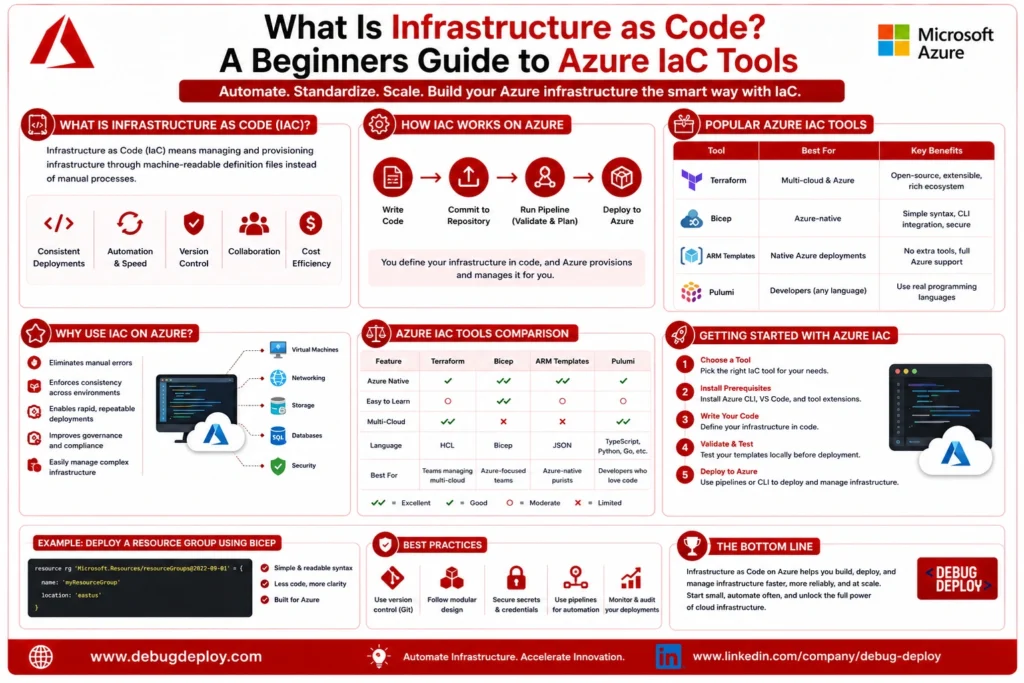
Cloud computing has completely changed how businesses develop, implement, and oversee their IT infrastructure. Modern enterprises are increasingly embracing automation to deploy and maintain their cloud environments rather than manually configuring servers, networking components, storage accounts, and security settings. This method enhances consistency, scalability, and dependability across infrastructure installations while also saving time.
Infrastructure as Code (IaC) is one of the key strategies propelling this change. Infrastructure as Code has emerged as a critical competency for cloud engineers, DevOps experts, system administrators, and IT teams as businesses embrace cloud platforms such as Microsoft Azure. IaC enables infrastructure to be specified in code files that can be version-controlled, tested, reused, and automatically deployed, as opposed to manually defining resources through a graphical interface.
What Is Infrastructure as Code (IaC)?
The method of managing and supplying IT infrastructure using machine-readable configuration files rather than manual procedures is known as Infrastructure as Code (IaC). Cloud resources including virtual machines, storage accounts, virtual networks, databases, load balancers, and security rules are described in these files.
Infrastructure becomes programmable using IaC. Azure automatically provides the necessary resources based on templates created by developers and cloud engineers that specify the intended cloud environment. The infrastructure may be saved in version control systems like Git, reviewed by team members, tested prior to deployment, and reused in many contexts because it is described in code.
Infrastructure as Code lowers the possibility of manual configuration errors while maintaining consistency across development, testing, and production environments.
Why Infrastructure as Code Matters
Using command-line tools or cloud portals, traditional infrastructure administration frequently entails creating resources by hand. This strategy might be effective in small settings, but as businesses grow, it becomes more challenging to administer. Manual deployments take a lot of time, are prone to human mistake, and are challenging to replicate reliably.
By facilitating automated deployments, standardized configurations, and repeatable infrastructure building, Infrastructure as Code tackles these issues. Businesses may more effectively manage cloud resources, swiftly recover from setbacks, and deploy similar environments several times.
Because infrastructure updates may be deployed alongside application code in a controlled and automated manner, IaC has become a core requirement for enterprises using DevOps and continuous integration/continuous deployment (CI/CD).
How Infrastructure as Code Works
Infrastructure as Code begins with writing configuration files that define the desired cloud resources. These files describe the infrastructure rather than the individual steps needed to create it.
For example, an IaC template might specify:
A virtual machine
A virtual network
A storage account
A SQL database
Network security rules
When the template is deployed, Azure automatically provisions all required resources according to the defined configuration. If changes are needed later, developers simply update the template and redeploy it. Azure compares the existing infrastructure with the desired configuration and applies only the necessary changes.
This declarative approach simplifies infrastructure management while improving consistency across environments.
Benefits of Infrastructure as Code
Infrastructure as Code offers numerous advantages for organizations adopting Azure cloud services.
Faster Infrastructure Deployment
Infrastructure that previously required hours or days to configure manually can be deployed in minutes using automated templates.
Consistent Environments
Development, testing, staging, and production environments remain identical because they are created from the same infrastructure code.
Reduced Human Errors
Manual configuration mistakes are minimized because deployments follow predefined templates rather than individual administrator actions.
Improved Collaboration
Infrastructure code can be stored in Git repositories, allowing teams to collaborate using version control, code reviews, and change tracking.
Easier Disaster Recovery
Organizations can quickly recreate infrastructure after failures by redeploying existing templates instead of rebuilding environments manually.
Better Scalability
As business requirements grow, additional cloud resources can be deployed automatically without redesigning the infrastructure.
Stronger Compliance
Standardized infrastructure templates help organizations maintain consistent security settings and regulatory compliance across cloud environments.
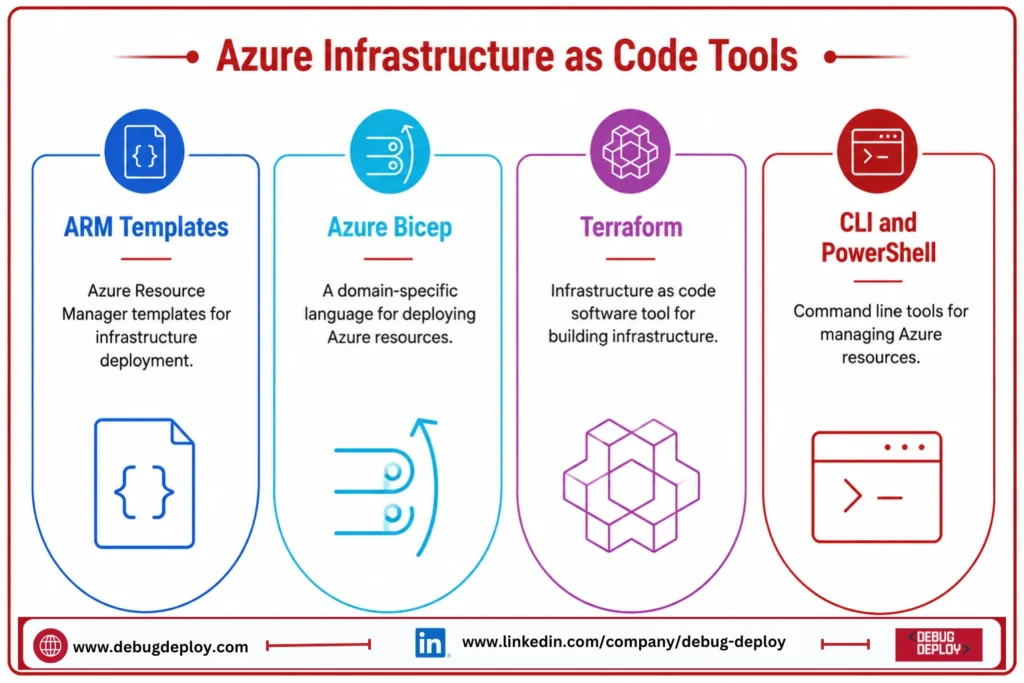
Azure Infrastructure as Code Tools
Microsoft Azure provides several Infrastructure as Code tools that support different automation requirements.
Azure Resource Manager (ARM) Templates
Azure Resource Manager (ARM) Templates are Microsoft’s native Infrastructure as Code solution. ARM templates use JSON files to define Azure resources and their configurations.
ARM templates support:
Virtual Machines
Storage Accounts
Virtual Networks
SQL Databases
Load Balancers
Azure App Services
Networking resources
They provide a reliable way to automate Azure deployments while ensuring consistent infrastructure configurations.
Bicep
Bicep is Microsoft’s modern Infrastructure as Code language designed to simplify ARM template development. Instead of writing lengthy JSON files, developers can create cleaner, easier-to-read Bicep files.
Advantages of Bicep include:
Simpler syntax
Better readability
Native Azure support
Modular infrastructure templates
Easier maintenance
Automatic conversion to ARM templates
Because of its simplicity, Bicep has become the preferred IaC language for many Azure professionals.
Terraform
Terraform is an open-source Infrastructure as Code tool developed by HashiCorp. It supports multiple cloud providers, including Azure, AWS, Google Cloud, Oracle Cloud, and VMware.
Terraform offers several advantages:
Multi-cloud deployments
Reusable modules
State management
Large provider ecosystem
Strong community support
Organizations operating across multiple cloud platforms often choose Terraform because it allows them to manage infrastructure using a single language.
Azure CLI
Azure Command-Line Interface (Azure CLI) enables administrators to automate Azure resource management using command-line scripts. While not a traditional declarative IaC tool, Azure CLI is widely used for deployment automation and scripting.
Azure CLI supports:
Resource creation
Virtual machine management
Storage management
Networking configuration
Deployment automation
It is especially useful for operational tasks and automation scripts.
Azure PowerShell
Azure PowerShell provides PowerShell cmdlets for managing Azure resources programmatically. IT administrators familiar with Windows environments often use PowerShell to automate infrastructure deployment and management.
PowerShell supports:
Resource provisioning
Identity management
Security configuration
Virtual machine administration
Automation workflows
Infrastructure as Code and DevOps
Infrastructure as Code is one of the core practices of DevOps because it enables infrastructure to be managed using the same software development principles applied to application code.
Teams can:
Store infrastructure templates in Git repositories.
Review infrastructure changes through pull requests.
Test deployments before production.
Integrate infrastructure deployment into CI/CD pipelines.
Roll back changes if issues occur.
This approach improves reliability while accelerating software delivery.
Best Practices for Azure Infrastructure as Code
Organizations should follow several best practices when implementing IaC:
Store templates in version control systems.
Create reusable infrastructure modules.
Separate development, testing, and production configurations.
Apply least-privilege security principles.
Validate templates before deployment.
Document infrastructure code clearly.
Monitor deployments continuously.
Automate testing wherever possible.
These practices help maintain secure, reliable, and scalable cloud environments.
Common Use Cases
Infrastructure as Code is widely used across Azure environments for:
Application deployment
Virtual machine provisioning
Kubernetes cluster creation
Database deployment
Networking configuration
Disaster recovery environments
Development and testing environments
Enterprise cloud migration
Multi-region infrastructure deployment
Its flexibility makes it valuable for organizations of all sizes.
Challenges of Infrastructure as Code
Even though IaC has many advantages, novices may encounter some difficulties.
It takes practice to learn configuration languages like Terraform, Bicep, and ARM templates. If templates are disorganized, large infrastructure projects may become complicated. Version control, security guidelines, and deployment testing must also be properly managed by teams.
However, as teams gain expertise and implement disciplined development procedures, these issues become easier to handle.
How to Start Learning Azure IaC
For beginners, a practical learning path includes:
Understand Azure cloud fundamentals.
Learn basic resource deployment through the Azure portal.
Explore Azure Resource Manager templates.
Learn Bicep for modern Azure automation.
Practice creating virtual machines, storage accounts, and networking resources using IaC.
Explore Terraform for multi-cloud deployments.
Integrate IaC with Azure DevOps or GitHub Actions.
Building small projects regularly helps reinforce automation concepts and prepares learners for real-world cloud environments.
Future of Infrastructure as Code
Infrastructure as Code will become ever more crucial as cloud computing develops. AI-assisted infrastructure creation, policy-driven automation, GitOps workflows, enhanced security validation, and closer connection with DevOps platforms are some of the upcoming developments. Automated infrastructure management is being used by organizations more and more to boost digital transformation, lower operating costs, and increase agility.
Conclusion
Managing contemporary cloud infrastructures on Microsoft Azure now requires the use of Infrastructure as Code. Organizations may increase deployment speed, preserve consistency, improve security, and enable scalable cloud operations by substituting automated, reusable, and version-controlled templates for manual infrastructure provisioning. Azure provides robust IaC technologies to meet various automation requirements, including ARM Templates, Bicep, Terraform, Azure CLI, and Azure PowerShell. Learning Infrastructure as Code is a worthwhile investment for novices beginning cloud computing or DevOps in 2026. It lays the groundwork for effective cloud infrastructure management and equips professionals for the increasing need for automation abilities in today’s technological environment.
Want to Get Certified in Azure?
Get trained by a Microsoft Certified Trainer (MCT) and master Infrastructure as Code (IaC) to automate, deploy, and manage Azure resources efficiently.
Recommended Microsoft Azure training programs:
| Course Code | Course Title |
|---|---|
| AZ-104T00-A | Microsoft Azure Administrator |
| AZ-400T00-A | Designing and Implementing Microsoft DevOps Solutions |
| AZ-305T00-A | Designing Microsoft Azure Infrastructure Solutions |
✅ Live Instructor-Led Training
✅ Hands-On Azure IaC Labs (ARM, Bicep & Terraform)
✅ Real-World Infrastructure Automation Projects
✅ DevOps & CI/CD Best Practices
✅ Certification Exam Guidance
📧 Email us: trainings@debugdeploy.com
📱 WhatsApp us for quick assistance
Start your Azure Infrastructure as Code journey today and become an expert in cloud automation!