
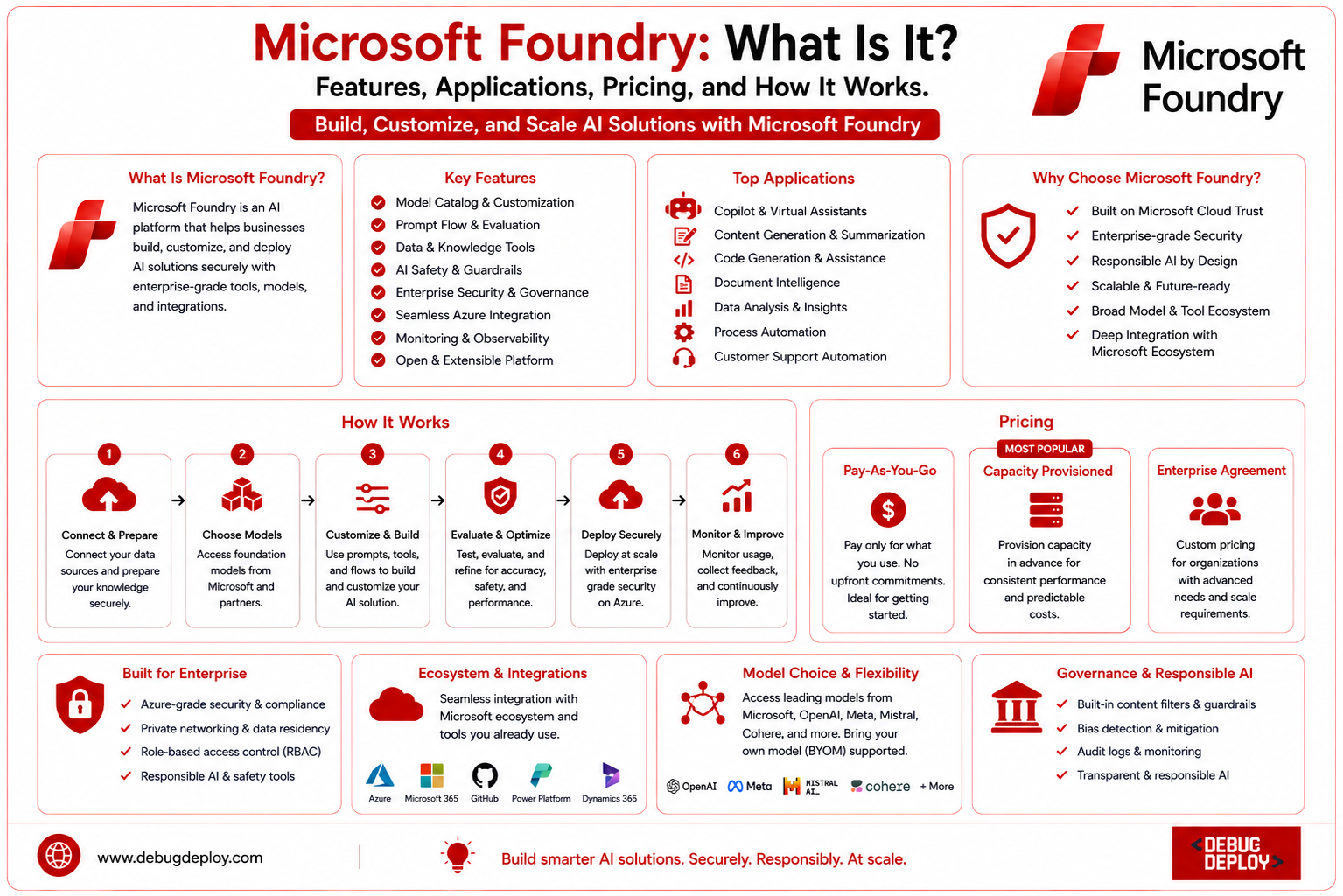
Artificial intelligence (AI) is reshaping the way businesses build software, automate workflows, analyze data, and improve customer experiences. As organizations increasingly adopt AI, they need platforms that simplify development while ensuring security, scalability, and governance. Microsoft addresses these needs with Microsoft Foundry, an enterprise AI platform that enables developers and businesses to build, customize, deploy, and manage AI-powered applications efficiently.
Microsoft Foundry combines advanced AI models, cloud infrastructure, development tools, and enterprise-grade security into a unified platform. Instead of managing multiple AI services separately, organizations can use a single environment to develop intelligent applications, integrate enterprise data, and deploy AI solutions securely on Microsoft Azure.
Whether you are creating AI chatbots, intelligent search systems, business automation tools, or industry-specific AI solutions, Microsoft Foundry provides the tools needed to accelerate development while maintaining enterprise-level reliability. This guide explains what Microsoft Foundry is, its features, applications, pricing, benefits, and how it works.
What Is Microsoft Foundry?
Microsoft Foundry is Microsoft’s enterprise AI development platform designed to help organizations create, customize, deploy, and manage artificial intelligence applications using Microsoft’s cloud ecosystem. It provides developers with access to powerful AI models, development frameworks, orchestration tools, enterprise data integration, and security capabilities from a single platform.
Instead of building AI infrastructure from scratch, developers can use Microsoft Foundry to quickly create AI-powered applications while taking advantage of Azure’s scalability, security, and compliance features. The platform is suitable for startups, software companies, government organizations, healthcare providers, financial institutions, manufacturers, and large enterprises looking to accelerate AI adoption.
Microsoft Foundry supports the complete AI application lifecycle—from model selection and development to deployment, monitoring, and continuous optimization.
How Does Microsoft Foundry Work?
Microsoft Foundry simplifies AI development by providing an integrated workspace where developers can choose AI models, connect enterprise data, create intelligent workflows, and deploy applications using Azure cloud services.
The development process typically includes selecting an appropriate AI model, connecting business data sources, designing prompts or AI agents, testing application performance, implementing security controls, and deploying the solution into production.
Because Microsoft Foundry integrates directly with Azure services, organizations benefit from scalable infrastructure, identity management, monitoring, compliance support, and enterprise security without managing complex backend systems themselves.
Key Features of Microsoft Foundry
Microsoft Foundry offers a comprehensive set of capabilities for modern AI development.
Access to Advanced AI Models
Microsoft Foundry provides access to powerful foundation models that support text generation, summarization, code generation, document analysis, conversational AI, translation, and reasoning tasks. Developers can choose models based on business requirements without training their own AI models from scratch.
AI Agent Development
One of the platform’s most valuable capabilities is the ability to build intelligent AI agents. These agents can answer questions, automate repetitive business processes, assist employees, retrieve enterprise knowledge, and improve customer support experiences.
Enterprise Data Integration
Microsoft Foundry connects seamlessly with enterprise data sources including Azure SQL Database, Azure Cosmos DB, Microsoft 365, SharePoint, Azure Storage, and other cloud services. This enables AI applications to provide responses based on an organization’s own business information rather than only general knowledge.
Prompt Engineering Tools
Developers can create, refine, and optimize prompts that improve AI response quality. Built-in testing tools allow teams to compare outputs and fine-tune prompts before deployment.
Security and Governance
Security is integrated throughout the platform. Microsoft Foundry supports role-based access control, Azure Active Directory authentication, encryption, compliance frameworks, audit logging, and responsible AI practices. These capabilities help organizations build AI solutions while maintaining regulatory compliance and protecting sensitive business data.
Scalable Deployment
Applications built with Microsoft Foundry can scale automatically using Azure cloud infrastructure. Whether serving a small internal team or millions of users worldwide, businesses can increase resources without redesigning their applications.
Monitoring and Performance Analytics
Microsoft Foundry includes monitoring tools that help organizations track AI usage, application performance, response quality, system health, and operational costs. These insights help teams continuously improve AI applications over time.
Benefits of Microsoft Foundry
Microsoft Foundry offers numerous advantages for businesses adopting AI technologies.
One of its biggest benefits is faster AI development. Developers can use pre-built AI models and integrated development tools instead of creating complex AI infrastructure manually. This significantly reduces development time.
The platform also improves collaboration between developers, IT administrators, business analysts, and data scientists by providing a centralized environment for AI projects.
Its enterprise-grade security ensures that organizations can confidently deploy AI applications while meeting industry compliance requirements.
Another major benefit is scalability. Organizations can begin with small proof-of-concept projects and expand them into enterprise-wide AI solutions without changing their infrastructure.
Additionally, Microsoft Foundry simplifies AI management by combining development, deployment, monitoring, governance, and optimization within one platform.
Common Applications of Microsoft Foundry
Microsoft Foundry supports a wide variety of business applications across industries.
AI Customer Support
Organizations can build intelligent virtual assistants capable of answering customer questions, resolving common issues, and improving customer satisfaction while reducing support costs.
Enterprise Knowledge Management
Businesses can create AI-powered search systems that retrieve information from internal documents, company policies, technical manuals, contracts, and knowledge bases.
Business Process Automation
AI agents built with Microsoft Foundry can automate repetitive tasks such as document processing, invoice analysis, report generation, workflow approvals, and administrative operations.
Software Development Assistance
Development teams can create AI-powered coding assistants that generate code, explain programming concepts, review software, and improve developer productivity.
Healthcare
Healthcare providers can develop AI solutions for clinical documentation, administrative automation, patient support, and medical knowledge retrieval while maintaining regulatory compliance.
Financial Services
Banks and financial institutions use AI for customer support, document processing, fraud investigation assistance, compliance reporting, and financial data analysis.
Manufacturing
Manufacturers can implement AI for predictive maintenance, quality inspection, production optimization, inventory management, and supply chain analytics.
Education
Educational institutions use Microsoft Foundry to build personalized learning assistants, research support systems, academic chatbots, and administrative automation solutions.
Microsoft Foundry Pricing
Microsoft Foundry follows Azure’s consumption-based pricing model rather than offering a single fixed subscription fee. The total cost depends on several factors, including:
AI model usage
Number of input and output tokens processed
Azure compute resources
Data storage
Networking usage
Additional Azure services integrated into the application
Small development projects typically incur lower costs, while enterprise deployments serving thousands of users require more cloud resources. Organizations should estimate expected workloads and monitor resource consumption regularly to optimize spending.
How to Get Started with Microsoft Foundry
Getting started with Microsoft Foundry involves a few simple steps:
Create or sign in to a Microsoft Azure account.
Access Microsoft Foundry through the Azure portal.
Select an AI model appropriate for your project.
Connect enterprise data sources.
Design AI prompts, workflows, or intelligent agents.
Test and evaluate application performance.
Configure security, permissions, and governance policies.
Deploy the application to production.
Continuously monitor usage and optimize performance.
Starting with a pilot project allows organizations to understand the platform before scaling AI across departments.
Best Practices for Using Microsoft Foundry
Before starting development, companies should establish specific business goals in order to optimize the value of Microsoft Foundry. AI performance is greatly enhanced by well-structured and high-quality data. Prompts should be tested frequently, AI-generated responses should be validated, application performance should be tracked, and robust security measures should be implemented. Accuracy is maintained and business results are enhanced by ongoing optimization based on user feedback.
Who Should Use Microsoft Foundry?
Microsoft Foundry is designed for:
AI developers
Software engineers
Data scientists
Cloud architects
DevOps professionals
Enterprise IT teams
Business analysts
Digital transformation leaders
Research organizations
Large enterprises adopting generative AI
Its flexibility makes it suitable for organizations of all sizes seeking to build secure, scalable AI solutions.
Future of Microsoft Foundry
Microsoft Foundry is anticipated to develop with more sophisticated AI models, autonomous AI agents, multimodal capabilities, deeper Microsoft ecosystem integration, better governance features, and enhanced automation as enterprise AI use continues to expand. These developments will streamline AI development and management while assisting enterprises in creating increasingly intelligent applications.
Conclusion
By 2026, Microsoft Foundry will rank among the company’s most significant platforms for enterprise AI development. It makes it possible for businesses to create, implement, and manage intelligent applications more effectively by integrating powerful AI models, Azure cloud infrastructure, enterprise security, governance, and integrated development tools into a single platform. Microsoft Foundry offers the flexibility and scalability required for contemporary AI innovation, whether your objective is to build industry-specific AI solutions, automate business processes, construct chatbots driven by AI, or create enterprise knowledge assistants. Learning Microsoft Foundry may give developers, cloud experts, and organizations a major edge in creating safe, scalable, and future-ready AI applications as companies continue to invest in AI.
Want to Get Certified in Azure AI?
Get trained by a Microsoft Certified Trainer (MCT) and learn how to build intelligent applications using Microsoft AI services, Azure AI Foundry, and generative AI technologies.
Recommended Microsoft certification programs:
| Course Code | Course Title |
|---|---|
| AI-900T00-A | Microsoft Azure AI Fundamentals |
| AI-102T00-A | Designing and Implementing an Azure AI Solution |
✅ Live Instructor-Led Training
✅ Hands-On Azure AI & Azure AI Foundry Labs
✅ Real-World Generative AI Projects
✅ Prompt Engineering & AI Application Development
✅ Certification Exam Guidance
📧 Email us: trainings@debugdeploy.com
📱 WhatsApp us for quick assistance
Start your Azure AI certification journey today and build the next generation of intelligent applications with confidence!