
Introduction
For businesses of all sizes, cybersecurity has emerged as one of the top concerns. The number of possible cyberthreats keeps increasing as companies use cloud computing, remote work, mobile devices, and hybrid settings. Simple viruses and malware are no longer the only types of attacks that occur today. Ransomware, phishing tactics, zero-day vulnerabilities, credential theft, insider threats, and sophisticated assaults that circumvent conventional security measures are now commonplace for organizations.
Microsoft has developed a comprehensive security ecosystem called Microsoft Defender to counter these changing threats. Microsoft Defender offers intelligent, cloud-powered protection for endpoints, identities, email, apps, cloud workloads, and data instead of depending only on antivirus software.
Microsoft Defender for Endpoint, an enterprise-grade endpoint security platform that assists enterprises in identifying, investigating, and responding to cyber attacks before they do substantial damage, is one of the most crucial elements of this ecosystem.
Understanding Microsoft Defender and Defender for Endpoint is crucial whether you work as an IT administrator, cybersecurity analyst, cloud engineer, or someone getting ready for Microsoft security certifications. This guide describes these solutions, their main characteristics, how they operate, and why they are now essential tools for contemporary cybersecurity.
What Is Microsoft Defender?
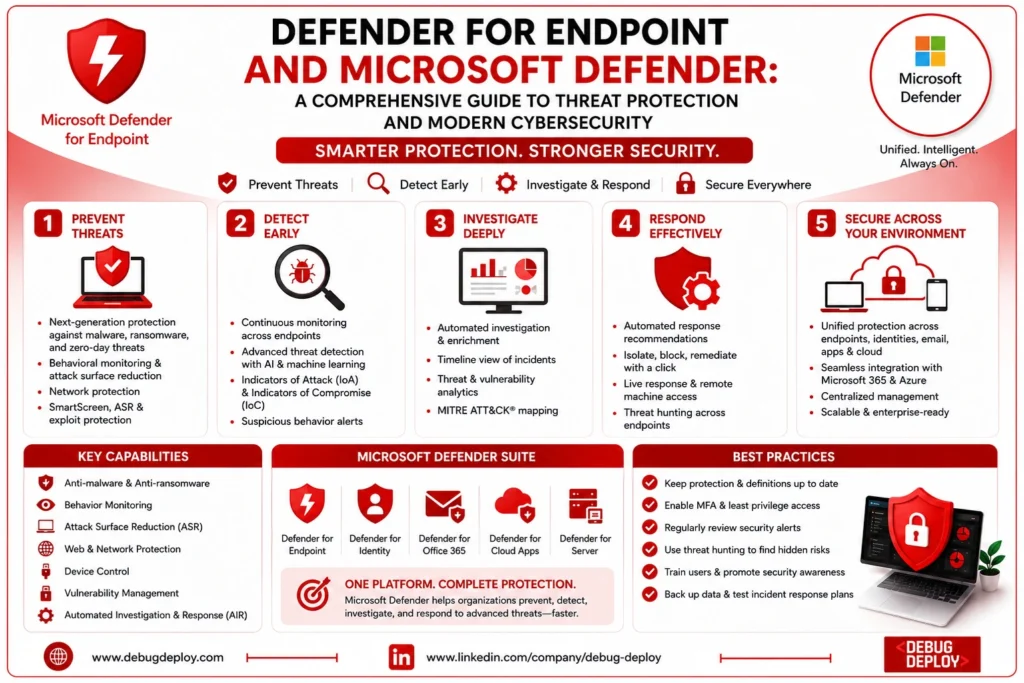
Microsoft’s integrated cybersecurity platform, Microsoft Defender, is intended to safeguard users, devices, identities, apps, email, cloud services, and organizational data. Organizations can manage security from a centralized interface thanks to the integration of many security products into a single ecosystem.
Organizations can use Microsoft Defender to detect and address threats throughout their whole Microsoft infrastructure rather than investing in separate security products for each environment. To detect suspicious activities and lower security threats, the platform makes use of artificial intelligence, machine learning, cloud intelligence, and automated investigation capabilities.
One of the most complete enterprise security products on the market today, Microsoft Defender serves businesses utilizing Windows, Azure, Microsoft 365, and hybrid cloud environments.
What Is Microsoft Defender for Endpoint?
A specialized part of the Microsoft Defender ecosystem, Microsoft Defender for Endpoint is designed to safeguard endpoint devices.
Laptops, desktop computers, servers, virtual machines, and mobile devices that are connected to a company’s network are examples of endpoints. Protecting these devices is essential for preserving organizational security because they are frequently the first target for fraudsters.
Defender for Endpoint continuously monitors device behavior, analyzes suspicious activity, finds sophisticated threats, and offers automated investigation and response capabilities, in contrast to typical antivirus software that mainly searches files for known malware.
It aids security teams with early threat detection, device containment, and stopping attacks from propagating throughout the company.
How Microsoft Defender for Endpoint Works
Security signals from protected devices are continuously gathered by Microsoft Defender for Endpoint. Running processes, network activity, user behavior, file activities, application events, and system modifications are some examples of these signals.
Microsoft’s artificial intelligence, behavioral analytics, and global threat intelligence are used to analyze the gathered data. Defender detects anomalous activity that might point to an attack, even if the particular virus has never been seen before, rather than depending solely on malware signatures.
Defender creates security warnings, looks into connected incidents, and suggests corrective measures when it finds questionable activity. It frequently has the ability to automatically erase dangerous files, stop malicious activities, or isolate infected devices before attackers can have more access.
An organization’s capacity to identify and address contemporary cyberthreats is greatly enhanced by this proactive approach.
Key Features of Microsoft Defender for Endpoint
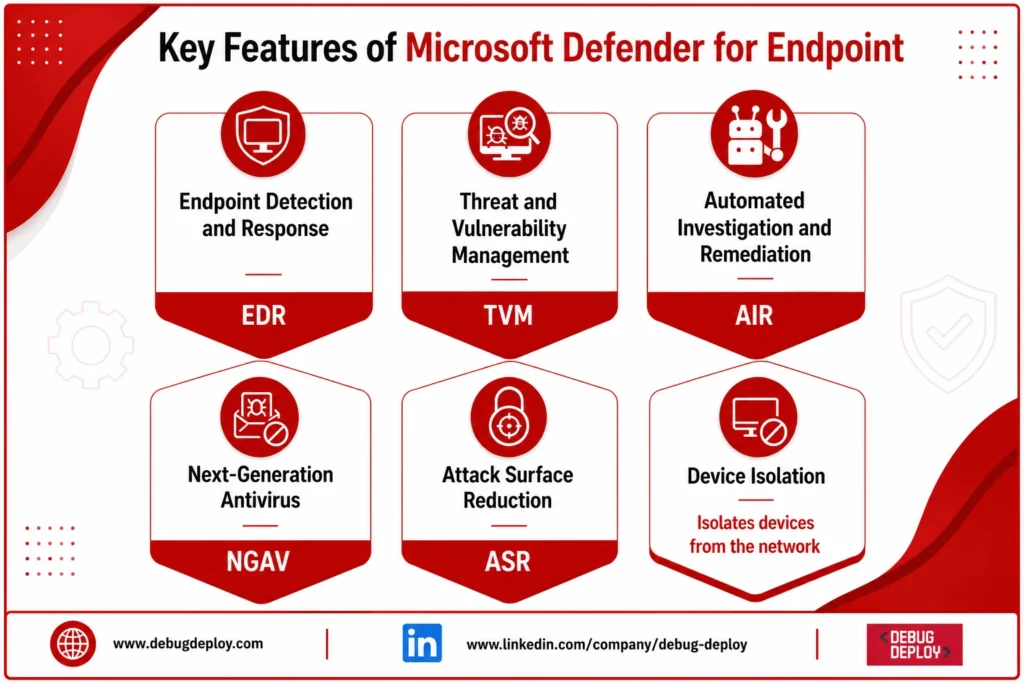
Endpoint Detection & Response (EDR)
Continuously monitors endpoint activity.
Detects suspicious behavior and investigates security incidents.
Next-Generation Antivirus (NGAV)
Combines AI, machine learning, and cloud intelligence.
Protects against both known and emerging threats.
Threat & Vulnerability Management (TVM)
Identifies software vulnerabilities and security misconfigurations.
Helps prioritize and remediate risks before exploitation.
Attack Surface Reduction (ASR)
Blocks malicious scripts and risky activities.
Controls application execution to reduce attack opportunities.
Automated Investigation & Remediation (AIR)
Automatically analyzes security alerts.
Takes corrective actions to minimize manual intervention.
Device Isolation
Isolates compromised devices from the network.
Maintains secure remote access for investigation and response.
Comprehensive Endpoint Protection
Delivers end-to-end security across the entire attack lifecycle.
Enhances threat detection, response, and recovery.
Microsoft Defender Product Family
Endpoint security is only one aspect of Microsoft Defender. It consists of a number of specialist products made to safeguard various aspects of a company’s digital environment.
Microsoft Defender for Office 365 guards against phishing, malware, and business email compromise threats on email, Microsoft Teams, and collaboration tools.
Microsoft Defender for Identity keeps an eye on Active Directory environments on-site to identify identity-based attacks and questionable authentication practices.
By detecting security threats, keeping an eye on cloud workloads, and enhancing compliance, Microsoft Defender for Cloud protects Azure, hybrid, and multi-cloud systems.
Microsoft Defender for Cloud Apps helps businesses manage cloud application security and stop data loss while offering visibility into Software-as-a-Service (SaaS) applications.
When combined, these solutions form a cohesive security ecosystem that safeguards users, devices, identities, apps, and cloud infrastructure.
Why Endpoint Security Is More Important Than Ever
One of the most frequent entrance sites for hackers is now endpoint devices. Workers use various devices during the day, download files, use cloud apps, and work remotely via public networks.
In order to protect against complex assaults like ransomware, fileless malware, privilege escalation, credential theft, and zero-day exploits, traditional antivirus software is no longer adequate.
Contemporary endpoint security systems, such as Microsoft Defender for Endpoint, continuously track device activity, identify anomalous activity, and instantly react to new threats.
This proactive strategy increases organizational resilience while drastically lowering the probability of successful intrusions.
Real-World Example
Suppose a phishing email with a malicious attachment masquerading as an invoice is sent to an employee.
When the employee opens the attachment, concealed malware contacts an external command-and-control server and starts trying to encrypt files.
Unusual encryption activities and suspect network communication are quickly identified by Microsoft Defender for Endpoint. The platform starts an automated investigation, stops the malicious process, isolates the compromised device from the company network, and generates an alert.
Security analysts are provided with comprehensive details about the attack, such as the compromised processes, impacted data, and suggested corrective actions. The ransomware cannot propagate to other systems since the threat is swiftly contained.
Without advanced endpoint protection, the same attack could have resulted in widespread business disruption and significant financial losses.
Benefits of Microsoft Defender
Because Microsoft Defender integrates several security features into a single platform, organizations choose it.
It lowers operational complexity for IT teams by offering consolidated security management across Microsoft installations. Without depending only on conventional signature updates, cloud-based threat intelligence makes it possible to quickly identify recently developed assaults.
Integrated automation speeds up investigations and makes it easier for security personnel to handle situations. A complete security ecosystem that can safeguard contemporary hybrid systems is created by integration with Microsoft 365, Azure, Microsoft Entra ID, and Microsoft Sentinel.
Defender eliminates the need for numerous third-party security solutions while offering smooth integration for businesses currently utilizing Microsoft technology.
Who Should Learn Microsoft Defender?
Many different types of technology professionals can benefit from knowing Microsoft Defender.
Defender is used by cybersecurity analysts to look into security events and address threats. Threat hunting and alert monitoring are tasks carried out by Security Operations Center (SOC) analysts. Administrators of Microsoft 365 and Azure set up security rules and safeguard company assets. IT administrators oversee endpoint security in enterprise settings, while cloud engineers safeguard workloads operating in Azure.
Professionals getting ready for certifications like SC-200 (Security Operations Analyst), SC-300 (Identity and Access Administrator), SC-100 (Cybersecurity Architect), AZ-500 (Azure Security Engineer), and Microsoft 365 security certifications can also benefit from understanding Microsoft Defender.
Getting Started with Microsoft Defender
Cybersecurity basics, such as malware, phishing, ransomware, authentication, and endpoint protection, should be thoroughly understood by novices.
Next, investigate the Microsoft Defender interface to learn about the organization of alerts, incidents, devices, vulnerabilities, and security advice. Examine security dashboards, investigate alarms, practice onboarding test devices, and investigate automated investigation features.
Learn how Microsoft Defender works with Microsoft Entra ID, Microsoft Sentinel, Microsoft Intune, and Microsoft Defender XDR to create an all-encompassing enterprise security platform as your knowledge expands.
The greatest way to comprehend how Defender functions in real-world settings is through practical experience.
Conclusion
Traditional antivirus software is insufficient to combat modern cyber threats. Businesses want intelligent security platforms that can identify complex assaults, react automatically, and safeguard people in on-premises, cloud, and hybrid settings.
By integrating advanced threat detection, artificial intelligence, cloud intelligence, endpoint security, identity protection, and automated response into a single cybersecurity ecosystem, Microsoft Defender offers this all-encompassing protection.
Through continuous monitoring, endpoint detection and response, vulnerability management, and automated remediation, Microsoft Defender for Endpoint, one of its solutions, is essential in defending devices against contemporary cyber attacks.
Understanding Microsoft Defender and Defender for Endpoint is crucial to protecting today’s digital workplace and staying ahead of evolving cyber threats, regardless of whether you’re managing enterprise IT environments, pursuing a career in cybersecurity, or getting ready for Microsoft security certifications.
Want to Get Certified in Microsoft Security?
Get trained by a Microsoft Certified Trainer (MCT) and gain the skills to protect endpoints, detect cyber threats, and secure enterprise environments using Microsoft Defender and Microsoft Security solutions.
Recommended Microsoft certification programs:
| Course Code | Course Title |
|---|---|
| SC-900T00-A | Microsoft Security, Compliance, and Identity Fundamentals |
| SC-200T00-A | Microsoft Security Operations Analyst |
| AZ-500T00-A | Microsoft Azure Security Technologies |
✅ Live Instructor-Led Training
✅ Hands-On Microsoft Defender Labs
✅ Endpoint Protection & Threat Detection
✅ Incident Response & Security Operations (SOC)
✅ Certification Exam Guidance
📧 Email us: trainings@debugdeploy.com
📱 WhatsApp us for quick assistance
Start your Microsoft Security certification journey today and become an expert in modern cybersecurity and threat protection!