
Introduction
Automation is becoming a crucial part of contemporary DevOps procedures as software development continues to change. Teams may develop, test, and release applications more quickly, reliably, and error-free with the aid of Continuous Integration and Continuous Deployment (CI/CD). Azure DevOps and GitHub Actions are two of the most widely utilized CI/CD platforms among developers and companies globally.
Although they serve different audiences and use cases, both platforms are supported by Microsoft and have strong automation features. If you want to focus on CI/CD technologies or are just starting out in DevOps, you might be wondering: Which should you learn first, GitHub Actions or Azure DevOps?
In this guide, we’ll compare both tools across key areas, including features, ease of use, scalability, integrations, career opportunities, and learning paths, helping you decide which platform best aligns with your goals.
Understanding Azure DevOps
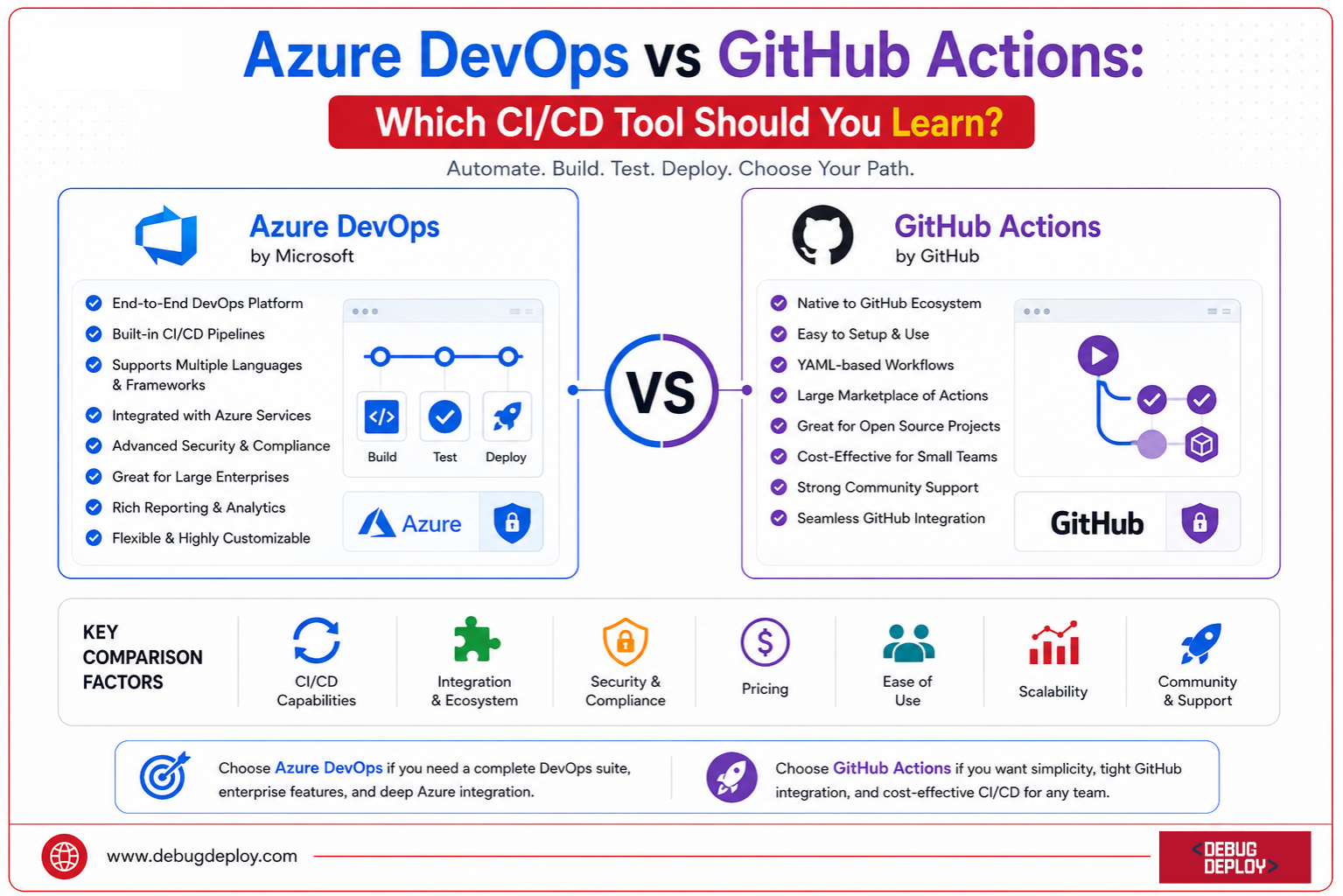
Azure DevOps is Microsoft’s comprehensive DevOps platform that provides a complete suite of development and deployment services. It supports the entire software development lifecycle, from project planning to source control, testing, deployment, and monitoring.
Azure DevOps includes several integrated services:
Azure Repos for source control
Azure Pipelines for CI/CD automation
Azure Boards for project management
Azure Test Plans for testing
Azure Artifacts for package management
Because of its extensive capabilities, Azure DevOps is widely used by large enterprises managing complex development workflows.
Understanding GitHub Actions
With GitHub’s integrated automation platform, GitHub Actions, developers can design workflows from inside their repositories. Teams can use it to automate software development processes like creating, testing, deploying, and keeping an eye on apps.
Developers use YAML files kept in their repositories to define workflows with GitHub Actions. Events like these can set off these workflows:
Code pushes
Pull requests
Branch merges
Scheduled jobs
Manual triggers
GitHub Actions has become extremely popular due to its simplicity, flexibility, and seamless integration with GitHub repositories.
Ease of Learning
For beginners, ease of learning is often one of the most important considerations.
Azure DevOps Learning Experience
Although Azure DevOps has a higher learning curve, it delivers strong enterprise-level capabilities. Multiple services and their interactions within the larger DevOps ecosystem must be understood by new users.
Even while Microsoft offers top-notch documentation and educational materials, setting up intricate pipelines and settings can take more work.
GitHub Actions Learning Experience
In general, novices can learn GitHub Actions more easily. Because workflows are directly saved within repositories, developers can examine current workflow files to gain a quick understanding of how automation operates.
Additionally, the marketplace offers hundreds of pre-built actions, which eliminates the need to start from scratch when creating bespoke automation.
Winner for Beginners: GitHub Actions
CI/CD Pipeline Capabilities
Both tools provide robust CI/CD functionality, but their approaches differ.
Azure DevOps Pipelines
Azure Pipelines supports:
Multi-stage deployments
Advanced release management
Hybrid and multi-cloud deployments
Infrastructure as Code workflows
Container deployments
Enterprise compliance requirements
Azure Pipelines is designed for organizations that require highly controlled and complex deployment processes.
GitHub Actions Workflows
GitHub Actions provides:
Event-driven automation
Matrix builds
Reusable workflows
Container support
Self-hosted runners
Cloud deployment automation
For many development teams, GitHub Actions offers all the CI/CD capabilities needed without the complexity of a dedicated DevOps platform.
Winner for Enterprise CI/CD: Azure DevOps
Integration with Development Workflows
Azure DevOps Integrations
Azure DevOps integrates deeply with:
Microsoft Azure
Visual Studio
Active Directory
Power Platform
Kubernetes
Terraform
Jenkins
ServiceNow
Organizations already invested in Microsoft’s ecosystem often benefit significantly from these integrations.
GitHub Actions Integrations
GitHub Actions excels at developer-focused integrations.
It works seamlessly with:
GitHub repositories
Docker
Kubernetes
AWS
Azure
Google Cloud
Slack
Jira
Terraform
The GitHub Marketplace provides thousands of community-built actions that accelerate automation projects.
Winner for Developer Productivity: GitHub Actions
Enterprise Adoption
Enterprise adoption often influences career opportunities and long-term relevance.
Why Enterprises Choose Azure DevOps
Large organizations frequently select Azure DevOps because it provides governance, security controls, compliance capabilities, and project management features within a single platform.
Azure DevOps is particularly common in industries such as:
Banking
Healthcare
Government
Manufacturing
Telecommunications
Why Modern Teams Choose GitHub Actions
GitHub Actions is highly popular among:
Startups
SaaS companies
Open-source projects
Cloud-native organizations
Agile development teams
Its simplicity and flexibility make it an attractive option for modern software delivery practices.
Winner for Enterprise Environments: Azure DevOps
Security and Compliance
Security is increasingly important in CI/CD pipelines.
Azure DevOps Security Features
Azure DevOps offers:
Role-based access control
Azure Active Directory integration
Audit logging
Compliance reporting
Secure release approvals
Policy management
These features make Azure DevOps suitable for highly regulated industries.
GitHub Actions Security Features
GitHub Actions includes:
Secret management
Dependency scanning
Code scanning
Branch protection rules
Security alerts
GitHub Advanced Security integration
While highly secure, GitHub Actions generally relies more heavily on GitHub’s broader security ecosystem.
Winner for Compliance-Heavy Organizations: Azure DevOps
Career Opportunities
When choosing a technology to learn, job market demand is a major factor.
Azure DevOps Career Paths
Popular roles include:
DevOps Engineer
Azure Engineer
Cloud Engineer
Platform Engineer
Site Reliability Engineer
Solutions Architect
Many enterprises actively seek professionals with Azure DevOps expertise.
GitHub Actions Career Paths
GitHub Actions skills are increasingly valuable for:
Software Developers
DevOps Engineers
Cloud Engineers
Platform Engineers
Full-Stack Developers
Since GitHub is widely used across the industry, GitHub Actions knowledge is becoming a highly transferable skill.
Winner for Overall Market Reach: GitHub Actions
Certifications and Learning Path
Azure DevOps Certifications
Microsoft offers certifications that support Azure DevOps learning:
AZ-900: Azure Fundamentals
AZ-104: Azure Administrator
AZ-400: Designing and Implementing Microsoft DevOps Solutions
AZ-305: Azure Solutions Architect
These certifications are widely recognized in enterprise environments.
GitHub Certifications
GitHub provides certifications such as:
GitHub Foundations
GitHub Actions Certification
GitHub Administration Certification
Although newer than Microsoft’s certification ecosystem, GitHub certifications continue to gain industry recognition.
Winner for Structured Certification Path: Azure DevOps
Which Tool Should You Learn First?
Choose Azure DevOps if:
You want to work in large enterprises
You are pursuing Azure cloud certifications
You need advanced release management capabilities
You work in regulated industries
You want expertise in complete DevOps lifecycle management
Choose GitHub Actions if:
You are a beginner learning CI/CD
You work primarily with GitHub repositories
You want fast and simple automation
You develop cloud-native applications
You prefer developer-centric workflows
Can You Learn Both?
Absolutely.
In fact, many organizations use both tools simultaneously. GitHub is often used for source control and collaboration, while Azure DevOps handles advanced deployment and release management.
A practical learning roadmap might look like this:
Learn GitHub fundamentals.
Master GitHub Actions workflows.
Understand CI/CD concepts and automation practices.
Explore Azure DevOps Pipelines and release management.
Learn enterprise DevOps architecture and governance.
This approach provides a strong foundation while expanding your career opportunities across multiple environments.
Conclusion
Both GitHub Actions and Azure DevOps are robust CI/CD platforms, but they cater to different audiences and requirements.
Because of its ease of use, smooth GitHub connection, and increasing popularity among contemporary development teams, GitHub Actions is typically the greatest place for novices to start. It enables developers to swiftly automate processes without having to oversee a complicated DevOps ecosystem.
Conversely, Azure DevOps continues to be a top enterprise-grade solution with sophisticated pipeline management, governance, security, and lifecycle management features. Professionals working in large enterprises and Microsoft-centric environments will find it very beneficial.
Want to Master CI/CD With Microsoft Azure DevOps?
Learn from a Microsoft Certified Trainer (MCT) and develop the DevOps skills needed to automate software delivery using Azure DevOps, GitHub Actions, and modern CI/CD practices.
Recommended Microsoft Azure Certification Programs:
AZ-400: Designing and Implementing Microsoft DevOps Solutions
AZ-204: Developing Solutions for Microsoft Azure
AZ-104: Microsoft Azure Administrator Associate
AZ-900: Microsoft Azure Fundamentals
✅ Live Instructor-Led Training
✅ Azure DevOps & GitHub Actions Hands-on Labs
✅ CI/CD Pipeline Design & Automation
✅ Infrastructure as Code (IaC) & DevOps Best Practices
✅ Git, Docker, Kubernetes & Azure Integration
✅ Certification Exam Preparation & Guidance
📧 Email: trainings@debugdeploy.com
📱 WhatsApp: Contact us for quick assistance
Build industry-ready DevOps skills with Microsoft Azure and learn how to design, automate, and manage modern CI/CD pipelines for faster, more reliable software delivery.