
Today’s businesses rely on data to make decisions more quickly and intelligently. But it takes more than just making dashboards and visualizations to transform unprocessed data into insightful knowledge. Tools that can connect to many data sources, clean and transform data, do analysis, and provide findings in an understandable format are essential for organizations.
Although both Alteryx and Power BI are widely utilized in contemporary data operations, their main functions are distinct. Power BI is primarily intended for business intelligence, visualization, reporting, and dashboard construction, whereas Alteryx is heavily focused on data preparation, automation, and advanced analytics.
Organizations may select the best tool or decide when it makes more sense to use both by knowing the differences between Alteryx and Power BI.
What Is Alteryx?
Alteryx is a data analytics and automation platform designed to help users prepare, combine, transform, and analyze data with limited coding.
It is commonly used for tasks such as:
Data cleansing
Data preparation
Data blending
Workflow automation
Predictive analytics
Spatial analytics
Advanced data analysis
Alteryx provides a visual workflow interface where users can connect different tools to create repeatable data processes. This makes it useful for analysts who work with large and complex datasets from multiple sources.
What Is Power BI?
Microsoft Power BI is a business intelligence and data visualization platform. It allows users to connect to data, transform it, create analytical models, build reports, and share interactive dashboards.
Power BI is commonly used for:
Business reporting
Interactive dashboards
KPI monitoring
Data visualization
Data analysis
Management reporting
Self-service business intelligence
Power BI integrates closely with Microsoft technologies such as Excel, Azure, Microsoft Fabric, Microsoft 365, and Microsoft Entra ID.
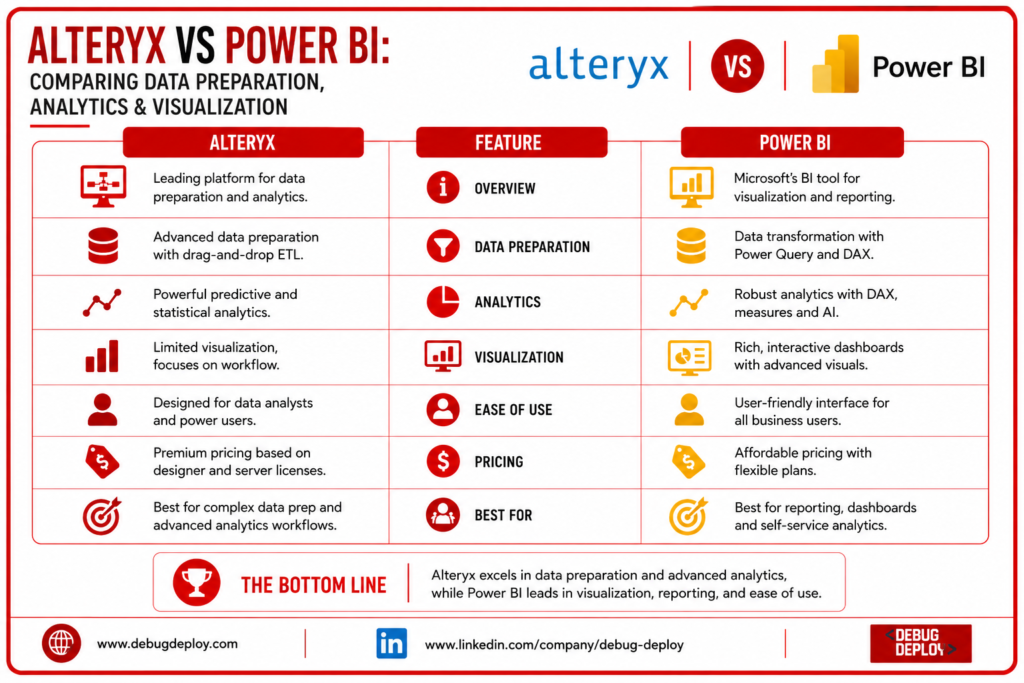
Alteryx vs Power BI: Key Difference
Their main objective is the most significant distinction.
Whereas Power BI concentrates on modeling, displaying, and sharing insights, Alteryx concentrates on data preparation and analysis.
Data from many sources can be cleaned, transformed, combined, and subjected to sophisticated analytical procedures using Alteryx.
The produced data can then be used by Power BI to generate interactive visualizations, dashboards, reports, and KPIs.
Because of this distinction, Alteryx and Power BI are frequently complementing rather than exact substitutes.
Data Preparation
Data preparation is one of Alteryx’s strongest capabilities.
Organizations often receive data from multiple systems, and the information may contain missing values, duplicate records, inconsistent formats, or incorrect data types.
Alteryx provides visual tools for:
Removing duplicates
Filtering records
Joining datasets
Unioning data
Transforming columns
Cleaning values
Aggregating information
Automating repetitive workflows
Instead of carrying out the same modifications by hand each time, users can design repeating workflows.
Additionally, Power BI offers robust data preparation via Power Query. In addition to many additional operations, users can import data, remove columns, modify data types, merge tables, replace values, and filter records.
Power Query is frequently adequate for simple business reporting. Alteryx can offer more features for sophisticated workflow automation and complicated data preparation.
Data Connectivity
Both platforms support multiple data sources.
Power BI can connect to sources such as:
Excel
CSV
SQL Server
Oracle
SharePoint
Azure
Salesforce
Web services
Cloud databases
Alteryx also supports databases, spreadsheets, cloud platforms, files, APIs, and other enterprise data sources.
The best choice depends on the organization’s existing data architecture and the complexity of its data preparation requirements.
Data Transformation
Alteryx provides a visual workflow approach to data transformation. Users can build complex processes by connecting different transformation tools.
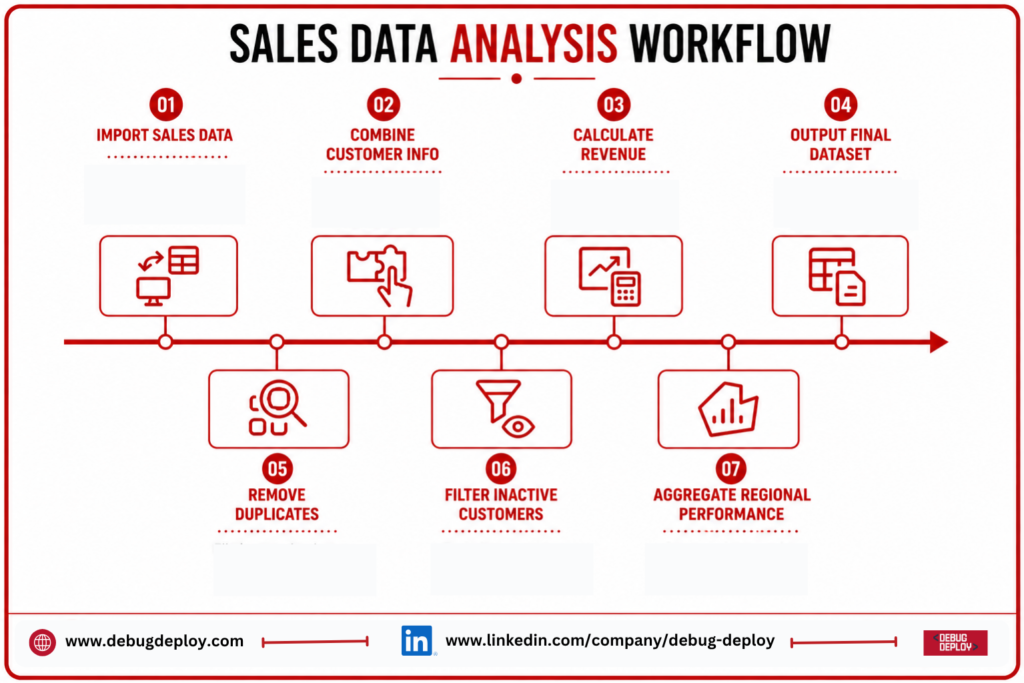
For example, an analyst could create a workflow that:
Imports sales data.
Removes duplicate records.
Combines customer information.
Filters inactive customers.
Calculates revenue.
Aggregates regional performance.
Outputs a final dataset.
Power BI can perform many similar transformations through Power Query. However, Power BI’s main objective is ultimately to prepare data for modeling and reporting.
Analytics Capabilities
Predictive and statistical analysis are among the advanced analytics features that Alteryx offers. Analysts that need to carry out more intricate analytical operations without writing a lot of code may find it helpful.
Power BI places a greater emphasis on interactive reporting and business analytics. Developers can generate metrics and computations including revenue growth, profit margins, averages, ranks, and year-to-date metrics using its DAX (Data Analysis Expressions) language.
As a result, Power BI is especially effective for business-focused analysis and reporting, while Alteryx can be more appropriate for sophisticated analytical operations.
Visualization
Power BI has a clear advantage when it comes to interactive business visualization.
Users can create:
Bar charts
Line charts
Pie charts
Maps
KPI cards
Tables
Matrix reports
Interactive dashboards
Filters, slicers, drill-through, bookmarking, and other interactive capabilities are also supported by Power BI.
Although Alteryx can show analytical data, its main capabilities are not dashboard construction and visualization.
Power BI is typically a better option if the primary need is to create executive dashboards and interactive reports.
Automation
Another area where Alteryx is really helpful is automation.
Businesses can create repeatable processes that carry out data analysis and preparation duties automatically. This can increase uniformity and lessen the amount of manual spreadsheet effort.
Additionally, Power BI facilitates automation through dataflows, Power Automate integration, periodic data refreshes, and other Microsoft services.
But Alteryx is particularly concerned with developing data procedures that can be repeated.
Ease of Use
Programming is less necessary thanks to the visual interfaces offered by both systems.
For users who need to generate dashboards and reports and are already familiar with Excel, Power BI is typically simpler.
Alteryx is also intended for analysts and business users, although because of its workflow-based methodology, users may need to learn more about data preparation and analytical procedures.
The user’s objectives and technical expertise ultimately determine the learning curve.
Performance
Data volume, transformation complexity, data model architecture, hardware or cloud resources, and query efficiency all affect performance.
Large data processing requirements and intricate workflows might have an impact on Alteryx performance.
Semantic model architecture, relationships, DAX computations, data volume, and report complexity all have a significant impact on Power BI performance.
Performance can be greatly increased on either platform by streamlining data structures and removing pointless changes.
Pricing Considerations
Licensing, deployment, users, features, and organizational needs all affect pricing.
Organizations should compare Alteryx’s price to the amount of manual data preparation and analysis it can automate, as Alteryx typically targets professional and enterprise analytics users.
Depending on the needs of the company, Power BI provides a variety of licensing and capacity choices.
When comparing costs, businesses should consider more than license fees. Total cost can also include:
Implementation
Training
Administration
Infrastructure
Data storage
Support
Maintenance
Alteryx vs Power BI: Quick Comparison
Feature | Alteryx | Power BI |
Data Preparation | Excellent | Excellent |
Data Transformation | Excellent | Excellent |
Data Blending | Excellent | Strong |
Advanced Analytics | Excellent | Strong |
Visualization | Good | Excellent |
Dashboard Development | Limited compared with Power BI | Excellent |
Workflow Automation | Excellent | Strong |
DAX | No | Yes |
Self-Service BI | Strong | Excellent |
Microsoft Integration | Strong | Excellent |
Best Use | Data preparation & analytics | BI & visualization |
Can You Use Alteryx and Power BI Together?
Yes. In many organizations, using both platforms can provide an effective end-to-end data workflow.
For example, Alteryx can be used to:
Connect → Clean → Transform → Blend → Analyze
The resulting dataset can then be delivered to Power BI for:
Model → Visualize → Report → Share → Monitor
This approach allows organizations to use each platform for the tasks it handles best.
Which Should You Choose?
Choose Alteryx if:
Data preparation is a major requirement.
You work with multiple complex data sources.
You need repeatable data workflows.
You want advanced analytics capabilities.
You need to automate manual data-processing tasks.
Your analysts spend significant time cleaning and combining data.
Choose Power BI if:
Dashboard development is your priority.
You need interactive reports.
Business users need self-service analytics.
You want strong data visualization.
Your organization uses Microsoft products.
You need KPI reporting and business intelligence.
Choose Both if:
You need advanced data preparation and powerful visualization.
Data comes from many complex sources.
Different teams handle data engineering and reporting.
You want an automated end-to-end analytics workflow.
Conclusion
Power BI and Alteryx are more than just rival programs; they frequently address various aspects of the data analytics process. While Power BI is excellent in data modeling, visualization, dashboards, and business reporting, Alteryx is particularly great in data preparation, blending, workflow automation, and advanced analytics.
Power BI is typically a better option for companies that prioritize data visualization and business intelligence. Alteryx can be quite helpful for teams who spend a lot of time preparing, aggregating, and analyzing complicated datasets.
Combining Alteryx and Power BI can result in a strong workflow for larger analytics settings, where Alteryx prepares and processes data and Power BI converts the results into interactive dashboards and useful business insights.
Want to Master Microsoft Power BI for Data Preparation, Analytics & Visualization?
Learn how to transform raw data into clean, meaningful insights and interactive dashboards with Microsoft Power BI training from a Microsoft Certified Trainer (MCT). Build practical skills in data preparation, modeling, analytics, and business intelligence.
Recommended Microsoft Power BI & Data Certification Programs:
PL-300: Microsoft Power BI Data Analyst
PL-900: Microsoft Power Platform Fundamentals
DP-900: Microsoft Azure Data Fundamentals
DP-203: Data Engineering on Microsoft Azure
✅ Live Instructor-Led Training
✅ Power Query & Data Preparation Skills
✅ DAX, Data Modeling & Analytics
✅ Interactive Dashboard & Data Visualization Development
✅ Real-World Business Intelligence Projects
✅ Certification Exam Preparation & Career Guidance
📧 Email: trainings@debugdeploy.com
📱 WhatsApp: Contact us for quick assistance
Build your Power BI expertise to prepare, analyze, and visualize business data effectively while turning complex information into actionable insights and smarter decisions.