
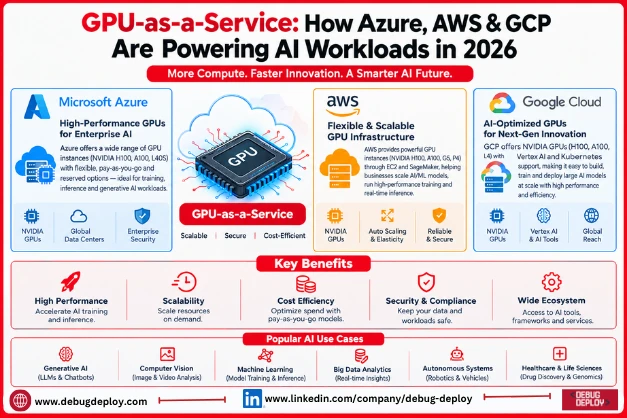
One of the main factors influencing the need for cloud infrastructure is artificial intelligence. Modern AI applications need a lot of processing power, from computer vision, recommendation engines, and advanced analytics to generative AI and massive language models.
In the past, in order to handle these workloads, enterprises had to buy and maintain costly GPU technology. By enabling companies and developers to access GPU-powered computing via the cloud, GPU-as-a-Service (GPUaaS) is altering that paradigm.
In 2026, specialized GPU infrastructure for AI training, inference, machine learning, high-performance computing, and other demanding workloads will be accessible through major cloud platforms such as Microsoft Azure, Amazon Web Services (AWS), and Google Cloud Platform (GCP).
What Is GPU-as-a-Service?
GPU-as-a-Service is a cloud computing model that provides on-demand access to GPU-powered infrastructure without requiring an organization to purchase and maintain physical GPUs.
Instead of buying hardware, businesses can provision GPU resources through a cloud provider and pay according to their usage and pricing model.
A simplified GPU-as-a-Service architecture looks like:
AI Application → Cloud Platform → GPU Compute → Data & Storage → AI Model
This approach allows organizations to scale computing resources based on workload requirements.
Why GPUs Matter for AI in 2026
Central processing units (CPUs) are designed to handle a broad range of computing tasks. GPUs, however, can perform large numbers of parallel calculations, making them particularly useful for many AI and machine learning workloads.
GPUs are commonly used for:
Large language model training
Generative AI
Machine learning
Deep learning
Computer vision
Natural language processing
AI model inference
Scientific computing
High-performance computing
Recommendation systems
As AI models become more sophisticated, access to scalable accelerator infrastructure has become an important part of cloud architecture.
GPU-as-a-Service on Microsoft Azure
Microsoft Azure offers GPU-capable virtual machines and specialized infrastructure for high-performance computing, artificial intelligence, machine learning, and visualization.
Azure’s GPU ecosystem can handle a variety of workload needs, from large-scale model training and inference to AI research and testing.
Businesses can combine GPU infrastructure with additional Azure services, such as:
Azure Machine Learning
Azure AI services
Azure Kubernetes Service (AKS)
Azure Blob Storage
Azure Virtual Network
Azure Monitor
This allows organizations to build AI environments that combine compute, data, networking, security, and machine learning capabilities.
Azure GPU Use Cases
Azure GPU infrastructure can be used for:
Training machine learning models
Generative AI applications
Computer vision
Model inference
AI-powered enterprise applications
HPC workloads
Data science experimentation
For Microsoft-focused organizations, Azure can also simplify integration with existing Microsoft identity, security, data, and application environments.
GPU-as-a-Service on AWS
GPU-based cloud architecture is offered by Amazon Web Services (AWS) via services like Amazon EC2.
For various AI and machine learning applications, AWS provides a variety of GPU-enabled instance options.
Businesses may integrate GPU computing with services like:
Amazon SageMaker
Amazon S3
Amazon EKS
Amazon VPC
AWS CloudWatch
AWS AI and machine learning services
This creates an environment where teams can build, train, deploy, and monitor machine learning applications.
AWS GPU Use Cases
AWS GPU infrastructure can support:
Generative AI
Deep learning
Model training
Model inference
Computer vision
Natural language processing
HPC
Recommendation systems
Organizations can select infrastructure based on workload requirements, performance needs, availability, and cost considerations.
GPU-as-a-Service on Google Cloud
Google Cloud Platform (GCP) provides GPU-enabled infrastructure for AI, machine learning, data analytics, and high-performance computing.
Google Cloud can integrate GPU resources with services such as:
Vertex AI
Google Kubernetes Engine (GKE)
Cloud Storage
Compute Engine
BigQuery
Google Cloud networking and security services
This can provide an integrated environment for organizations developing and deploying AI applications.
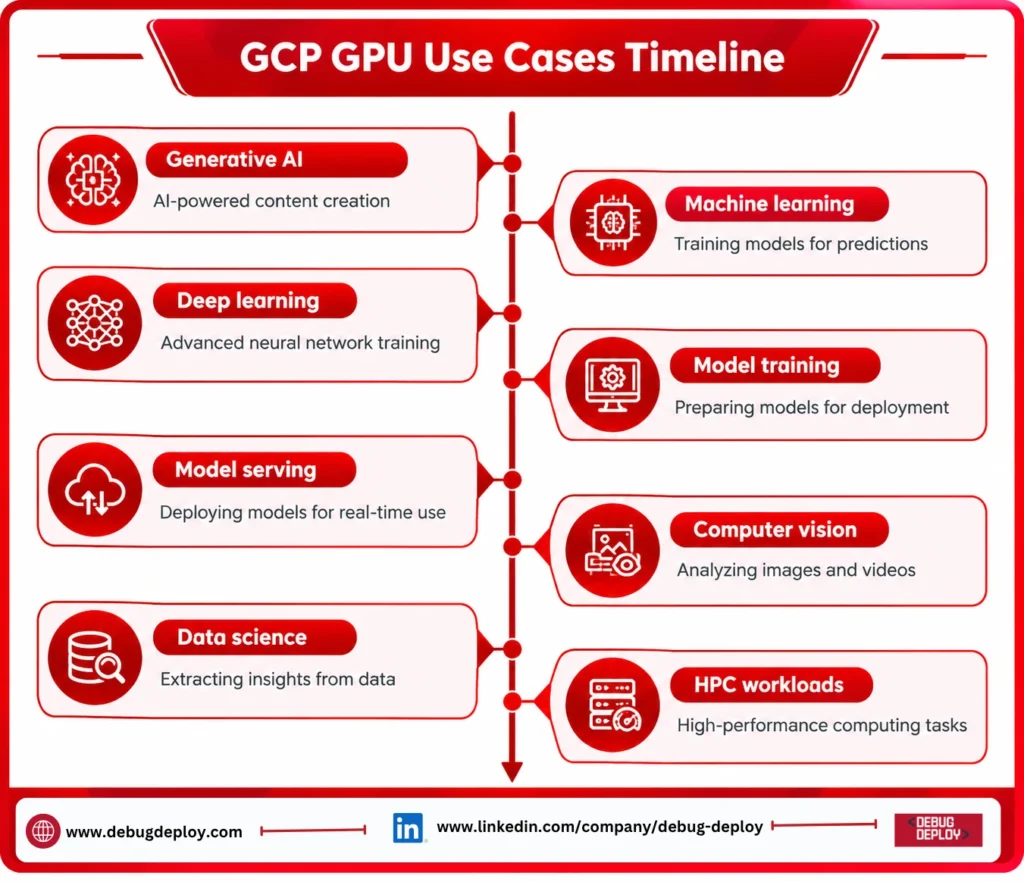
GCP GPU Use Cases
GCP GPU infrastructure can support:
Generative AI
Machine learning
Deep learning
Model training
Model serving
Computer vision
Data science
HPC workloads
Azure vs AWS vs GCP for GPU Workloads
The three major cloud providers offer GPU-based infrastructure, but organizations should evaluate them according to their own architecture and workload requirements.
Factor | Microsoft Azure | AWS | Google Cloud |
GPU infrastructure | Available across multiple VM families | Available through GPU-enabled EC2 instances | Available through GPU-enabled compute |
AI platform | Azure Machine Learning and Azure AI | SageMaker and AWS AI services | Vertex AI |
Containers | AKS | EKS | GKE |
Object storage | Azure Blob Storage | Amazon S3 | Cloud Storage |
Enterprise integration | Strong Microsoft ecosystem | Broad AWS ecosystem | Strong data and AI ecosystem |
AI development | Azure AI and ML services | AWS AI/ML services | Vertex AI |
Best fit | Depends on existing architecture and requirements | Depends on workload and AWS ecosystem | Depends on workload and GCP ecosystem |
This comparison is architectural rather than a universal recommendation. GPU availability, pricing, quotas, regions, and specific hardware options can change over time, so organizations should evaluate current offerings before deployment.
How GPU-as-a-Service Works
A typical GPU cloud workflow involves several stages.
1. Select a GPU Resource
The organization chooses a suitable GPU-enabled cloud instance based on workload requirements.
2. Connect Data and Storage
Training datasets, models, and application data are connected to the compute environment.
3. Deploy the AI Workload
Teams can run frameworks such as PyTorch, TensorFlow, or other supported AI software.
4. Scale Resources
GPU resources can be increased or reduced based on workload requirements.
5. Monitor Performance and Cost
Teams monitor GPU utilization, application performance, resource consumption, and cloud spending.
Benefits of GPU-as-a-Service
GPU cloud computing can provide several benefits.
Reduced Hardware Investment
Organizations do not necessarily need to purchase large GPU clusters upfront.
Flexible Scaling
GPU resources can be provisioned according to workload requirements.
Faster AI Development
Development teams can access specialized infrastructure without building an entire physical data center environment.
Global Availability
Cloud providers operate infrastructure across multiple geographic regions, subject to service availability and quotas.
Integration With Cloud Services
GPU workloads can be connected to cloud storage, databases, networking, security, Kubernetes, monitoring, and AI services.
Challenges of GPU-as-a-Service
GPUaaS also introduces challenges that organizations should consider.
Cost
GPU resources can be expensive, particularly for continuously running workloads.
Availability
Specific GPU models may have regional capacity limitations or quota restrictions.
Data Transfer
Moving large datasets between services or regions can introduce additional costs and latency.
Utilization
Low GPU utilization can result in inefficient spending.
Architecture Complexity
AI workloads often require specialized networking, storage, orchestration, monitoring, and data pipelines.
This is why FinOps for AI workloads is becoming increasingly relevant.
How to Optimize GPU Cloud Costs
Organizations can improve GPU efficiency by:
Monitoring GPU utilization
Selecting appropriate GPU types
Scaling resources according to demand
Scheduling non-production workloads
Optimizing AI models
Using efficient inference architectures
Managing storage and data transfer
Monitoring cost per workload
Evaluating pricing options offered by cloud providers
The objective is not simply to use fewer GPUs. It is to ensure that GPU resources are used efficiently for the required business workload.
The Future of GPU Cloud Computing
As AI adoption expands, GPU infrastructure is becoming a strategic component of cloud architecture.
Organizations are increasingly combining:
GPU Compute + AI Models + Data Platforms + Kubernetes + Cloud Storage + Security + FinOps
This integrated approach can help businesses build scalable AI environments without managing every layer of physical infrastructure themselves.
GPU-as-a-Service can also support organizations experimenting with AI before committing to large-scale dedicated infrastructure.
Conclusion
By 2026, GPU-as-a-Service will be a crucial component of AI workloads.
GPU-enabled infrastructure for machine learning, generative AI, inference, deep learning, and high-performance computing is offered by Microsoft Azure, AWS, and Google Cloud.
Workload requirements, current cloud architecture, GPU availability, performance, security, data placement, scalability, and pricing are all important considerations when choosing a platform.
GPU infrastructure should thus be assessed in conjunction with data architecture, AI platforms, cloud security, application design, and FinOps for companies developing an AI strategy in 2026.
Organizations may build a more scalable basis for the upcoming generation of AI applications by considering GPUs as part of a larger AI cloud architecture rather than just as computing resources.
Want to Master GPU Cloud Infrastructure for AI Workloads in 2026?
Learn how to design and manage high-performance, scalable, and cost-efficient GPU-powered cloud environments across Azure, AWS, and GCP with guidance from a Microsoft Certified Trainer (MCT). Build practical skills in AI infrastructure, cloud architecture, GPU workloads, data platforms, scalability, and optimization.
Recommended Cloud, AI & Data Certification Programs:
AZ-305: Designing Microsoft Azure Infrastructure Solutions
AI-102: Designing and Implementing a Microsoft Azure AI Solution
AZ-104: Microsoft Azure Administrator
DP-900: Microsoft Azure Data Fundamentals
Live Instructor-Led Training
GPU & AI Cloud Infrastructure Skills
Azure, AWS & GCP AI Workload Architecture
Cloud GPU Resource Management & Optimization
Scalable AI Infrastructure & Data Integration
Real-World AI & Cloud Projects
Certification Preparation & Career Guidance
– Email: trainings@debugdeploy.com
– WhatsApp: Contact us for quick assistance
Build your GPU cloud infrastructure expertise and learn how to design scalable, secure, and cost-efficient environments for AI training, inference, machine learning, and other demanding workloads in 2026.