
Business intelligence and data visualization are now crucial for companies looking to make quicker, data-driven decisions. Businesses gather data from systems in sales, finance, marketing, customer service, operations, and other areas, but raw data by itself does not yield insightful information. Through interactive reports and dashboards, business intelligence solutions assist firms in connecting, analyzing, visualizing, and sharing this data.
Two well-known business intelligence tools that offer data visualization, analytics, reporting, and self-service features are Qlik Sense and Microsoft Power BI. They approach business intelligence and data analysis differently, though.
The main distinctions between Qlik Sense and Power BI in terms of data visualization, analytics, reporting, data modeling, performance, usability, cost, and overall use cases are explained in this comparison.
What Is Qlik Sense?
A business intelligence and analytics tool called Qlik Sense was created to assist companies in examining data and identifying connections between various datasets.
Qlik Sense’s associative analytics methodology is one of its main advantages. Qlik lets users explore relationships across their data and find patterns that might not be immediately apparent, rather than restricting them to predetermined paths.
Qlik Sense can be used for:
Interactive dashboards
Data discovery
Self-service analytics
Enterprise reporting
Data exploration
KPI monitoring
Embedded analytics
It is suitable for organizations that need flexible data exploration and analytics across multiple data sources.
What Is Power BI?
Users may connect to data, convert it, develop analytical models, and produce interactive reports and dashboards with Microsoft Power BI, a platform for business intelligence and data visualization.
Business analysts, data specialists, managers, and companies of all sizes use Power BI extensively.
It integrates closely with Microsoft’s ecosystem, including:
Excel
Microsoft 365
Azure
Microsoft Fabric
Microsoft Teams
Microsoft Entra ID
Power BI supports both self-service analytics and enterprise business intelligence.
Qlik Sense vs Power BI: Key Difference
The way the platforms handle data analysis is the main distinction.
Associative data exploration is a major feature of Qlik Sense, which enables users to explore relationships within datasets and find unexpected connections.
Data modeling, visualization, reporting, and connection with the Microsoft ecosystem are all major areas of concentration for Power BI.
Although both platforms are capable BI solutions, the best choice will rely on the organization’s current technology, user needs, data architecture, and reporting objectives.
Data Visualization
Power BI is well known for its extensive visualization capabilities.
Users can create:
Bar charts
Line charts
Pie charts
Maps
KPI cards
Tables
Matrix reports
Scatter charts
Interactive dashboards
Slicers, drill-through, bookmarks, filters, and custom graphics are also supported by Power BI.
Additionally, Qlik Sense offers a wide range of charts and visualizations as well as interactive dashboards. Users can interactively examine data and find relationships because of its associative model.
Power BI can be a compelling solution for businesses that value Microsoft integration and a wide range of visualization possibilities. When flexible data exploration is a key requirement, Qlik Sense is especially helpful.
Analytics Capabilities
One of the most notable aspects of Qlik Sense is its associative engine. After choosing a data point, users can see both related and irrelevant data from the dataset.
This can assist analysts in identifying connections and trends that conventional reporting might find challenging.
Semantic models, DAX computations, filters, drill-through capabilities, and interactive reports are some of the ways Power BI offers robust business analytics.
With DAX, Power BI developers can create calculations such as:
Total revenue
Profit margin
Year-over-year growth
Average sales
Year-to-date performance
Customer rankings
Both platforms support advanced analysis, but their analytical approaches are different.
Data Modeling
An essential component of both platforms is data modeling.
Relationships between tables and models, such as fact and dimension tables, are frequently used in Power BI. Using DAX, developers can optimize models for reporting performance and produce calculated measurements.
Qlik Sense connects several datasets and lets users investigate links between them using its associative data model.
Before selecting a platform, organizations with complex data environments should assess how each one manages their own data structures.
Data Connectivity
Both Qlik Sense and Power BI can connect to numerous data sources.
Power BI supports sources such as:
Excel
CSV
SQL Server
Oracle
SharePoint
Azure
Salesforce
Web services
Cloud databases
Databases, files, cloud apps, enterprise systems, APIs, and other data sources are also supported by Qlik Sense.
For companies that currently use Microsoft’s cloud and business apps, Power BI offers a significant benefit.
Organizations that need flexible connectivity across many data environments may find Qlik Sense appealing.
Reporting
Strong reporting features are offered by Power BI for both management and operational reporting. With interactive filters, drill-through, bookmarks, and intricate visualizations, users may produce multi-page reports.
Power BI services and collaboration capabilities allow reports to be published and shared within businesses.
With an emphasis on interactive data exploration, Qlik Sense also facilitates dashboard design and reporting.
Organizations should assess templates, governance, distribution, and report management capabilities on both platforms if standardized business reporting is a significant requirement.
Ease of Use
For consumers who are already familiar with Excel and Microsoft technologies, Power BI is typically seen as approachable.
Because of its drag-and-drop interface, business users may produce simple reports without having a lot of programming experience.
Although Qlik Sense has an easy-to-use interface, novice users may need to learn more about its associative data model.
Power BI might have a lower learning curve for novices and businesses that already use Microsoft tools.
Performance
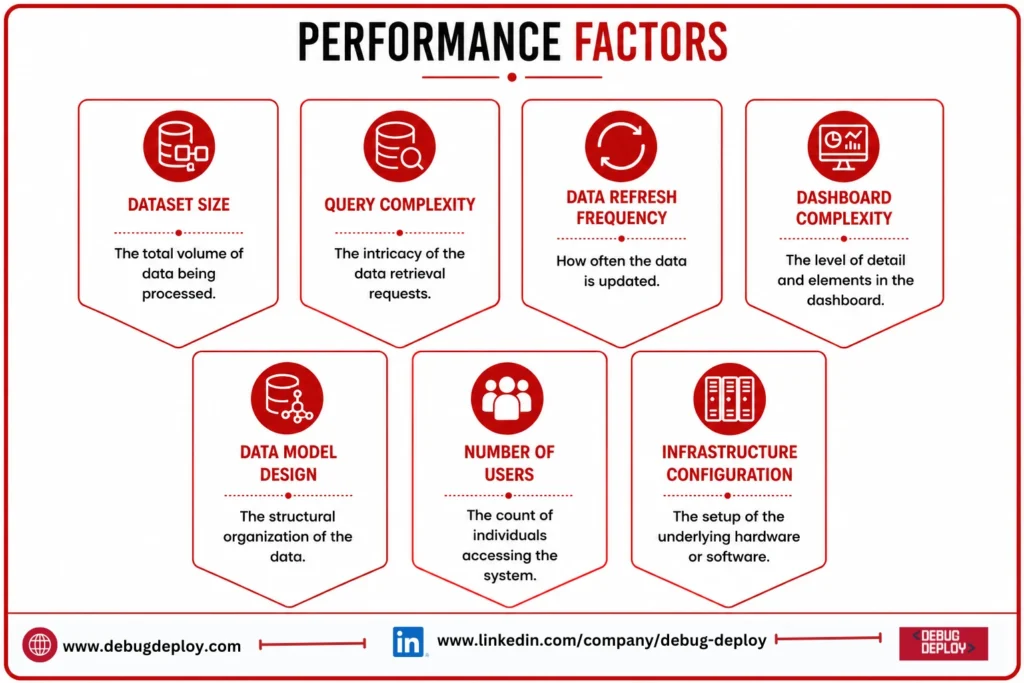
Performance depends on factors such as:
Dataset size
Data model design
Query complexity
Number of users
Data refresh frequency
Infrastructure configuration
Dashboard complexity
The associative engine of Qlik Sense is developed to facilitate interactive exploration of big datasets.
Large-scale analytics can also be supported by Power BI through the use of cloud capacity choices, in-memory technologies, and optimized semantic models.
Instead of depending just on broad performance comparisons for large installations, enterprises should test both systems using actual datasets and genuine user workloads.
Pricing Considerations
Another crucial consideration when contrasting Qlik Sense and Power BI is price.
Depending on whether users require capacity-based installations, individual reporting, or teamwork, Power BI offers a variety of license choices.
The cost of Qlik Sense is determined by a number of variables, including users, deployment specifications, features, and organizational requirements.
The actual cost should include more than software licensing. Organizations should also consider:
Implementation
Training
Administration
Infrastructure
Data storage
Support
Maintenance
User adoption
A platform with a lower license price may not necessarily have a lower total cost of ownership.
Security and Governance
Both platforms provide enterprise security and governance capabilities.
Microsoft Entra ID and Microsoft Purview are two examples of identity and security technologies that Power BI can interface with.
Security controls for people, apps, data access, and enterprise analytics settings are offered by Qlik Sense.
Before selecting a choice, organizations should consider row-level access, data governance, auditing, role management, authentication, and compliance requirements.
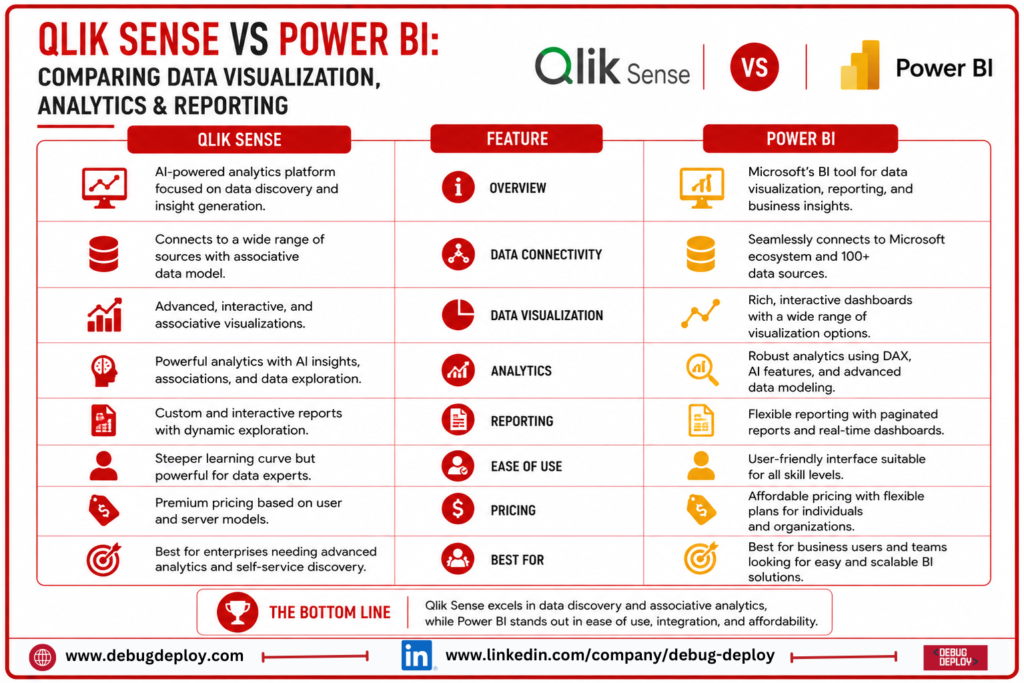
Qlik Sense vs Power BI: Quick Comparison
Feature | Qlik Sense | Power BI |
Data Visualization | Excellent | Excellent |
Data Exploration | Excellent | Excellent |
Associative Analytics | Excellent | Limited |
Dashboard Development | Excellent | Excellent |
Reporting | Strong | Excellent |
Data Modeling | Strong | Excellent |
Self-Service BI | Excellent | Excellent |
DAX | No | Yes |
Microsoft Integration | Good | Excellent |
Enterprise Analytics | Excellent | Excellent |
Learning Curve | Moderate | Beginner-friendly |
Best For | Data exploration & analytics | BI, reporting & visualization |
Which Should You Choose?
Choose Qlik Sense if:
Data exploration is a major priority.
You need associative analytics.
Your organization works with diverse data sources.
You want users to discover relationships across datasets.
Enterprise analytics is a major requirement.
Choose Power BI if:
You need easy-to-use dashboards.
Microsoft integration is important.
Your organization uses Excel, Azure, or Microsoft 365.
You need powerful reporting capabilities.
You want DAX-based calculations.
Business users need self-service analytics.
Can Qlik Sense and Power BI Be Used Together?
When various departments have varied needs, it may be feasible for certain firms to use both platforms.
For instance, Power BI may be used for management dashboards and Microsoft-based reporting, while Qlik Sense could be utilized for specialist data analysis and analytics.
Maintaining two BI platforms, however, may result in more requirements for governance, administration, training, and licensing. Therefore, organizations should assess if the advantages outweigh the added complexity.
Conclusion
Although both Qlik Sense and Power BI are strong business intelligence tools, their advantages differ. Associative analytics, flexible data exploration, and enterprise data discovery are what make Qlik Sense unique. Visualization, reporting, data modeling, DAX, self-service analytics, and connectivity with the Microsoft ecosystem are areas where Power BI excels.
Businesses should take into account their data sources, current technology investments, user skills, reporting needs, governance approach, performance requirements, and total cost of ownership when comparing Qlik Sense vs Power BI.
Power BI is frequently the sensible option for businesses that have a significant investment in Microsoft technologies and are searching for an accessible platform for dashboards, reporting, and business analytics. Qlik Sense might be a better choice for companies that value flexible enterprise analytics and associative data exploration.
Want to Master Microsoft Power BI for Data Visualization and Business Intelligence?
Learn how to transform complex business data into interactive dashboards, insightful reports, and actionable analytics with Microsoft Power BI training from a Microsoft Certified Trainer (MCT). Build practical skills to support data-driven decision-making across modern organizations.
Recommended Microsoft Power BI & Data Certification Programs:
PL-300: Microsoft Power BI Data Analyst
PL-900: Microsoft Power Platform Fundamentals
DP-900: Microsoft Azure Data Fundamentals
DP-203: Data Engineering on Microsoft Azure
✅ Live Instructor-Led Training
✅ Power BI Dashboard & Report Development
✅ Power Query, DAX & Data Modeling Skills
✅ Data Visualization & Analytics Best Practices
✅ Real-World Business Intelligence Projects
✅ Certification Exam Preparation & Career Guidance
📧 Email: trainings@debugdeploy.com
📱 WhatsApp: Contact us for quick assistance
Build your Power BI expertise to turn business data into clear visual insights, powerful reports, and smarter decisions that drive business growth.