
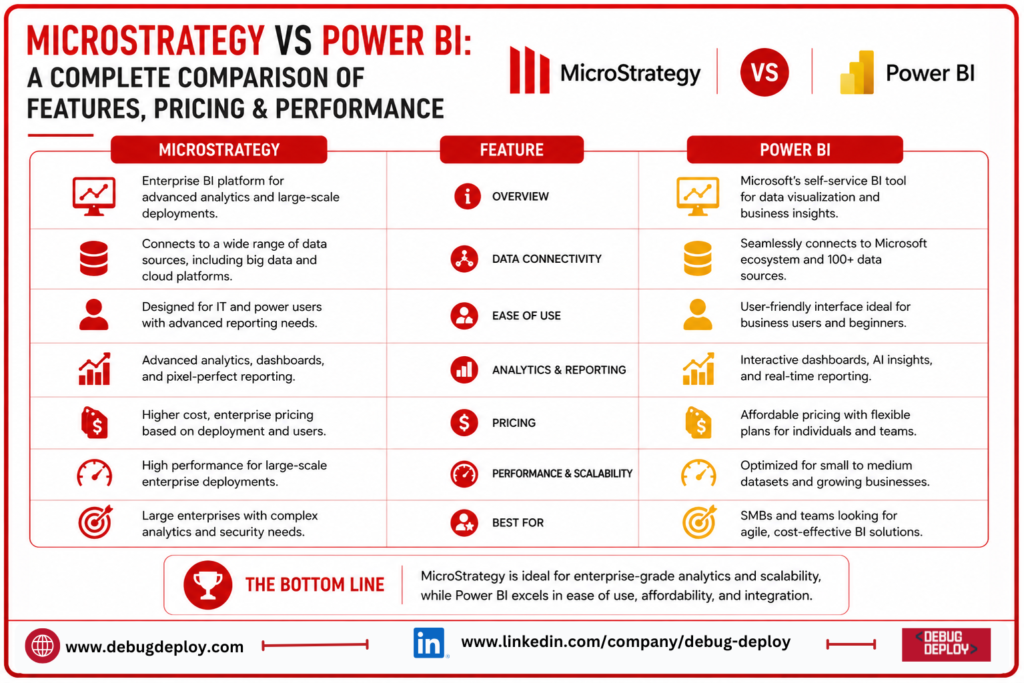
For businesses looking to transform massive amounts of data into insightful knowledge, business intelligence has become crucial. Businesses may connect data sources, create interactive dashboards, track key performance indicators, and facilitate data-driven decision-making with the aid of contemporary BI tools.
Microsoft Power BI and MicroStrategy are two well-known business intelligence platforms. They differ greatly in terms of usability, pricing, deployment, integrations, and target customers, but they both include analytics, reporting, dashboards, data visualization, and enterprise data management features.
To assist companies in selecting the best BI platform, this comparison of MicroStrategy and Power BI addresses their salient characteristics, cost, performance, data connectivity, visualization, security, and use cases.
What Is MicroStrategy?
MicroStrategy is a business intelligence and corporate analytics software made to assist companies in analyzing big, complicated information. Dashboards, reporting, data discovery, embedded analytics, and enterprise-level business intelligence are among the features it offers.
MicroStrategy is especially well-known for its emphasis on large-scale enterprise installations and controlled analytics. It allows organizations to maintain centralized control over data and security while offering consistent reporting and analytics across departments.
Industries like banking, healthcare, retail, telecommunications, and government can benefit from its capabilities.
What Is Power BI?
A platform for business intelligence and data visualization, Microsoft Power BI enables users to connect to data, generate reports, construct dashboards, and exchange insights among enterprises.
Excel, Azure, Microsoft Fabric, Microsoft 365, Teams, and many more Microsoft services and products are all integrated with Power BI. It is also well-liked by non-technical users and business analysts due to its very user-friendly interface.
Both enterprise BI deployments and self-service analytics are supported by Power BI.
MicroStrategy vs Power BI: Key Differences
The platforms’ approaches to business intelligence differ most from one another.
MicroStrategy places a lot of emphasis on complicated reporting systems, centralized governance, and enterprise-scale analytics.
Power BI has a strong emphasis on self-service analytics, visualization, ease of use, and connectivity with the larger Microsoft ecosystem.
MicroStrategy can be a good choice for businesses that need a lot of enterprise governance. Power BI is frequently a tempting option for businesses seeking easily accessible analytics with robust visualization and Microsoft integration.
Feature Comparison
Both platforms provide core BI capabilities such as:
Interactive dashboards
Data visualization
Business reporting
Data connectivity
KPI monitoring
Data analysis
Enterprise security
Mobile analytics
However, the user experience differs.
Analysts may easily generate charts, tables, maps, cards, and other graphics with Power BI’s well-known drag-and-drop interface.
With a focus on standardized business information and controlled reporting, MicroStrategy offers sophisticated enterprise analytics capabilities.
Data Connectivity
A BI platform is only as useful as its ability to connect with business data.
Power BI supports a broad range of data sources, including:
Excel
SQL Server
Azure services
Oracle
SharePoint
Salesforce
Web sources
Cloud databases
APIs
Organizations that already use Microsoft products will find Power BI especially easy due to its interaction with Microsoft technologies.
Additionally, a variety of databases, cloud platforms, enterprise data warehouses, and other data sources are supported by MicroStrategy.
MicroStrategy offers robust capabilities for linking and managing a variety of datasets for businesses with intricate corporate data infrastructures.
Data Visualization
The visualization features of Power BI are well known. Interactive charts, graphs, maps, KPI cards, tables, and personalized graphics can be made by users.
Additionally, the platform offers a high degree of customisation, enabling analysts to build dashboards according to particular company needs.
Although MicroStrategy offers dashboards and interactive visualizations as well, its main advantages are governed reporting and more comprehensive corporate analytics.
For many corporate customers, Power BI offers a significant benefit if ease of visualization and dashboard building is a top concern.
DAX and Advanced Analytics in Power BI
DAX (Data Analysis Expressions) is a key component of Power BI.
For sophisticated business computations, DAX enables users to define calculated columns and metrics. Revenue growth, profit margins, year-to-date statistics, averages, rankings, and numerous more data are all calculable by analysts.
When building analytical models, this gives Power BI developers a great deal of flexibility.
MicroStrategy supports enterprise reporting and analytics with its own analytical and semantic modeling capabilities.
Performance
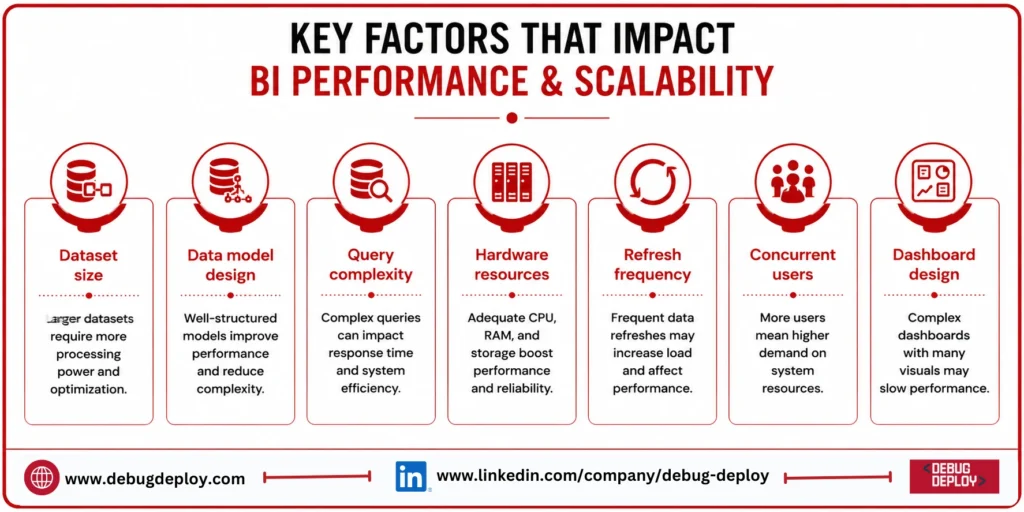
Performance depends on several factors, including:
Dataset size
Data model design
Query complexity
Hardware or cloud resources
Data refresh frequency
Number of concurrent users
Dashboard design
Large enterprise analytics setups and high-volume reporting needs are supported by MicroStrategy.
Large datasets can also be handled by Power BI, especially with well-designed and optimized models. Enterprise workloads can be supported by features like cloud capacity options, incremental refresh, in-memory technology, and semantic models.
Poor data modeling and ineffective searches can lower performance on both platforms.
Pricing Comparison
One of the most crucial factors to take into account when contrasting MicroStrategy and Power BI is price.
In general, Power BI provides a variety of licensing options tailored to various user and organizational types. Businesses may think about individual, per-user, or capacity-based choices, depending on the deployment and functionality needed.
The deployment type, user count, features, and enterprise needs all have a significant impact on MicroStrategy’s pricing. Usually, organizations must assess licensing in light of their particular context.
Because pricing models and product offerings can change, businesses should calculate total costs based on:
Number of users
Developer requirements
Data volume
Cloud infrastructure
Premium capabilities
Administration
Support
Training
The cheapest license does not necessarily represent the lowest total cost of ownership.
Ease of Use
In general, Power BI offers an advantage in terms of usability, particularly for novices and business analysts.
Many concepts, interfaces, and analytical procedures are familiar to Excel users, making the transfer to Power BI easier.
Because MicroStrategy is more enterprise-focused, administrators and users may need more training, especially when putting complex analytics environments into place.
Ease of use might be a crucial deciding factor for companies when a large number of employees produce their own reports.
Enterprise Governance
Governance is one of MicroStrategy’s important strengths.
Large organizations often need centralized control over:
Data definitions
Security
Reporting standards
User permissions
Metadata
Business metrics
Governed enterprise analytics environments are supported by MicroStrategy.
Additionally, Power BI offers a wide range of governance and administration features, especially when combined with Microsoft Fabric, Azure, Microsoft Purview, and Microsoft security technologies.
Businesses should assess which governance architecture is most appropriate for their current setting.
Security
Enterprise security features are offered by both platforms.
Microsoft’s identity and security ecosystem, which includes Microsoft Purview and Microsoft Entra ID, may be integrated with Power BI. Permissions, row-level security, governance rules, and other controls can be implemented by administrators.
Enterprise security controls for users, data access, reporting, and analytics environments are offered by MicroStrategy.
Power BI can offer significant integration benefits for businesses that already have a Microsoft security architecture.
Mobile and Embedded Analytics
Analytics beyond conventional desktop reporting are supported by both platforms.
Organizations can make reports and insights accessible throughout various applications and devices thanks to Power BI’s embedded analytics features and mobile applications.
Additionally, MicroStrategy facilitates the integration of analytics into business applications and processes by supporting embedded business intelligence and mobile analytics.
SaaS organizations who wish to offer reporting features right within their applications may find embedded analytics especially helpful.
MicroStrategy vs Power BI: Which Should You Choose?
Choose Power BI if:
You want an easy-to-use BI platform.
Your organization already uses Microsoft products.
You need strong data visualization capabilities.
Business users need self-service analytics.
You want extensive DAX-based calculations.
You need flexible dashboard development.
You want integration with Excel, Azure, and Microsoft Fabric.
Choose MicroStrategy if:
You need enterprise-focused analytics.
Centralized governance is a major priority.
You manage large and complex BI environments.
You need standardized reporting across departments.
Your organization requires extensive enterprise analytics capabilities.
You want strong control over business metrics and reporting.
MicroStrategy vs Power BI: Quick Comparison
Feature | MicroStrategy | Power BI |
Ease of Use | Advanced | Beginner-friendly |
Data Visualization | Strong | Excellent |
Enterprise BI | Excellent | Excellent |
Self-Service BI | Strong | Excellent |
DAX | No | Yes |
Microsoft Integration | Moderate | Excellent |
Enterprise Governance | Excellent | Strong |
Large-Scale Analytics | Excellent | Excellent |
Mobile Analytics | Yes | Yes |
Embedded Analytics | Yes | Yes |
Best For | Enterprise BI | Self-service + enterprise BI |
Conclusion
Although both MicroStrategy and Power BI are strong business intelligence tools, they have different advantages. Organizations that place a high value on enterprise analytics, centralized governance, standardized reporting, and large-scale deployments are a good fit for MicroStrategy.
For businesses searching for an easily accessible, highly visible, and adaptable BI platform with robust connection throughout the Microsoft ecosystem, Power BI is a great option.
Businesses should consider more than just cost or feature count when comparing MicroStrategy with Power BI. Data sources, user skill levels, governance needs, current technology investments, performance standards, security, scalability, and total cost of ownership should all be taken into account.
Power BI can offer a useful combination of usability, analytics, visualization, and integration for many businesses that currently use Microsoft technology. MicroStrategy might be a better fit for companies with extremely complicated enterprise reporting and governance requirements.
Want to Master Microsoft Power BI for Business Intelligence?
Learn how to transform business data into interactive dashboards, actionable insights, and data-driven decisions with Microsoft Power BI training from a Microsoft Certified Trainer (MCT). Build practical BI skills for reporting, analytics, and enterprise decision-making.
Recommended Microsoft Power BI & Data Certification Programs:
PL-300: Microsoft Power BI Data Analyst
PL-900: Microsoft Power Platform Fundamentals
DP-900: Microsoft Azure Data Fundamentals
DP-203: Data Engineering on Microsoft Azure
✅ Live Instructor-Led Training
✅ Power BI Dashboard & Report Development
✅ Power Query, DAX & Data Modeling Skills
✅ Business Intelligence & Data Visualization Best Practices
✅ Real-World Analytics & Reporting Projects
✅ Certification Exam Preparation & Career Guidance
📧 Email: trainings@debugdeploy.com
📱 WhatsApp: Contact us for quick assistance
Build powerful Business Intelligence skills with Microsoft Power BI and turn complex data into clear insights that support smarter and faster business decisions.