
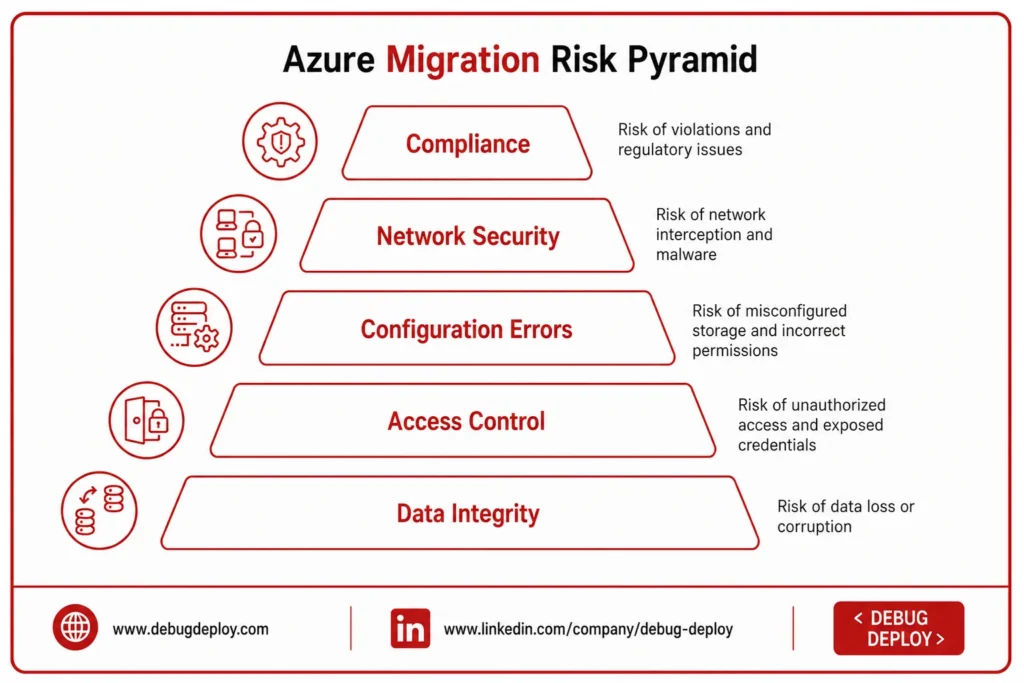
Organizations can increase scalability, flexibility, performance, and operational efficiency by moving databases, files, business workloads, and apps to Microsoft Azure. However, there are security issues when transferring data from on-premises infrastructure to the cloud. Sensitive data may migrate across networks, cloud services, databases, and temporary storage places, raising the possibility of data loss, unwanted access, or misconfiguration.
Careful planning is necessary before, during, and after a safe Azure transfer. To safeguard their data throughout the process, organizations should include robust identity restrictions, encryption, secure networking, backups, monitoring, and compliance procedures.
Why Data Protection Matters During Azure Migration
Customer records, financial data, employee information, intellectual property, application databases, credentials, and private documents are examples of business data. Financial losses, operational interruption, reputational harm, and compliance problems might arise from losing or disclosing this information during relocation.
Common migration risks include:
Data loss or corruption
Unauthorized access
Exposed credentials
Incorrect permissions
Misconfigured storage
Network interception
Malware and ransomware
Compliance violations
A security-first migration strategy helps reduce these risks while ensuring that applications and data remain available.
1. Identify and Classify Your Data
Make a list of all the programs, databases, files, and storage systems that must be moved to Azure before beginning any migrations.
Information should be categorized based on its commercial significance and level of sensitivity. Organizations can classify data, for instance, as highly sensitive, confidential, internal, or public.
This categorization aids in identifying the data that needs more monitoring, more stringent access controls, greater encryption, or unique compliance requirements.
Additionally, it is an excellent chance to eliminate redundant, out-of-date, and superfluous material. The organization’s security footprint is increased and storage needs are increased when unnecessary data is migrated.
2. Create a Migration Security Plan
Security should be included in the migration plan from the beginning.
A migration security plan should define:
What data will be migrated
Who can access the data
How information will be transferred
What encryption will be used
Where backups will be maintained
How migration activity will be monitored
What compliance requirements apply
How the organization will respond to incidents
Clearly defining responsibilities between IT administrators, security teams, database administrators, and business owners can also prevent security gaps.
3. Use Strong Identity and Access Controls
Identity security is one of the most important parts of Azure security.
Microsoft Entra ID can be used to manage identities and control access to Azure resources. Organizations should apply the principle of least privilege so users receive only the permissions required for their roles.
Important practices include:
Enable multifactor authentication.
Use role-based access control.
Limit administrator privileges.
Review permissions regularly.
Remove temporary accounts after migration.
Avoid sharing administrator credentials.
Strong identity management helps prevent unauthorized users from accessing sensitive workloads during the migration.
4. Encrypt Data During Transfer
When data moves from the current environment to Azure, it should be secure.
When sending sensitive data, organizations should use encrypted connections and secure communication techniques. This could involve private connectivity, VPN connections, or other secure transfer methods, depending on the migration architecture.
In the event that network traffic is intercepted during the transfer process, encryption helps safeguard data.
Because sensitive data may be kept there during transfer, organizations should also take staging areas and temporary files into account.
5. Encrypt Data at Rest
Once information reaches Azure, data protection must continue.
Depending on the needs of the organization, sensitive data kept in databases, virtual machine drives, storage accounts, backups, and data lakes should be encrypted.
Additionally, organizations should limit access to key-management systems and safeguard encryption keys.
If unauthorized users are able to access underlying storage, encryption at rest offers an extra degree of security.
6. Secure Azure Storage
Cloud storage configuration should be carefully reviewed before sensitive information is migrated.
Organizations should avoid unnecessary public access and apply appropriate identity-based permissions. Depending on the workload, private endpoints can also help reduce exposure to public networks.
Important storage security practices include:
Restrict unnecessary public access.
Review storage permissions.
Protect storage keys.
Enable appropriate logging.
Use identity-based access where possible.
Configure suitable redundancy.
Monitor unusual storage activity.
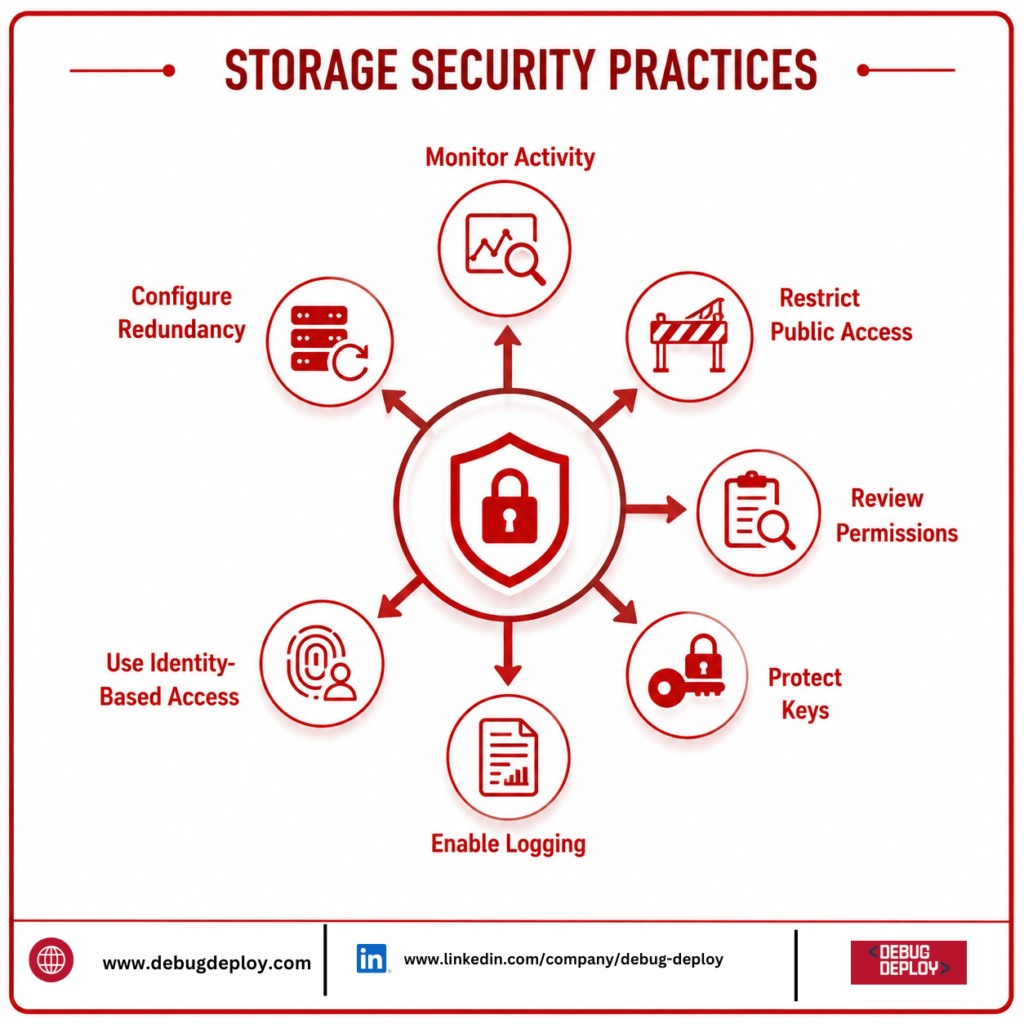
A secure storage configuration reduces the possibility of accidental data exposure.
7. Protect the Azure Network
For cloud workloads and migration traffic to be protected, network security is crucial.
Organizations may manage system communication and resource isolation with the use of Azure Virtual Network. Based on predetermined rules, network security groups can limit both inbound and outgoing traffic.
Network segmentation should also be taken into account by organizations. Databases, for instance, should communicate over private network layers or regulated application layers rather than being directly connected to the public internet.
A well-designed network restricts illegal communication and lowers the attack surface.
8. Create and Verify Backups
Before moving important workloads, there should be a validated backup.
In the event that data is corrupted, migration tools malfunction, applications are misconfigured, or an unanticipated security issue takes place, backups offer a recovery alternative.
Businesses shouldn’t just assume that they have backups. They ought to confirm that backups are complete and genuinely restorable.
Conducting a test restoration prior to migration helps boost recovery process confidence for significant workloads.
9. Test Before Migrating Production Data
A pilot migration allows organizations to identify problems before moving critical production workloads.
Start with a smaller or non-critical workload and evaluate:
Data integrity
Application functionality
User permissions
Network connectivity
Encryption
Performance
Backup and recovery
Monitoring
Once the migration process has been tested successfully, the same procedures can be applied to larger production workloads.
10. Monitor the Migration
Throughout the relocation, security monitoring should continue.
Network traffic, configuration modifications, data transfers, storage access, administrative changes, and authentication activity should all be monitored by organizations.
Unusual access patterns, suspicious activities, and infrastructure issues can all be found with the aid of Azure’s monitoring and security features.
Additionally, centralized logging facilitates security teams’ investigation of problems and comprehension of events that transpired throughout the move.
11. Protect Credentials and Secrets
Passwords, API keys, certificates, connection strings, and other sensitive credentials are frequently needed for migration initiatives.
Spreadsheets, scripts, source-code repositories, and plain-text files should never be used to store these secrets.
Organizations can safely handle certificates, encryption keys, and secrets with Azure Key Vault. Only authorized users and apps should be able to access these resources.
Examine all credentials used throughout the project after transfer, and rotate or remove any temporary credentials that are no longer needed.
12. Consider Compliance Requirements
Throughout the transfer, companies in regulated industries must take compliance into account.
Requirements may include financial information, healthcare records, consumer information, data residency, or data privacy, depending on the type of organization.
Prior to migration, determine which rules apply to your workloads and make sure that the security controls and planned Azure architecture meet those requirements.
Planning should take compliance into consideration rather than treating it as a last step.
13. Validate Data After Migration
After the move is complete, data protection continues.
Verify that information was transferred accurately by comparing the migrated data with the original environment once workloads have been shifted. Record counts, file integrity, database consistency, permissions, and application functionality may all be included in validation, depending on the workload.
Before the old environment is fully retired, business leaders should also make sure that essential apps function properly.
An extra degree of security is offered by sticking to a rollback method until validation is finished.
Common Azure Migration Security Mistakes
Organizations should avoid common mistakes such as:
Migrating without verified backups
Giving excessive administrative permissions
Leaving storage publicly accessible
Ignoring encryption
Hardcoding credentials
Skipping pilot testing
Failing to monitor migration activity
Ignoring compliance requirements
Deleting the source environment too early
Forgetting to remove temporary access
Avoiding these issues can significantly improve migration security.
Azure Migration Security Checklist
Before completing the migration, verify that:
Data has been classified.
Critical workloads have verified backups.
Multifactor authentication is enabled.
Least-privilege access is implemented.
Data is encrypted during transfer.
Sensitive information is encrypted at rest.
Storage permissions have been reviewed.
Network access is restricted.
Credentials are securely managed.
Monitoring and logging are enabled.
Compliance requirements have been reviewed.
Migrated data has been validated.
Temporary accounts and permissions have been removed.
Disaster recovery procedures have been tested.
Conclusion
Security must be taken into account at every stage of an Azure transfer in order to protect data. Classifying data and developing a thorough migration security plan should be the first steps for organizations. Information can then be protected during the transfer with the use of strong identity restrictions, encryption, secure networking, validated backups, monitoring, and appropriate credential management.
Organizations should verify data, examine permissions, evaluate recovery protocols, and eliminate temporary resources or access following migration.
Although Azure offers strong capabilities for protecting cloud workloads, safe configuration and appropriate operating procedures are just as crucial. Businesses may lower the risk of data loss and unauthorized access while building a solid foundation for their workloads in Azure by adhering to an organized security-first approach.
Want to Secure Your Data During an Azure Migration?
Learn how to plan and execute secure Microsoft Azure migrations while protecting business data, applications, and workloads with guidance from a Microsoft Certified Trainer (MCT). Build practical skills for secure cloud migration, data protection, and Azure governance.
Recommended Microsoft Azure Certification Programs:
AZ-900: Microsoft Azure Fundamentals
AZ-104: Microsoft Azure Administrator
AZ-305: Designing Microsoft Azure Infrastructure Solutions
AZ-500: Microsoft Azure Security Technologies
✅ Live Instructor-Led Training
✅ Azure Migration & Modernization Skills
✅ Data Protection, Backup & Recovery Concepts
✅ Azure Identity, Security & Access Management
✅ Cloud Governance & Compliance Best Practices
✅ Certification Exam Preparation & Career Guidance
📧 Email: trainings@debugdeploy.com
📱 WhatsApp: Contact us for quick assistance
Build the Azure skills needed to protect critical data, reduce migration risks, and create secure, reliable, and scalable cloud environments.