
Introduction
Microsoft 365, Microsoft Teams, Outlook, OneDrive, SharePoint, Microsoft Entra ID, and Intune are just a few of the many Microsoft services that modern businesses depend on. Managing these services separately may get complicated, particularly when businesses need to programmatically access corporate data, integrate apps, or automate activities. While IT administrators require effective solutions to automate typical administrative operations across the Microsoft ecosystem, developers frequently have to deal with different APIs.
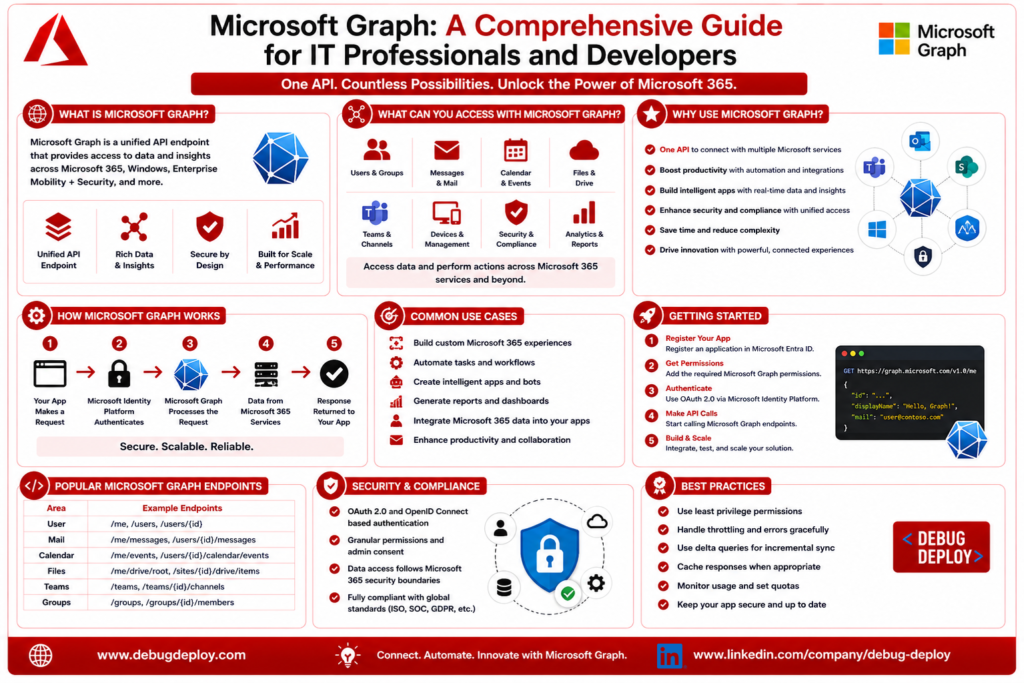
Microsoft Graph becomes a potent solution in this situation. Microsoft Graph offers a single unified API that enables apps and administrators to safely access data, people, files, emails, calendars, devices, security insights, and much more, as opposed to engaging with distinct APIs for various Microsoft services.
Whether you’re building enterprise applications, automating Microsoft 365 administration, integrating Azure services, or preparing for Microsoft certifications, understanding Microsoft Graph is becoming an essential skill. In this guide, we’ll explore what Microsoft Graph is, how it works, its key features, common use cases, and why it’s so important for both IT professionals and developers.
What Is Microsoft Graph?
Secure access to data and services throughout the Microsoft cloud is made possible by Microsoft Graph, a single REST API and developer platform. Developers may communicate with Microsoft 365, Outlook, Teams, SharePoint, OneDrive, and Microsoft Entra ID via a single endpoint rather than learning and integrating individual APIs for each of these services.
Your application and Microsoft’s cloud environment are connected by Microsoft Graph. Applications can retrieve or alter data, including user profiles, emails, files, calendar events, Teams communications, group memberships, devices, and organizational resources, after authenticating with Microsoft Entra ID.
This unified approach offers a consistent security architecture across Microsoft services and streamlines development.
How Microsoft Graph Works
Microsoft Graph uses common HTTP queries like GET, POST, PATCH, PUT, and DELETE to function through REST APIs. Applications initially use OAuth 2.0 and OpenID Connect protocols to authenticate users or services via Microsoft Entra ID. Microsoft Entra ID issues an access token that allows access to particular Microsoft Graph resources if authentication is completed.
After that, the program makes requests to Microsoft Graph endpoints. Microsoft Graph fetches or changes the required data from the relevant Microsoft cloud service based on the permissions granted. Developers can easily handle and show data in their apps because the response is usually returned in JSON format.
Because all services follow a unified API structure, developers can build integrations more efficiently without learning different APIs for each Microsoft product.
Services Available Through Microsoft Graph
The ability of Microsoft Graph to link several Microsoft services via a single API is one of its greatest advantages.
Microsoft Entra ID allows developers and administrators to control users, groups, roles, and authentication settings. It is also possible to programmatically manipulate Outlook data, including emails, contacts, calendars, and mailboxes. OneDrive files and folders may be safely uploaded, downloaded, and shared, and Microsoft Graph provides access to SharePoint sites, document libraries, and lists.
Applications may communicate via chats, channels, meetings, and collaboration tools thanks to Microsoft Teams integrations. Additionally, organizations can use the same API platform to automate Microsoft 365 administrative operations, retrieve corporate security information through Microsoft Defender, and control devices with Microsoft Intune.
This broad integration capability makes Microsoft Graph one of Microsoft’s most valuable developer services.
Key Features of Microsoft Graph
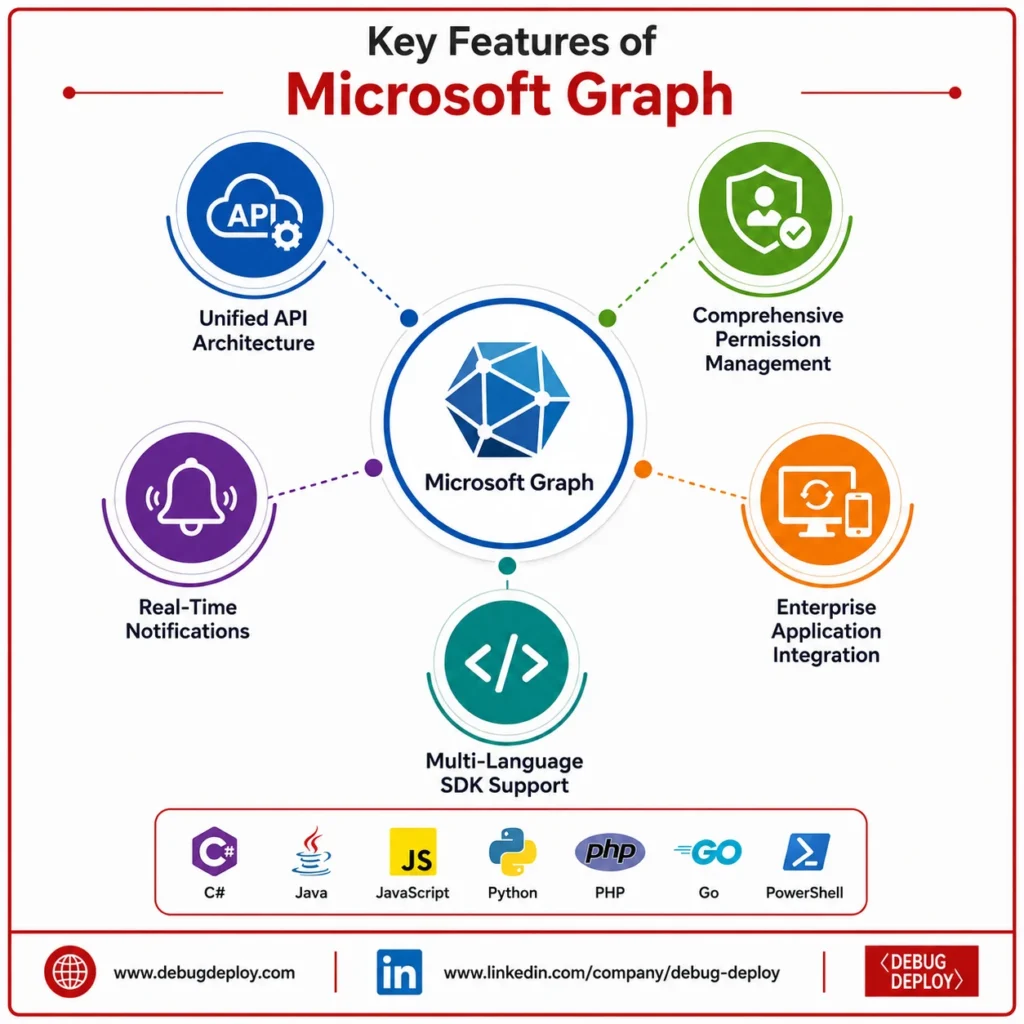
Unified API Architecture
Access multiple Microsoft services through a single, consistent API endpoint.
Simplifies development and improves application maintainability.
Comprehensive Permission Management
Supports Delegated Permissions for actions performed on behalf of signed-in users.
Supports Application Permissions for background services and automated processes without user interaction.
Real-Time Notifications
Provides Webhooks and Change Notifications for instant updates.
Tracks events such as:
New emails
File modifications
Calendar and meeting updates
Changes to organizational data
Enterprise Application Integration
Enables responsive business applications that stay synchronized with Microsoft 365 data.
Supports secure and scalable enterprise automation.
Multi-Language SDK Support
Offers SDKs for popular programming languages, including:
C#
Java
JavaScript
Python
PHP
Go
PowerShell
Makes Microsoft Graph integration faster and easier across different development environments.
Why IT Professionals Should Learn Microsoft Graph
Even while software developers utilize Microsoft Graph extensively, IT administrators and cloud experts can also benefit from it.
Microsoft Graph can automate a number of standard administrative operations, including creating users, assigning licenses, maintaining Microsoft 365 groups, providing reports, evaluating security incidents, and keeping an eye on organizational resources.
IT departments can use the Microsoft 365 admin portal to automate repetitive administrative processes, saving time, lowering errors, and increasing operational efficiency.
Microsoft Graph automation greatly streamlines daily management for companies with thousands of users.
Why Developers Use Microsoft Graph
Microsoft Graph gives developers a reliable and safe approach to create business apps that connect to Microsoft services.
Applications may safely retrieve emails, files, meetings, contacts, calendars, and organizational data straight from Microsoft 365 after gaining the required rights, eliminating the need for users to manually export data.
With Microsoft’s cloud ecosystem, developers may create productivity apps, employee portals, HR systems, reporting dashboards, workflow automation tools, customer support platforms, and collaboration solutions.
Using a single API to access several Microsoft services significantly lowers development time while enhancing application capabilities.
Real-World Use Cases
Microsoft Graph is utilized in many different business contexts.
When a new employee joins the company, an HR program can set up Microsoft 365 user accounts immediately. Microsoft Teams activity, Outlook calendar usage, and SharePoint document analytics may all be retrieved by a reporting dashboard to produce productivity insights.
Microsoft Graph is frequently used by IT organizations to automate license assignments, password management, and user onboarding and offboarding. Document management solutions can automatically synchronize files with OneDrive and SharePoint, and customer support applications can retrieve calendar availability prior to meeting scheduling.
These real-world applications show why Microsoft Graph has emerged as a key element of contemporary Microsoft cloud development.
Security and Permissions in Microsoft Graph
One of Microsoft Graph’s most crucial features is security. To guarantee that only authorized users and applications may access organizational resources, every request must be authenticated using Microsoft Entra ID.
By enabling administrators to issue only the permissions necessary for particular operations, Microsoft Graph adheres to the least privilege principle. Emails, files, users, and organizational data cannot be accessed by applications unless the necessary rights have been specifically granted.
Additionally, administrators have more control over organizational data and lower security risks by reviewing, monitoring, and revoking application permissions as needed.
Getting Started with Microsoft Graph
Learn the fundamentals of REST APIs, HTTP methods, JSON, and OAuth 2.0 authentication if you’re new to Microsoft Graph. Because Microsoft Entra ID controls authorization and authentication for Microsoft Graph, it is as crucial to understand it.
Next, get an access token, set up the necessary API permissions, and register an application in the Azure portal. Before writing your own code, test out common API calls using Microsoft Graph Explorer.
Explore the Microsoft Graph SDKs for your favorite programming language and begin creating useful automation projects utilizing Microsoft 365 data after you’re at ease making API calls.
The quickest approach to learn how Microsoft Graph functions in practical settings is through hands-on practice.
Career Opportunities with Microsoft Graph Skills
Professionals with Microsoft Graph expertise are becoming increasingly valued as businesses depend more and more on Microsoft cloud technology.
For positions like Microsoft 365 Administrator, Azure Administrator, Cloud Engineer, Software Developer, Full-Stack Developer, DevOps Engineer, Solutions Architect, Automation Engineer, and IT Support Specialist, familiarity with Microsoft Graph is helpful.
Additionally, it enhances Microsoft credentials such as AZ-204 (Azure Developer Associate), AZ-104 (Azure Administrator Associate), MS-102 (Microsoft 365 Administrator), SC-300 (Identity and Access Administrator), and many Power Platform certifications.
In addition to enhancing technical proficiency, learning Microsoft Graph creates chances to use Microsoft’s quickly growing cloud ecosystem to create enterprise-grade solutions.
Conclusion
With a single, secure API, developers and IT specialists can now work with Microsoft 365, Teams, Outlook, SharePoint, OneDrive, Microsoft Entra ID, Intune, and many more services thanks to Microsoft Graph, which has emerged as the primary gateway for accessing Microsoft cloud services.
Its unified architecture makes it easier to develop applications, facilitates enterprise automation, fortifies security with Microsoft Entra ID, and lets businesses simplify intricate administrative procedures. Microsoft Graph will become more crucial to digital transformation, workflow automation, and application integration as companies continue to embrace Microsoft cloud technology.
Whether you’re a developer building business applications, an IT administrator automating Microsoft 365 management, or a cloud professional preparing for Microsoft certifications, learning Microsoft Graph is a valuable investment that will enhance your expertise and future career opportunities.
Want to Get Certified in Microsoft 365 & Azure Integration?
Get trained by a Microsoft Certified Trainer (MCT) and learn how to integrate Microsoft Graph APIs with Microsoft 365, Azure, and enterprise applications.
Recommended Microsoft certification programs:
| Course Code | Course Title |
|---|---|
| MS-900T01-A | Microsoft 365 Fundamentals |
| AZ-204T00-A | Developing Solutions for Microsoft Azure |
| MS-4014 | Build Applications with Microsoft 365 Copilot and Microsoft Graph |
✅ Live Instructor-Led Training
✅ Hands-On Microsoft Graph API Labs
✅ Microsoft 365 & Azure Integration Scenarios
✅ Authentication, Permissions & API Best Practices
✅ Certification Exam Guidance
📧 Email us: trainings@debugdeploy.com
📱 WhatsApp us for quick assistance
Start your Microsoft Graph learning journey today and build secure, intelligent applications with Microsoft 365 and Azure!