
Introduction
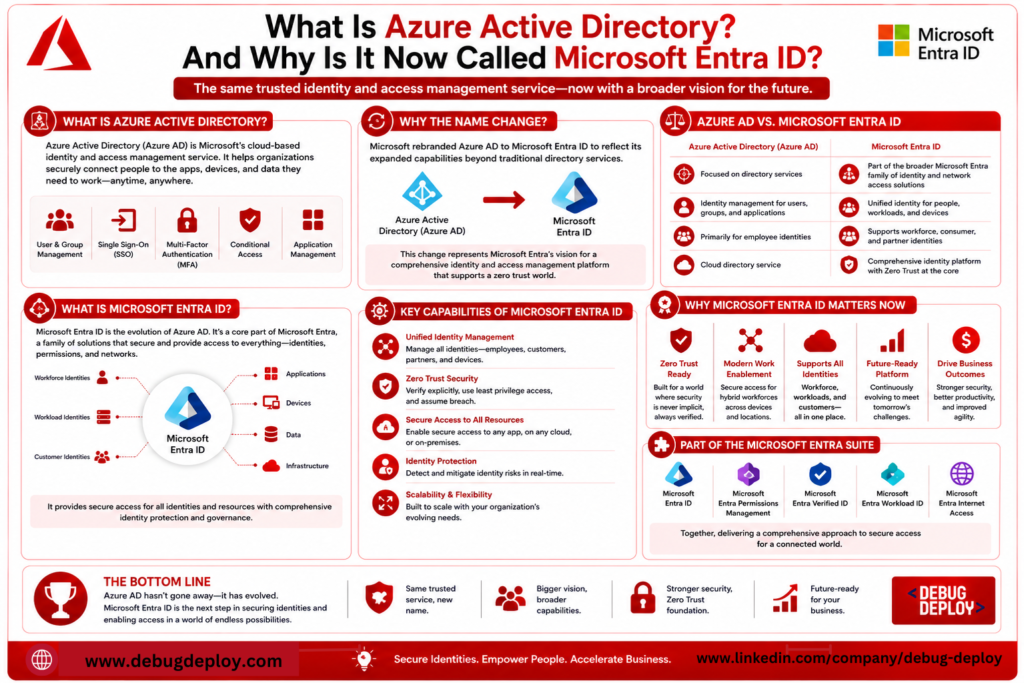
Azure Active Directory (Azure AD) and Microsoft Entra ID are two names you’ve likely encountered for what appears to be the same identity service if you’ve been studying Microsoft Azure or getting ready for Azure certifications. Beginners are frequently perplexed by this, wondering if Microsoft just renamed an old product or released a brand-new one.
You might be surprised at how easy the solution is. Although Azure Active Directory is now known as Microsoft Entra ID, its fundamental function is still the same. Microsoft’s wider goal for identity and access management across cloud environments not just Azure is reflected in the name change.
Understanding Microsoft Entra ID is crucial whether you’re an IT administrator, cybersecurity expert, cloud engineer, or someone just beginning your cloud computing adventure. In today’s cloud-first environment, it is essential for protecting users, apps, and organizational resources.
We’ll go over what Azure Active Directory was, why Microsoft rebranded it, how Microsoft Entra ID functions, and why it’s still one of the most crucial services in the Microsoft cloud ecosystem in this guide.
What Was Azure Active Directory?
Microsoft’s cloud-based identity and access management (IAM) solution was called Azure Active Directory (Azure AD). Azure AD was created especially for cloud situations, in contrast to the conventional Windows Active Directory used within business networks.
Verifying user identities and managing access to programs, services, and company resources were its main goals. Users may log in once and safely access several services with a single identity rather than having different usernames and passwords for each application.
Employers used Azure Active Directory as a consolidated platform to manage staff, external users, devices, apps, and security regulations. It developed into a fundamental service for thousands of third-party apps as well as Microsoft 365, Azure, and Dynamics 365.
Why Did Microsoft Rename Azure Active Directory?
Microsoft formally changed Azure Active Directory to Microsoft Entra ID in 2023.
The original name generated confusion, not because the product had changed significantly. Many customers thought Azure Active Directory was just Windows Server Active Directory on the cloud. Although both systems deal with identity management, they function differently and are built for distinct situations.
Additionally, the service’s new name brings it into line with the larger Microsoft Entra family of security solutions, which also includes identity governance, verified identities, and rights management. Microsoft established a single identity platform that goes beyond Azure and works with hybrid and multi-cloud scenarios by launching the Microsoft Entra brand.
The functionality, licensing, and core features remain largely the same. If you previously worked with Azure Active Directory, you’re essentially working with Microsoft Entra ID today.
What Is Microsoft Entra ID?
Microsoft’s cloud-based identity and access management service, Microsoft Entra ID, verifies user identification and grants access to resources and apps.
Microsoft Entra ID validates an employee’s identification before authorizing access whenever they use organizational credentials to connect into a business application, access an Azure subscription, open Microsoft Teams, or sign into Microsoft 365.
Microsoft Entra ID is a consolidated identity platform that facilitates safe authentication, authorization, and access management, saving organizations from having to manage distinct login systems for each application.
This centralized strategy greatly increases corporate security while streamlining management.
How Microsoft Entra ID Works

Within an organization, each user is assigned a distinct digital identity. Microsoft Entra ID uses the organization’s security policies and verifies the user’s identity when they try to access an application.
Before gaining access, users must fulfill any extra security requirements, such as Multi-Factor Authentication (MFA) or Conditional Access.
Microsoft Entra ID offers safe access to authorized apps after authentication is completed, eliminating the need for users to constantly log in. This procedure, also referred to as Single Sign-On (SSO), enhances user efficiency and security.
Employees can safely access company resources from home, the office, or while traveling because authentication takes place in the cloud.
Key Features of Microsoft Entra ID
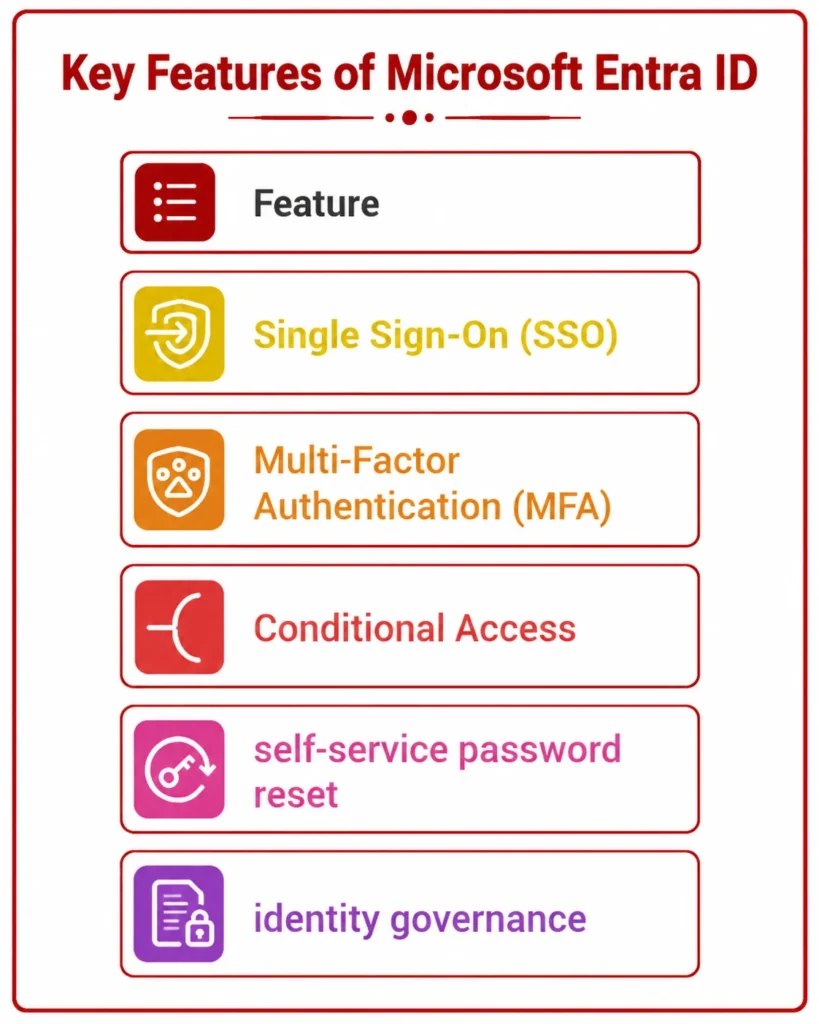
Microsoft Entra ID’s extensive feature set for identity management is one of its greatest advantages.
Single Sign-On (SSO) eliminates the need to remember multiple usernames and passwords by enabling users to access different business apps with a single set of credentials.
By forcing users to confirm their identity using techniques like security keys, phone notifications, or authentication apps, Multi-Factor Authentication (MFA) adds an extra degree of protection.
Organizations can establish security restrictions depending on user location, device status, application sensitivity, or risk level thanks to conditional access. Administrators may, for instance, only mandate MFA when staff members log in from foreign devices or nations.
Microsoft Entra ID also supports self-service password reset, allowing users to reset forgotten passwords without contacting the IT department. This reduces administrative workload while improving user experience.
Another important capability is identity governance, which helps organizations manage user lifecycles, access reviews, and permissions throughout an employee’s journey within the company.
Microsoft Entra ID vs Traditional Active Directory
Despite their similar names, Microsoft Entra ID and conventional Active Directory have different functions.
Conventional Active Directory was created for local network management of computers, servers, printers, and users. It is mainly intended for on-premises systems and depends on domain controllers deployed inside corporate data centers.
Conversely, Microsoft Entra ID is made for cloud computing. It facilitates safe authentication from any location in the world, offers remote access, connects with Software-as-a-Service (SaaS) platforms, and manages identities for cloud applications.
Many organizations now use a hybrid identity approach, where traditional Active Directory continues managing on-premises resources while Microsoft Entra ID manages cloud identities and applications.
Why Microsoft Entra ID Matters for Cloud Security
The new security perimeter is identity. As businesses embrace mobile devices, cloud apps, and remote work, safeguarding user identities is as crucial as safeguarding servers and networks.
By confirming identities prior to providing access, enforcing robust authentication techniques, identifying questionable sign-in attempts, and implementing intelligent access controls, Microsoft Entra ID assists enterprises in bolstering security.
Organizations can adopt Zero Trust security principles, in which each access request is continually checked independent of the user’s location, instead of depending just on passwords.
This strategy dramatically lowers the possibility of cyberattacks and illegal access.
Career Opportunities for Professionals Who Learn Microsoft Entra ID
As cloud adoption continues to grow, professionals with identity and access management skills are becoming increasingly valuable.
Knowledge of Microsoft Entra ID is useful for careers such as:
Azure Administrator
Cloud Engineer
Cybersecurity Analyst
Identity and Access Administrator
Microsoft 365 Administrator
Cloud Security Engineer
Systems Administrator
IT Support Engineer
Many Microsoft certifications, including AZ-104, AZ-305, SC-300, and Microsoft 365 certifications, include Microsoft Entra ID as an important exam topic.
Developing expertise in identity management not only helps you pass certification exams but also prepares you for real-world cloud administration roles.
Tips for Beginners Learning Microsoft Entra ID
If you’re just getting started, start by learning the fundamentals of identities, directory services, authentication, and authorization. To learn about users, groups, roles, and apps, create a Microsoft Azure account and browse the Microsoft Entra admin portal.
After that, practice setting up security groups, assigning roles, implementing Multi-Factor Authentication, and investigating Conditional Access settings. Proceed to advanced security features, identity governance, and hybrid identity as your confidence increases.
Reading documentation is not nearly as effective as learning via practical experience.
Conclusion
Despite being renamed from Azure Active Directory to Microsoft Entra ID, its significance within the Microsoft cloud ecosystem has only increased. For Microsoft 365, Azure, Dynamics 365, and dozens of enterprise apps, it continues to be the primary identity and access management solution.
To become proficient in cloud computing, cybersecurity, and contemporary IT administration, novices must first grasp Microsoft Entra ID. Identity management abilities will become even more important as businesses continue to implement cloud-first tactics and Zero Trust security frameworks.
Learning Microsoft Entra ID will give you a solid foundation for protecting users, apps, and company resources in today’s digital environment, whether you’re getting ready for a Microsoft certification or pursuing a job in cloud computing.
Want to Understand Microsoft Entra ID (Formerly Azure Active Directory)?
Learn why Azure Active Directory (Azure AD) was renamed to Microsoft Entra ID and discover how it helps organizations manage identity, authentication, access control, and Zero Trust security. Gain hands-on knowledge from a Microsoft Certified Trainer (MCT) and build the skills needed to secure modern cloud environments.
Recommended Microsoft Certification Programs:
AZ-900: Microsoft Azure Fundamentals
SC-900: Microsoft Security, Compliance, and Identity Fundamentals
AZ-104: Microsoft Azure Administrator
MS-900: Microsoft 365 Fundamentals
✅ Live Instructor-Led Training
✅ Microsoft Entra ID (Azure AD) Fundamentals
✅ Identity & Access Management (IAM)
✅ Single Sign-On (SSO), MFA & Conditional Access
✅ Zero Trust Security & Identity Protection
✅ Certification Exam Preparation & Career Guidance
📧 Email: trainings@debugdeploy.com
📱 WhatsApp: Contact us for quick assistance
Master Microsoft Entra ID to securely manage users, devices, and applications, strengthen your cloud security skills, and prepare for Microsoft Azure and Security certification exams with expert-led training.