
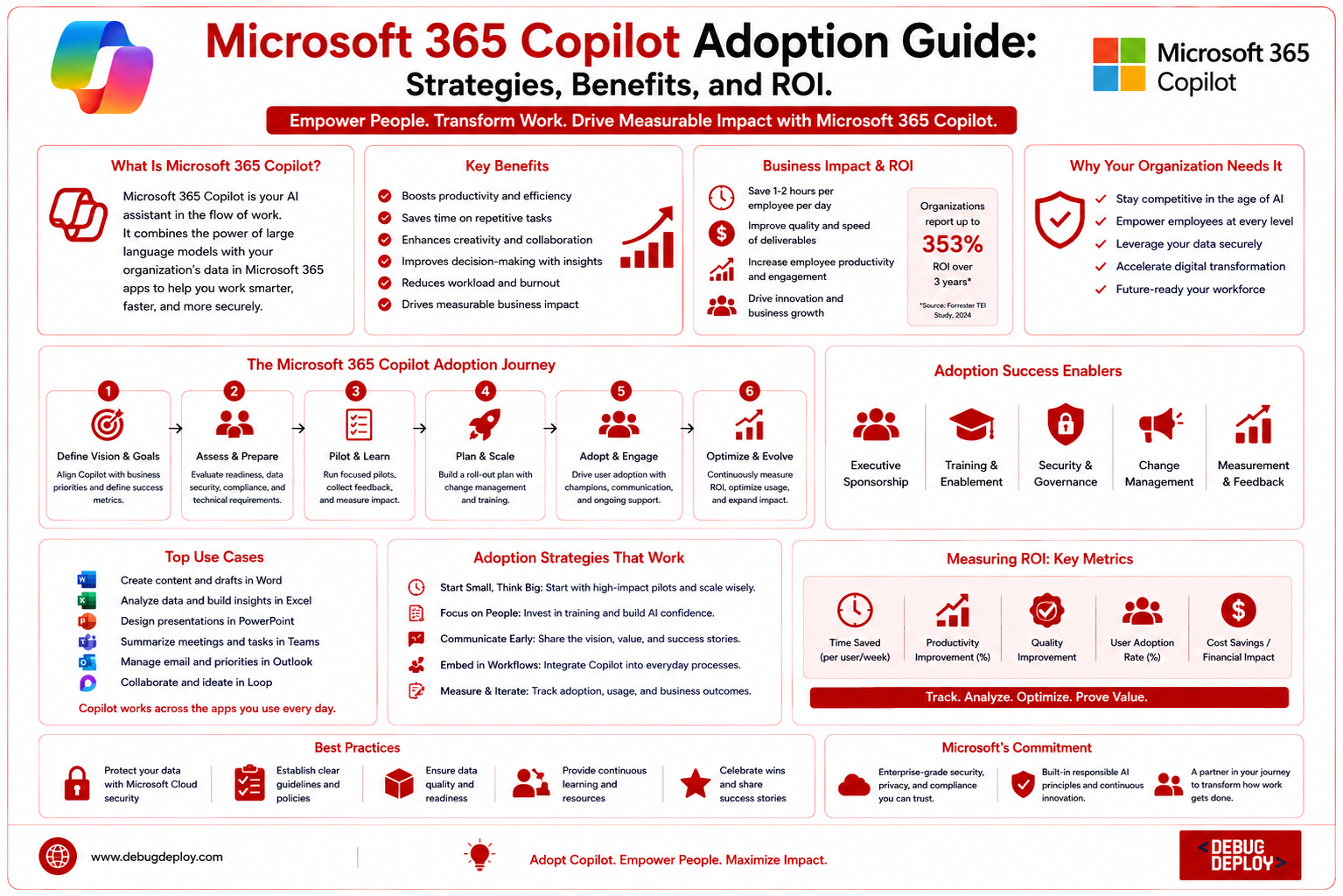
By enabling workers to work more quickly, make wiser judgments, and automate tedious chores, artificial intelligence is revolutionizing the modern workplace. AI-powered productivity solutions are now crucial for increasing productivity and preserving a competitive edge as businesses continue to embrace digital transformation in 2026. Microsoft 365 Copilot, an AI-powered assistant built into Microsoft 365 programs like Word, Excel, PowerPoint, Outlook, Teams, and OneNote, is one of the biggest advancements in this field.
Microsoft 365 Copilot operates seamlessly into the tools that employees use on a daily basis, in contrast to stand-alone AI chatbots. It assists with document drafting, meeting summaries, data analysis, presentation creation, email management, and natural language automation of repetitive chores. But just buying Copilot licenses does not ensure that your firm will succeed. To increase user engagement, boost productivity, and attain a quantifiable return on investment (ROI), organizations require an organized adoption strategy.
The advantages of Microsoft 365 Copilot, tried-and-true implementation techniques, and how companies can assess its total business value are all covered in this article.
What Is Microsoft 365 Copilot?
An AI-driven productivity tool integrated into Microsoft’s corporate apps is called Microsoft 365 Copilot. Using straightforward natural language prompts, users may create content, summarize information, analyze data, and automate workflows by combining Microsoft Graph with sophisticated massive language models.
Copilot respects organizational permissions and security standards while safely accessing data from emails, documents, meetings, calendars, chats, spreadsheets, and other Microsoft 365 resources. Employees may now work more productively without having to switch between different apps.
Microsoft 365 Copilot is used by companies in a variety of industries to increase staff productivity, decrease manual labor, speed up decision-making, and promote teamwork.
Why Organizations Are Adopting Microsoft 365 Copilot
Modern workplaces generate enormous amounts of digital information every day. Employees often spend significant time writing documents, searching for files, responding to emails, preparing presentations, attending meetings, and analyzing reports.
Microsoft 365 Copilot helps reduce these repetitive tasks by automating many daily activities. Instead of manually creating reports or reviewing lengthy meeting notes, employees can use AI to generate summaries, draft content, organize information, and identify key insights within seconds.
As organizations seek greater operational efficiency, Microsoft 365 Copilot has become an important tool for improving productivity while allowing employees to focus on higher-value work.
Benefits of Microsoft 365 Copilot
Microsoft 365 Copilot delivers several business advantages that support both individual employees and entire organizations.
Improved Employee Productivity
Copilot automates repetitive tasks such as drafting emails, generating documents, creating presentations, and summarizing meetings. This allows employees to spend more time on strategic and creative work.
Faster Decision-Making
By analyzing spreadsheets, reports, and business data, Copilot helps users identify trends, generate insights, and make informed decisions more quickly.
Better Collaboration
Copilot enhances teamwork by summarizing Teams meetings, organizing conversations, tracking action items, and helping employees quickly understand project updates.
Enhanced Content Creation
Employees can create reports, proposals, presentations, meeting notes, and business documents much faster with AI-generated drafts that can be refined as needed.
Reduced Administrative Work
Routine tasks such as scheduling meetings, managing emails, preparing summaries, and organizing documents become significantly easier through AI assistance.
Consistent Business Communication
Organizations can improve consistency in documentation, presentations, and communication by using AI-generated content aligned with business standards.
Microsoft 365 Copilot Adoption Strategies
Successful adoption requires more than enabling the software. Organizations should develop a structured implementation plan.
1. Identify Business Objectives
Before deployment, organizations should define clear goals such as improving employee productivity, reducing administrative workload, enhancing collaboration, or accelerating document creation.
Having measurable objectives helps evaluate adoption success later.
2. Start with a Pilot Program
Rather than deploying Copilot across the entire organization immediately, businesses should begin with a pilot group involving employees from different departments such as HR, finance, sales, marketing, and IT.
Feedback from pilot users helps identify challenges and improve implementation before larger deployments.
3. Train Employees
Employee education is essential for successful AI adoption.
Training should cover:
Writing effective prompts
Using Copilot in Word
Excel data analysis
PowerPoint presentation generation
Outlook email assistance
Teams meeting summaries
Responsible AI usage
Well-trained employees gain more value from Copilot.
4. Promote Responsible AI Usage
Organizations should establish governance policies covering:
Data privacy
Confidential information
AI-generated content review
Security best practices
Compliance requirements
Employees should understand that AI-generated content should always be reviewed before business use.
5. Monitor Adoption
Organizations should regularly monitor:
Active users
Feature utilization
Productivity improvements
User satisfaction
Training effectiveness
Continuous monitoring helps improve adoption over time.
Microsoft 365 Copilot Across Applications
Copilot provides valuable capabilities across the Microsoft 365 ecosystem.
Microsoft Word
Copilot helps users:
Draft reports
Rewrite content
Summarize documents
Improve writing quality
Generate business proposals
Microsoft Excel
Excel users can:
Analyze datasets
Generate formulas
Identify trends
Create charts
Build reports
Microsoft PowerPoint
Copilot assists by:
Creating presentations
Generating slide content
Designing layouts
Summarizing reports into slides
Microsoft Outlook
Users can:
Draft emails
Summarize long conversations
Prioritize messages
Generate responses
Microsoft Teams
Copilot helps teams by:
Summarizing meetings
Capturing action items
Answering meeting questions
Organizing discussions
OneNote
Users can organize notes, summarize meeting content, and generate ideas more efficiently.
Measuring Return on Investment (ROI)
Organizations should evaluate Microsoft 365 Copilot using measurable business outcomes.
Important ROI metrics include:
Time saved on document creation
Reduced email management time
Faster meeting follow-ups
Increased employee productivity
Improved collaboration
Reduced administrative workload
Higher employee satisfaction
Better decision-making speed
Comparing these improvements against licensing and implementation costs helps determine the overall business value.
Best Practices for Maximizing ROI
Organizations can maximize returns by:
Providing regular employee training
Encouraging daily Copilot usage
Sharing successful use cases
Continuously improving prompts
Monitoring productivity metrics
Updating governance policies
Gathering employee feedback
Continuous optimization ensures long-term success.
Common Challenges During Adoption
Some organizations experience challenges such as:
Employee resistance to AI
Limited understanding of prompt writing
Data governance concerns
Unrealistic expectations
Inconsistent usage
Security and compliance questions
Most of these challenges can be addressed through proper planning, training, and communication.
Who Should Use Microsoft 365 Copilot?
Microsoft 365 Copilot benefits many professionals, including:
Business executives
Project managers
HR professionals
Finance teams
Marketing specialists
Sales professionals
Customer support teams
IT administrators
Business analysts
Knowledge workers
Its capabilities make it valuable across organizations of all sizes.
Future of Microsoft 365 Copilot
Microsoft keeps adding more sophisticated automation, deeper connectivity with Microsoft 365, sophisticated AI agents, enhanced workflow automation, industry-specific capabilities, and more robust security measures to Copilot. Businesses who use Copilot now will be in a better position to increase productivity and maintain their competitiveness as AI becomes a standard part of workplace productivity.
Conclusion
By incorporating artificial intelligence right into the programs that employees use on a daily basis, Microsoft 365 Copilot is revolutionizing office efficiency. Copilot helps businesses operate more effectively and intelligently by automating repetitive processes, summarizing meetings, and creating documents and analyzing data. However, a well-thought-out adoption approach that incorporates staff training, governance, pilot programs, and ongoing performance monitoring is necessary to achieve maximum value. Businesses can obtain a good return on investment, increase productivity, improve collaboration, save operating costs, and prepare their staff for the future of AI-powered work by carefully integrating Microsoft 365 Copilot.
Want to Get Certified in Microsoft 365 Copilot & AI?
Get trained by a Microsoft Certified Trainer (MCT) and learn how to boost productivity with Microsoft 365 Copilot, Generative AI, and the Microsoft ecosystem.
Recommended Microsoft certification programs:
| Course Code | Course Title |
|---|---|
| MS-900T01-A | Microsoft 365 Fundamentals |
| AI-900T00-A | Microsoft Azure AI Fundamentals |
| MS-4004 | Empower Your Workforce with Microsoft 365 Copilot Use Cases |
✅ Live Instructor-Led Training
✅ Hands-On Microsoft 365 Copilot Labs
✅ Real-World AI Productivity Scenarios
✅ Prompt Engineering & Copilot Best Practices
✅ Certification Exam Guidance
📧 Email us: trainings@debugdeploy.com
📱 WhatsApp us for quick assistance
Start your Microsoft 365 Copilot certification journey today and transform the way you work with AI!