
Coding is becoming faster, more effective, and more accessible thanks to artificial intelligence, which is revolutionizing software development. It is no longer necessary for developers to spend hours reading documentation, developing repetitious code, or troubleshooting typical programming issues. AI-powered coding helpers are freeing programmers from tedious duties so they can concentrate more on problem-solving and creating creative applications.
GitHub Copilot is one of the most widely used AI coding assistants on the market right now. GitHub Copilot, created by GitHub in partnership with OpenAI, leverages cutting-edge artificial intelligence to produce functions, explain code, offer real-time code recommendations, help with debugging, and even generate documentation from within your code editor.
GitHub Copilot may greatly increase productivity and shorten development times, regardless of whether you are an experienced software engineer working on enterprise apps or a novice learning your first programming language. Everything you need to know about GitHub Copilot is covered in this article, including its features, benefits, cost, restrictions, and how to use it efficiently.
What Is GitHub Copilot?
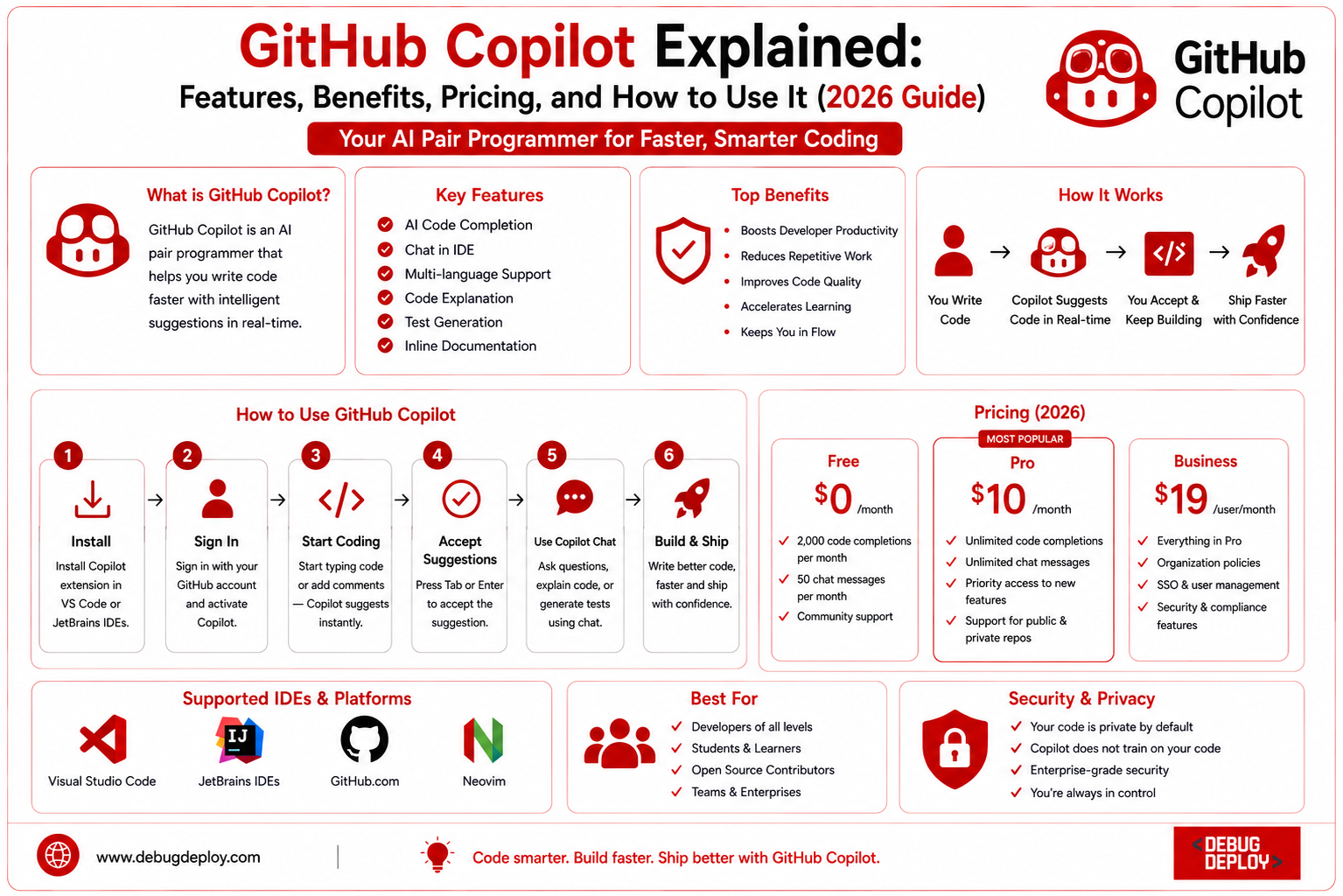
GitHub Copilot is an AI-powered coding assistant that helps developers write code more quickly by offering recommendations and clever code completions while they type. It works with well-known code editors as Neovim, JetBrains IDEs, Visual Studio Code, and Visual Studio.
GitHub Copilot comprehends the context of your project, in contrast to conventional autocomplete systems that only forecast the next word or syntax. It creates pertinent code snippets, functions, classes, and even entire modules by analyzing your current code, comments, variable names, and programming habits.
It supports a wide range of programming languages, making it useful for web development, mobile applications, cloud computing, DevOps, machine learning, automation, and enterprise software development.
How Does GitHub Copilot Work?
Large language models trained on publicly accessible code, programming documentation, and best practices for software development are used by GitHub Copilot. Copilot evaluates the context and recommends code that aligns with your intent when you type code or write a remark outlining what you want to build.
When you submit a comment like “Create a function to sort employee records by salary,” for instance, Copilot will automatically create a function in the programming language you are using.
As work moves forward, the AI continues to learn from the context of your project, increasing the accuracy of its recommendations.
Key Features of GitHub Copilot
GitHub Copilot includes numerous features designed to improve developer productivity.
1. AI Code Completion
Copilot predicts entire lines or blocks of code instead of only individual words. This reduces typing effort and speeds up development.
2. Function Generation
Developers can describe the desired functionality in plain English, and Copilot generates complete functions or methods based on the description.
3. Multi-Language Support
GitHub Copilot supports many popular programming languages, including:
Python
Java
JavaScript
TypeScript
C#
C++
Go
PHP
Ruby
Kotlin
Swift
SQL
HTML
CSS
This broad language support makes it useful across different software projects.
4. Code Explanation
Copilot can explain existing code, making it easier for beginners to understand complex logic or unfamiliar programming concepts.
5. Bug Detection Assistance
While it does not replace professional testing tools, Copilot can suggest corrections for common coding mistakes and recommend improvements.
6. Documentation Generation
Developers can automatically generate comments, documentation, and summaries for functions and classes, saving time during project documentation.
7. Test Case Generation
Copilot helps generate unit tests and testing templates, making it easier to improve software quality.
8. Chat-Based Coding Assistance
GitHub Copilot Chat allows developers to ask coding questions, request explanations, refactor code, and troubleshoot errors without leaving the development environment.
Benefits of Using GitHub Copilot
GitHub Copilot offers several advantages for developers and organizations.
Faster Development
AI-generated code reduces the time spent writing repetitive functions and boilerplate code.
Improved Productivity
Developers can focus on business logic and problem-solving instead of routine coding tasks.
Better Learning Experience
Beginners can learn programming by observing AI-generated examples and understanding recommended coding practices.
Reduced Repetitive Work
Tasks such as creating models, APIs, database queries, and utility functions become significantly faster.
Improved Code Consistency
Copilot often follows existing coding patterns within a project, helping maintain consistent coding styles.
Easier Documentation
Automatically generated documentation saves valuable development time and improves project maintainability.
GitHub Copilot Pricing (2026)
GitHub Copilot offers different subscription plans designed for individuals, businesses, and enterprises.
Free Plan
The free plan provides limited access, making it suitable for students, hobbyists, and developers who want to explore AI-assisted coding.
GitHub Copilot Pro
The Pro plan is designed for individual developers who require unlimited AI coding assistance, Copilot Chat, and advanced features for personal or professional projects.
GitHub Copilot Business
Business plans include additional features such as:
Organization-wide management
Enhanced security controls
Team administration
Policy management
Enterprise integration
GitHub Copilot Enterprise
Advanced AI capabilities, enterprise-grade security, governance, compliance features, and integration with large-scale development workflows are all included in corporate plans.
Developers should check the most recent subscription options before making a purchase because prices may vary over time.
How to Start Using GitHub Copilot
Getting started with GitHub Copilot is straightforward.
Step 1: Create a GitHub Account
Sign up for a GitHub account if you do not already have one.
Step 2: Subscribe to Copilot
Choose the plan that best fits your needs and activate your subscription.
Step 3: Install a Supported IDE
GitHub Copilot works with popular development environments such as:
Visual Studio Code
Visual Studio
JetBrains IDEs
Neovim
Step 4: Install the GitHub Copilot Extension
Download and install the GitHub Copilot extension from your IDE’s extension marketplace.
Step 5: Sign In
Authenticate using your GitHub account to activate Copilot.
Step 6: Start Coding
Begin writing code or descriptive comments, and Copilot will automatically generate intelligent suggestions.
Best Use Cases for GitHub Copilot
GitHub Copilot is valuable across many software development scenarios, including:
Web application development
Mobile app development
Cloud application development
API development
DevOps automation
Database programming
Machine learning projects
Infrastructure as Code (IaC)
Test automation
Data analysis
Its versatility makes it useful for both small personal projects and enterprise applications.
Limitations of GitHub Copilot
Although GitHub Copilot is highly capable, developers should understand its limitations.
AI-generated code may not always be correct or optimized.
Suggestions should always be reviewed before production deployment.
Complex business logic often requires manual implementation.
Security vulnerabilities may occasionally appear in generated code.
Developers remain responsible for testing, validation, and code quality.
Copilot should be viewed as an intelligent assistant rather than a replacement for software engineering expertise.
Tips for Getting Better Results
To maximize GitHub Copilot’s effectiveness:
Write clear and descriptive comments.
Use meaningful variable and function names.
Break large problems into smaller functions.
Review all generated code before using it.
Combine Copilot with debugging and testing tools.
Continue learning programming fundamentals rather than relying entirely on AI.
Following these practices helps developers produce higher-quality software.
Who Should Use GitHub Copilot?
GitHub Copilot is suitable for:
Beginner programmers
Software developers
Full-stack developers
Backend engineers
Frontend developers
DevOps engineers
Data scientists
AI and machine learning engineers
Cloud engineers
Software testing professionals
It benefits anyone who writes code regularly and wants to improve efficiency.
Conclusion
GitHub Copilot has revolutionized software development by fusing cutting-edge development environments with artificial intelligence. It is one of the most useful AI tools accessible in 2026 because of its capacity to produce code, clarify programming concepts, help with debugging, produce documentation, and increase productivity. GitHub Copilot may greatly speed up development by lowering repetitious work, whether you’re learning programming, creating cloud applications, creating enterprise software, or automating DevOps procedures. However, before putting apps into production, developers should always examine, test, and validate AI-generated code to guarantee security, accuracy, and maintainability.
Want to Get Certified in Azure AI & DevOps?
Get trained by a Microsoft Certified Trainer (MCT) and learn how to build, automate, and accelerate software development using GitHub Copilot, Azure AI, and modern DevOps practices.
Recommended Microsoft certification programs:
| Course Code | Course Title |
|---|---|
| AI-102T00-A | Designing and Implementing an Azure AI Solution |
| AZ-400T00-A | Designing and Implementing Microsoft DevOps Solutions |
✅ Live Instructor-Led Training
✅ Hands-On GitHub Copilot & Azure AI Labs
✅ Real-World DevOps & AI Development Scenarios
✅ Best Practices for AI-Assisted Coding
✅ Certification Exam Guidance
📧 Email us: trainings@debugdeploy.com
📱 WhatsApp us for quick assistance
Start your AI and DevOps certification journey today and become a next-generation software professional!