
Introduction
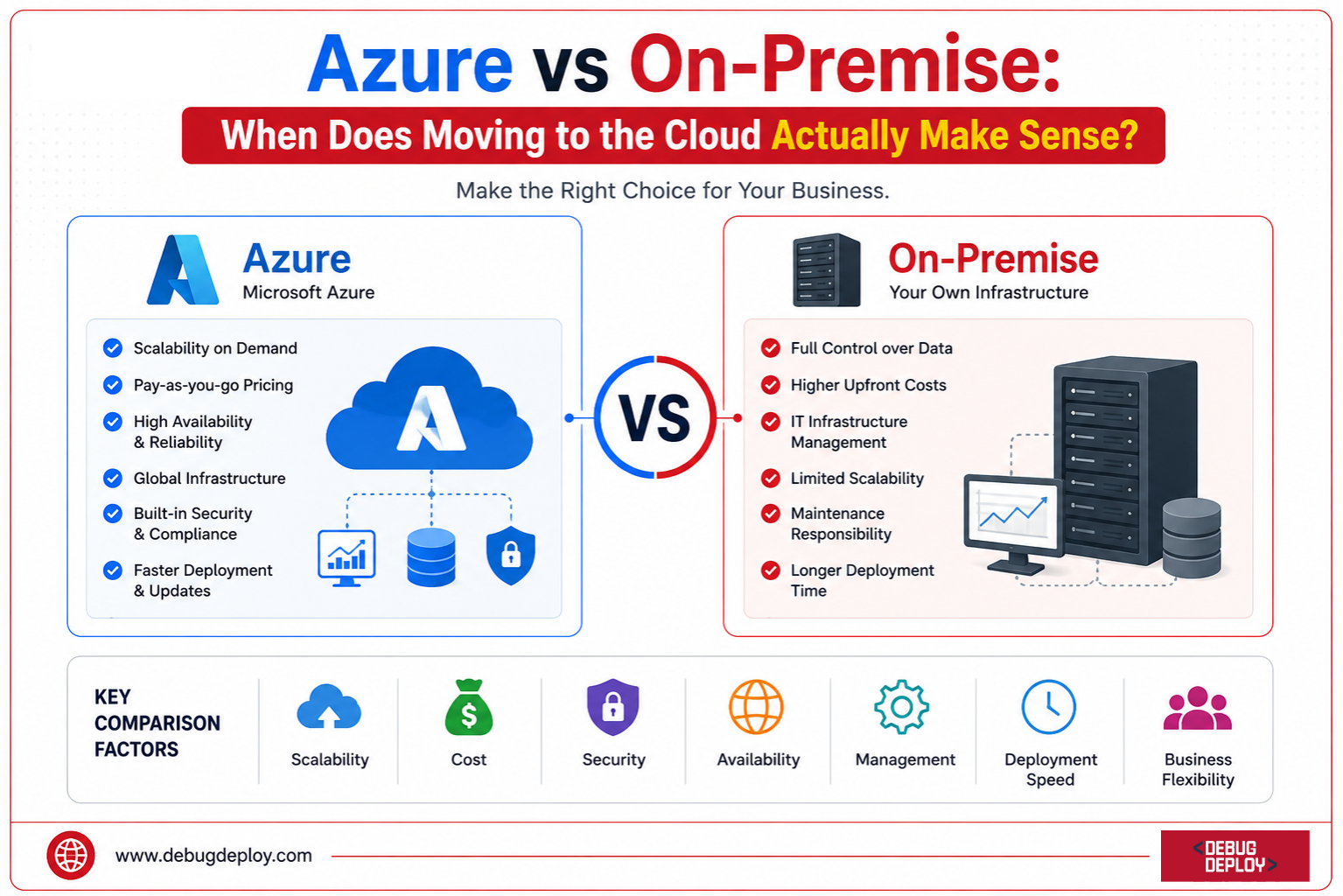
Cloud computing has completely changed how businesses develop, implement, and oversee their IT infrastructure. Businesses of all sizes have moved workloads, databases, and apps from conventional on-premise settings to cloud platforms like Microsoft Azure throughout the last ten years. Cloud adoption has been a major goal for many enterprises due to the promise of scalability, flexibility, cost savings, and innovation.
Moving everything to the cloud isn’t always the best course of action, despite cloud computing’s explosive rise. Due to legal obligations, performance concerns, outdated applications, or budgetary limitations, several companies still rely on on-premise infrastructure.
This raises an important question: When does moving from on-premise infrastructure to Microsoft Azure actually make sense?
The answer depends on your business goals, operational requirements, budget, and long-term technology strategy. In this guide, we’ll compare Azure and on-premise environments and explore the scenarios where cloud migration delivers the greatest value.
Understanding On-Premise Infrastructure
Servers, storage systems, networking hardware, and software that are physically hosted and maintained within a company’s own buildings or data centers are referred to as on-premise infrastructure.
Businesses used to buy gear, install software, maintain security, and manage upgrades internally.
Common characteristics of on-premise environments include:
Full control over infrastructure
Internal security management
Capital expenditure (CapEx) investments
Dedicated hardware ownership
Custom configuration options
For decades, this model served as the standard approach for enterprise IT operations.
Understanding Microsoft Azure
Microsoft Azure is a cloud computing platform that provides infrastructure, platform services, and software solutions over the internet.
Instead of purchasing physical servers, organizations can provision computing resources on demand and pay only for what they use.
Azure offers services including:
Virtual Machines
Storage Solutions
Databases
Artificial Intelligence
Analytics Platforms
Security Services
Networking Solutions
Backup and Disaster Recovery
This cloud-first approach enables organizations to scale resources quickly while reducing the burden of managing physical infrastructure.
Cost Comparison: CapEx vs OpEx
One of the biggest differences between Azure and on-premise environments is the cost model.
On-Premise Costs
Building and maintaining a data center requires significant upfront investment.
Typical expenses include:
Server hardware
Storage systems
Networking equipment
Software licenses
Cooling systems
Power consumption
Security infrastructure
IT maintenance staff
These costs are generally classified as capital expenditures (CapEx).
While organizations own the infrastructure, they must continue investing in upgrades, replacements, and maintenance throughout its lifecycle.
Azure Costs
Azure operates on a consumption-based pricing model.
Organizations pay only for the resources they use, including:
Compute power
Storage
Networking
Databases
Managed services
This shifts spending from capital expenditure to operational expenditure (OpEx).
For businesses with fluctuating workloads, Azure often reduces overall infrastructure costs significantly.
When Azure Makes Sense
Azure is typically more cost-effective when:
Workloads vary throughout the year
Rapid growth is expected
Infrastructure refresh cycles are approaching
New projects require immediate deployment
Scalability and Flexibility
Business requirements rarely remain static.
On-Premise Scalability Challenges
Scaling on-premise infrastructure often requires:
Purchasing additional hardware
Waiting for equipment delivery
Configuring new systems
Expanding physical data center capacity
These activities can take weeks or even months.
Azure Scalability Advantages
Azure enables organizations to scale resources within minutes.
Businesses can:
Add virtual machines instantly
Expand storage capacity automatically
Deploy applications globally
Handle traffic spikes dynamically
For organizations experiencing rapid growth, Azure provides a level of flexibility that traditional infrastructure cannot easily match.
When Azure Makes Sense
Cloud migration is highly beneficial when:
Demand fluctuates frequently
Business growth is unpredictable
Seasonal traffic spikes occur
Global expansion is planned

Security and Compliance
Security remains one of the most important considerations in any infrastructure decision.
On-Premise Security
Organizations have total control over security configurations when using on-premise environments.
Industries with extremely stringent compliance requirements may benefit from this.
However, sustaining enterprise-grade security calls for a large investment, workforce, and level of expertise.
Azure Security
Microsoft invests billions of dollars annually in cybersecurity and operates one of the world’s largest security infrastructures.
Azure provides:
Identity and access management
Threat detection
Security monitoring
Data encryption
Compliance certifications
Zero-trust security frameworks
Many organizations discover that Azure security capabilities exceed what they can realistically implement internally.
When Azure Makes Sense
Azure is often the better choice when:
Security resources are limited
Compliance requirements are evolving
Advanced threat protection is needed
Remote workforce support is required
Business Continuity and Disaster Recovery
Downtime can have significant financial and operational consequences.
On-Premise Recovery Challenges
Disaster recovery in on-premise environments typically requires:
Secondary data centers
Backup infrastructure
Replication systems
Recovery testing procedures
These solutions can be expensive and difficult to maintain.
Azure Disaster Recovery
Azure offers built-in disaster recovery solutions through services such as:
Azure Site Recovery
Azure Backup
Geo-redundant storage
Automated failover capabilities
Organizations can recover workloads much faster while reducing infrastructure costs.
When Azure Makes Sense
Cloud adoption becomes highly attractive when:
High availability is critical
Disaster recovery budgets are limited
Geographic redundancy is required
Business continuity objectives are strict
Innovation and AI Readiness
Modern businesses increasingly rely on data analytics and artificial intelligence.
On-Premise Limitations
Implementing AI and advanced analytics on-premise often requires:
Specialized hardware
GPU infrastructure
Complex software deployments
Large data engineering efforts
These requirements can slow innovation.
Azure Innovation Platform
Azure provides immediate access to services such as:
Azure OpenAI Service
Azure AI Studio
Machine Learning
Microsoft Fabric
Data Analytics Solutions
Cognitive Services
Organizations can experiment, innovate, and deploy AI solutions without purchasing additional hardware.
When Azure Makes Sense
Azure is an excellent choice when:
AI adoption is a priority
Data-driven decision making is expanding
Innovation speed matters
Development teams need modern cloud services
When On-Premise Still Makes Sense
Despite the advantages of Azure, on-premise infrastructure remains valuable in certain scenarios.
Organizations may prefer on-premise environments when:
Regulatory requirements prohibit cloud storage
Legacy applications cannot be migrated easily
Existing infrastructure investments remain viable
Ultra-low latency is required
Data sovereignty restrictions exist
In these situations, a full cloud migration may not provide immediate benefits.
The Rise of Hybrid Cloud
For many organizations, the best solution is not choosing one over the other.
Hybrid cloud combines the strengths of both environments.
With a hybrid approach, businesses can:
Keep sensitive workloads on-premise
Move scalable applications to Azure
Extend disaster recovery capabilities
Modernize infrastructure gradually
Optimize costs and performance
Microsoft Azure supports hybrid strategies through services such as Azure Arc, Azure Stack, and Azure ExpressRoute.
This approach allows organizations to migrate at their own pace while minimizing risk.
Key Questions Before Migrating to Azure
Before moving to the cloud, organizations should evaluate:
Are infrastructure costs increasing?
Is hardware nearing end-of-life?
Do applications require greater scalability?
Are security requirements becoming more complex?
Is disaster recovery difficult to manage?
Are AI and analytics initiatives growing?
Does the business need faster innovation?
If the answer to several of these questions is yes, Azure migration may provide substantial business value.
Conclusion
The choice between Azure and on-premise infrastructure is a matter of business strategy rather than just technology.
For businesses with specific needs, outdated technology, or stringent legal restrictions, on-premise settings are still beneficial. However, Microsoft Azure offers strong benefits that are challenging to attain with traditional infrastructure alone as companies look for more agility, scalability, security, and innovation.
When businesses need to lower operational complexity, enhance business continuity, scale quickly, bolster security, and expedite digital transformation projects, switching to Azure makes the most sense. For many companies, a well-thought-out hybrid environment that blends the advantages of both on-premises and cloud computing is the way of the future.
Moving to the cloud because everyone else is doing it is ultimately not the aim. Adopting the infrastructure model that best supports your current business goals while getting ready for future opportunities is the aim.
Planning to Migrate From On-Premise to Microsoft Azure?
Learn from a Microsoft Certified Trainer (MCT) and gain the cloud migration, infrastructure, and Azure administration skills needed to modernize enterprise workloads with confidence.
Recommended Microsoft Azure Certification Programs:
AZ-900: Microsoft Azure Fundamentals
AZ-104: Microsoft Azure Administrator Associate
AZ-305: Designing Microsoft Azure Infrastructure Solutions
AZ-700: Designing and Implementing Microsoft Azure Networking Solutions
✅ Live Instructor-Led Training
✅ Azure Migration & Cloud Adoption Best Practices
✅ Infrastructure, Networking & Security Skills
✅ Cost Optimization & Hybrid Cloud Concepts
✅ High Availability, Backup & Disaster Recovery Training
✅ Certification Exam Preparation & Guidance
📧 Email: trainings@debugdeploy.com
📱 WhatsApp: Contact us for quick assistance
Build practical Microsoft Azure skills and learn how to plan, migrate, and manage cloud infrastructure for secure, scalable, and cost-effective business solutions.