
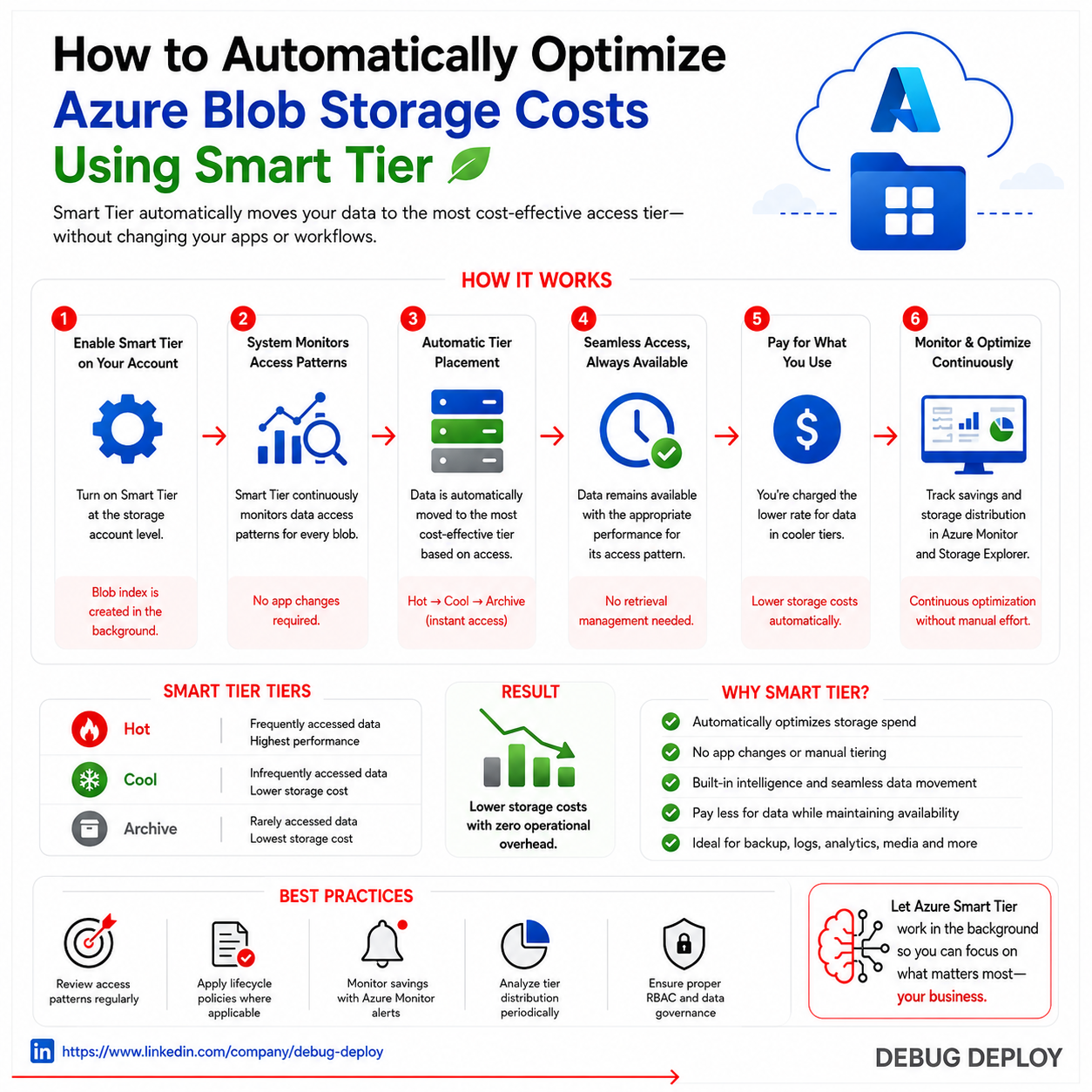
Managing cloud storage efficiently is one of the most important ways businesses control operational costs. As organizations generate larger volumes of backups, logs, media files, analytics datasets, and archived documents, storage expenses can increase quickly if data is kept in expensive high-performance tiers longer than necessary. In Microsoft Azure, Blob Storage is widely used for scalable object storage, but many users fail to optimize costs because data access patterns change over time. Files that are frequently accessed today may become rarely used next month. This is where Smart Tier strategies become valuable.
Automatically optimizing Azure Blob Storage costs using Smart Tier means placing data in the most cost-effective storage access tier based on usage patterns, lifecycle rules, and retention needs. Instead of manually reviewing thousands or millions of objects, organizations can use Azure’s automated tiering capabilities and lifecycle management policies to move data between Hot, Cool, and Archive tiers. This reduces waste, improves governance, and ensures storage aligns with business demand.
Understanding Azure Blob Storage Access Tiers
Azure Blob Storage offers multiple access tiers designed for different frequency-of-access scenarios. The Hot tier is intended for data that is actively used and needs fast regular access. It generally has higher storage costs but lower access costs. The Cool tier is built for infrequently accessed data that remains available when needed. It usually has lower storage costs than Hot, though retrieval and transaction costs may be higher. The Archive tier is designed for rarely accessed long-term data such as compliance records, backups, and historical content. It provides the lowest storage cost but slower retrieval times and rehydration requirements.
Choosing the wrong tier can significantly increase spending. Keeping old inactive files in Hot storage often wastes money, while placing frequently used files in Archive can create delays and retrieval charges.
What Smart Tier Means in Practice
Smart Tier is the practical strategy of automatically moving data to the most efficient tier based on behavior and age. Frequently accessed data remains in Hot storage, aging data transitions to Cool storage, and long-retention data moves to Archive. If access resumes, data can be promoted again depending on policy design and workload needs.
Rather than being a single branded feature in every context, Smart Tier commonly refers to intelligent automated tiering through Azure lifecycle management, monitoring, analytics, and policy-driven optimization.
Why Automatic Tiering Matters
Manual storage optimization becomes unrealistic at scale. A business may store millions of objects across departments, applications, and backup systems. Reviewing file age, usage frequency, and retention requirements by hand is time-consuming and error-prone. Automated tiering delivers several advantages.
First, it reduces unnecessary storage spend by ensuring stale data does not remain in premium-cost tiers. Second, it improves governance by applying consistent retention logic across environments. Third, it frees IT teams from repetitive storage administration tasks. Fourth, it supports scalability as data volumes continue to grow. Finally, it aligns cloud spending with real business usage.
How to Automatically Optimize Costs in Azure Blob Storage
The most effective method is to use Azure Blob lifecycle management policies. These policies evaluate blob properties such as last modified date, creation time, or access conditions, then automatically move data to lower-cost tiers or delete expired content.
A common policy model may look like this:
- Keep new and active files in Hot tier for the first 30 days
- Move inactive files to Cool tier after 30 days
- Move long-unused files to Archive after 180 days
- Delete temporary or obsolete files after 365 days if retention rules allow
This creates a hands-off cost optimization process that continuously adjusts storage placement.
Example Real-World Scenarios
A media company storing active video projects may keep current files in Hot tier while older completed projects move to Cool storage and multi-year archives move to Archive tier.
A software company may store logs in Hot for active monitoring, Cool for short-term investigations, and Archive for compliance history.
A finance organization may keep current reports in Hot, quarterly history in Cool, and legally retained records in Archive.
Each scenario uses the same principle: match cost to access frequency.
Best Practices for Smart Tier Optimization
Begin by classifying your data. Not all files have the same value or access pattern. Segment operational data, backups, logs, archives, analytics files, and customer assets separately.
Monitor access behavior regularly. If archived data is being retrieved often, policy thresholds may need adjustment.
Use tags and metadata to organize automation rules more intelligently. For example, production assets and temporary exports may require different lifecycle paths.
Review retrieval charges before aggressive archival moves. Archive storage is cheap to store but can cost more when frequently re-accessed.
Test policies on smaller datasets before applying them broadly across mission-critical storage accounts.
Step-by-Step Demo: Create Storage Account with Smart Tier
Step 1: Create a Storage Account
In Azure Portal:
- Create Resource
- Storage Account
- Select subscription/resource group
- Choose region
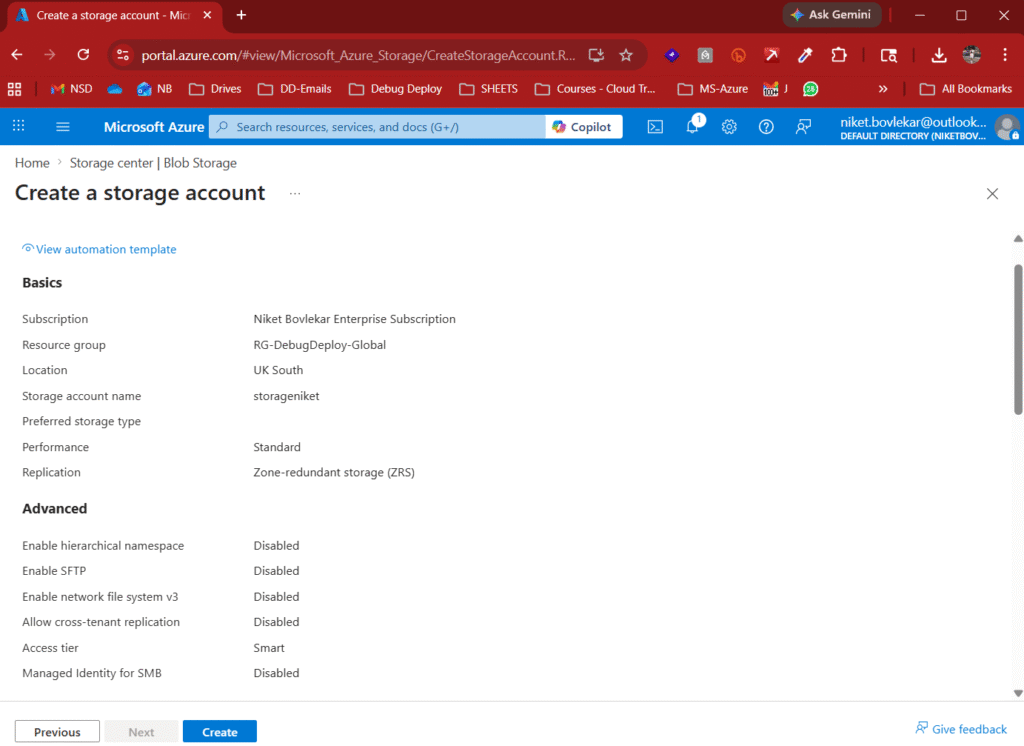
Step 2: Configure Performance & Redundancy
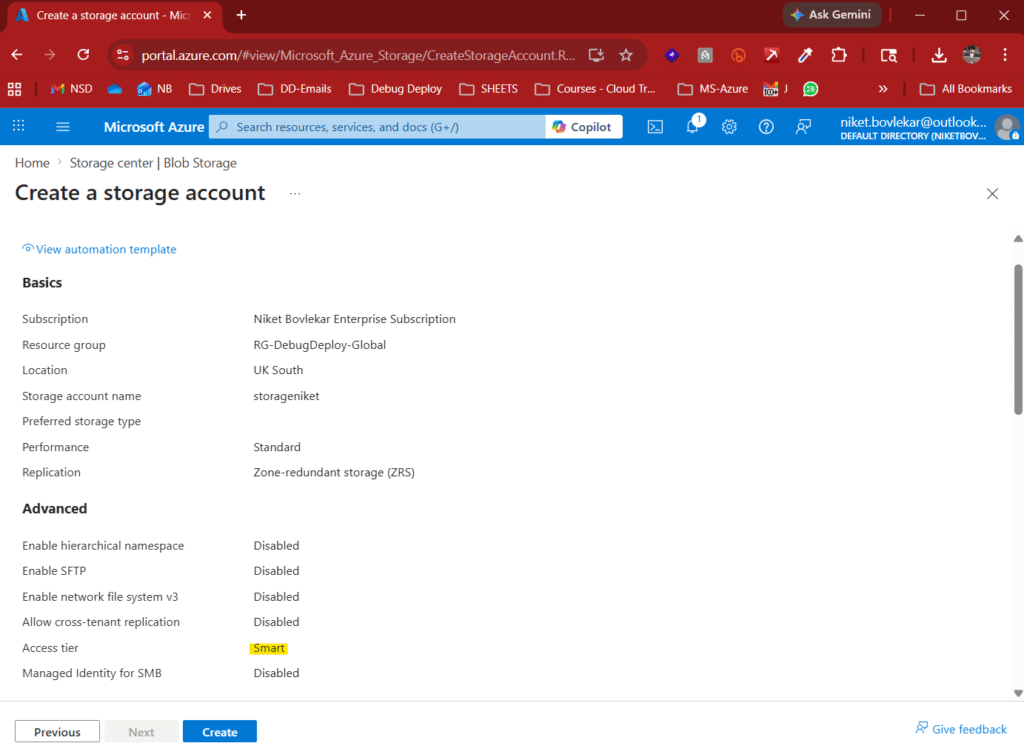
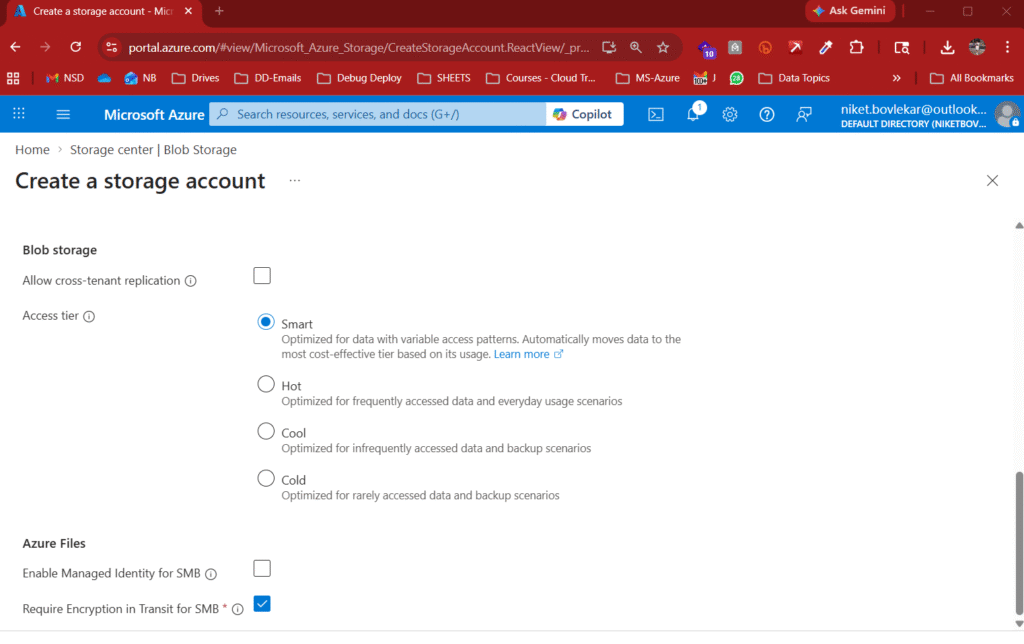
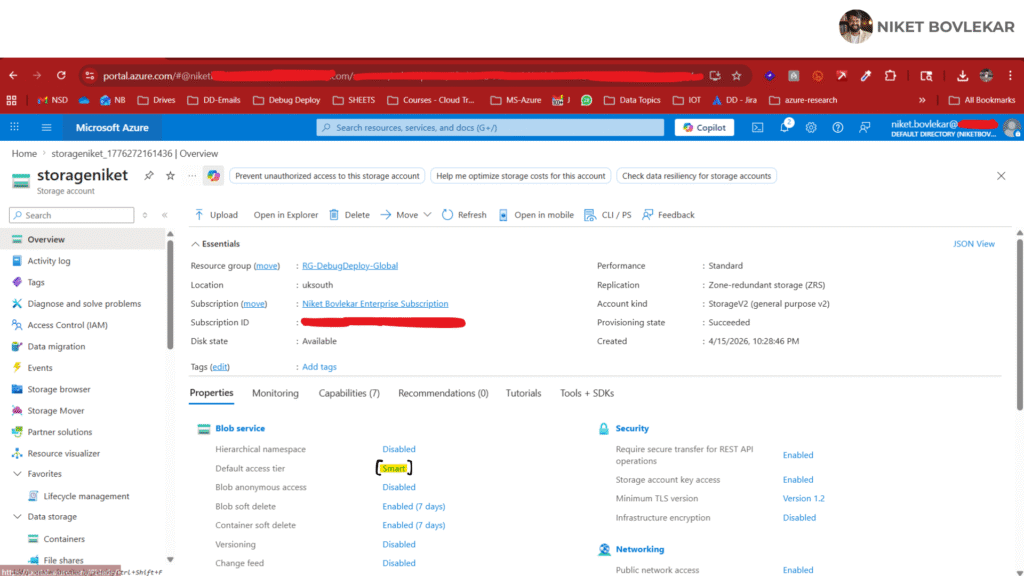
Step 3: Set Default Access Tier
Step 4: Deploy
Once created, Azure begins managing eligible objects automatically.
Best Use Cases
Smart Tier is especially valuable for:
Data Lakes
Usage fluctuates between active analytics and dormant historical data.
Logs & Telemetry
Recent logs are hot, older logs cool rapidly.
Enterprise Documents
Many files become infrequently accessed over time.
Mixed Workloads
Where future access patterns are unclear.
Strategic FinOps View
Cloud cost optimization is evolving.
It is no longer only about:
- shutting down compute
- rightsizing VMs
- reserved capacity
It is also about intelligent storage placement.
Smart Tier helps bring that intelligence into Azure Storage.
Final Thoughts
Microsoft Azure’s Smart Tier is a meaningful improvement for organizations managing growing storage estates.
It simplifies optimization, reduces operational overhead, and aligns cost with actual usage.
For many Azure environments, it is worth evaluating immediately.
Related Reports
Conclusion
Microsoft Azure Smart Tier simplifies one of the biggest challenges in cloud storage—cost optimization. By automatically adjusting data between tiers based on usage patterns, it eliminates manual effort while ensuring you always get the best balance between performance and cost.
For organizations using Azure Blob Storage, this means smarter storage management, reduced expenses, and a more efficient cloud strategy. Instead of reacting to rising costs, you can proactively control them with automation.
In a data-driven world where storage demands keep growing, Azure Smart Tier offers a practical, scalable, and cost-effective solution to stay ahead.
Want to Get Certified in Azure?
Get trained by a Microsoft Certified Trainer (MCT) and learn practical cloud cost-optimization skills for real-world Azure environments.
Recommended Microsoft Azure training programs:
| Course Code | Course Title |
|---|---|
| AZ-104T00-A | Microsoft Azure Administrator |
| AZ-305T00-A | Designing Microsoft Azure Infrastructure Solutions |
✅ Live Instructor-Led Training
✅ Hands-On Azure Storage Labs
✅ Cost Optimization & Governance Skills
✅ Blob Storage Tiering Strategies
✅ Real-World Administration Scenarios
✅ Certification Exam Guidance
📧 Email us: trainings@debugdeploy.com
📱 WhatsApp us for quick assistance
Start your Azure certification journey today and master cloud cost management with confidence!